


Every minute spent bridging the gap between support tickets and development workflows costs your organization money and momentum. Bug reports get lost in translation. Feature requests lose their context. Customer insights fade during handoffs. This disconnect between support and development isn’t a minor inefficiency – it’s a major barrier to delivering exceptional software. Understanding the key benefits of Azure DevOps integration can help organizations overcome these challenges and create a seamless workflow between teams.
Understanding the Support-Development Divide
Before exploring solutions, let’s examine the key challenges organizations face with disconnected systems:
Customer Support Hurdles
– Fragmented issue tracking
– No direct line to development status
– Guesswork in technical escalations
– Lost context in bug reporting
Engineering Bottlenecks
– Missing customer feedback loop
– Blind spots in user impact assessment
– Disjointed prioritization processes
– Scattered technical documentation
Business Impact
– Extended development cycles
– Customer satisfaction decline
– Resource misallocation
– Market responsiveness lag
Bridging the Gap: HappyFox + Azure DevOps
The integration between HappyFox and Azure DevOps eliminates these barriers by creating a seamless pipeline between customer feedback and development action. This unified approach transforms how teams collaborate and deliver value to customers.
5 Transformative Benefits of Integration
1. Seamless Issue Handoff
Current Environment:
– Painful copy-paste between systems
– Lost ticket context during transfer
– Multiple tools for issue tracking
– Duplicate effort in documentation
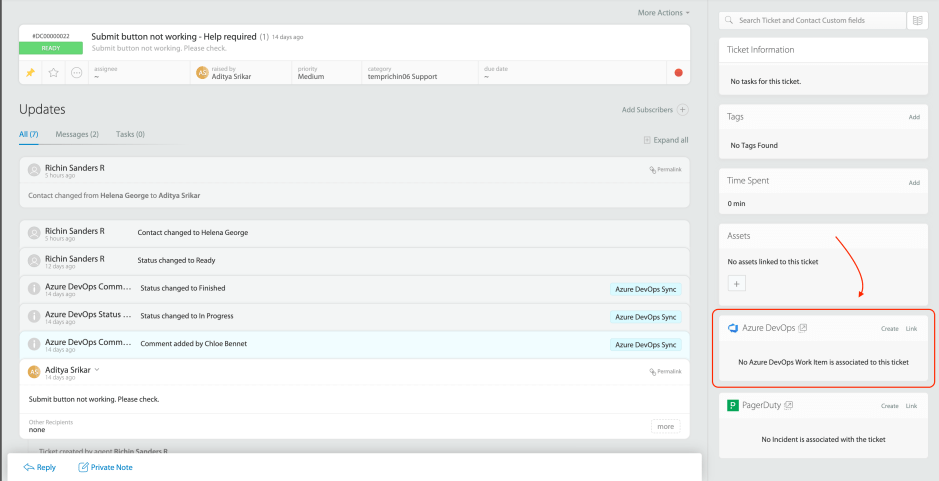
With Integration:
– One-step issue escalation
– Rich context preservation
– Automated work item generation
– Single source of truth
Impact Snapshot: An enterprise software provider cut their bug triage time by 65%, allowing developers to start work within hours instead of days.
2. Real-Time Collaboration Flow
Current Environment:
– Email chains for updates
– Meetings to sync status
– Information silos
– Communication overhead

With Integration:
– Instant status syncing
– Automated progress updates
– Shared knowledge base
– Unified communication channel
Impact Snapshot: A SaaS company reduced their sprint planning time by 40% through improved information flow between teams.
Learn more about HappyFox + Azure DevOps Integration
3. Smart Workload Management
Current Environment:
– Manual priority assessment
– Delayed escalation paths
– Scattered resource planning
– Reactive task allocation
With Integration:
– Data-driven prioritization
– Automated urgency tracking
– Intelligent resource matching
– Proactive workload balancing
Impact Snapshot: A product team improved their critical issue response rate by 80% using integrated severity tracking.
4. Continuous Feedback Loop
Current Environment:
– Disconnected quality checks
– Delayed user validation
– Inconsistent testing process
– Lost improvement opportunities
With Integration:
– Direct user feedback channel
– Automated validation tracking
– Structured testing workflow
– Continuous improvement cycle
Impact Snapshot: A tech startup reduced their feature rework by 45% through early customer feedback integration.
5. Customer Success Amplification
Current Environment:
– Generic status messages
– Delayed update delivery
– Inconsistent communication
– Limited transparency
With Integration:
– Personalized progress tracking
– Real-time status updates
– Consistent messaging
– Full process visibility
Impact Snapshot: A B2B platform saw a 70% increase in customer satisfaction scores for bug resolution communication.
Read more: Configure Azure DevOps with HappyFox Help Desk
Building the Business Case
Value Metrics
– Development cycle reduction
– Team efficiency gains
– Customer retention improvement
– Resource optimization
– Quality enhancement
Deployment Journey
– Swift integration setup
– Seamless workflow adoption
– Immediate benefit realization
– Progressive feature rollout
Target Outcomes
– Accelerated development cycles
– Enhanced team synergy
– Improved product quality
– Stronger customer relationships
– Optimized resource usage
Learn more: 6 Microsoft Enterprise Integrations Boosting Support Operations
Calculating Investment Return
Evaluate your potential gains across:
1. Development cycle efficiency
2. Support team productivity
3. Customer retention impact
4. Quality improvement savings
5. Resource utilization gains
Transform Your Development Pipeline
Discover how integrating HappyFox with Azure DevOps can revolutionize your software delivery process. Join industry leaders who have already unlocked the power of unified support and development workflows. Request a demo today.





