



What makes support teams genuinely excited about their help desk software?
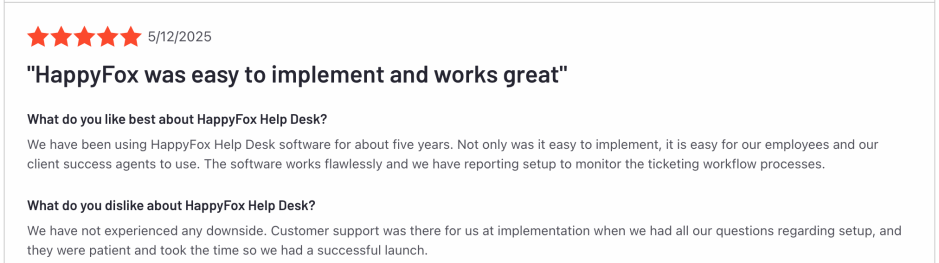
After talking to thousands of HappyFox customers, we discovered it’s not just about having features—it’s about having features that actually work together seamlessly.
From Smart Rules that eliminate manual work to AI Copilot that makes every agent sound professional, these 20 capabilities consistently earn rave reviews from support teams across industries. Here’s what drives measurable improvements in support performance and keeps customers coming back.
20 Best HappyFox Help Desk Features
1. Smart Rules Automation – Your 24/7 Support Assistant
What it does: Automatically routes, assigns, and manages tickets based on predefined criteria without human intervention.
Smart Rules in HappyFox act like having a super-efficient assistant who never sleeps. The system can automatically:
- Route tickets based on keywords, sender, subject line, or contact groups
- Assign agents using round-robin, skill-based, or load-balanced distribution
- Set priorities based on customer tier or issue type
- Update ticket properties like status, category, and due dates
- Trigger notifications to relevant team members and groups
- Escalate tickets when SLA deadlines approach
- Call webhooks when specific actions occur
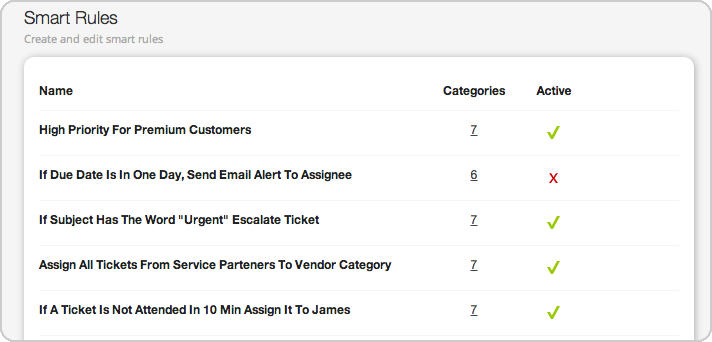
Why customers love it: Support managers consistently report 40-60% reduction in manual ticket handling. Smart Rules eliminate the manual routing bottleneck that slows down most support teams. The automation handles complex routing decisions instantly, so your best agents focus on solving problems instead of managing ticket assignments.
Pro Tip: Start with simple rules for common scenarios (like routing billing questions to your finance team), then gradually build more complex automation as your team gets comfortable.
A G2 user says, “Ease of use. Managing tickets are easy with automation and quick replies. Customer support is the best.”
2. Omnichannel Support – One Platform, Every Channel
What it does: Consolidates customer conversations from email, chat, social media, phone, and messaging apps into a single interface.
Gone are the days of juggling multiple platforms to track customer conversations. HappyFox’s omnichannel approach brings together:
- Email – Custom domains or HappyFox-hosted addresses
- Live Chat – HappyFox Chat integration for real-time website support
- Social Media – Facebook posts, comments, and Twitter/X, Instagram mentions and DMs
- WhatsApp – Business account integration via Twilio
- Voice – Aircall, Dialpad, and RingCentral integration with call recording
- Support Widgets – Embedded forms with knowledge base deflection
Why customers love it: Customer context stays intact regardless of how they contact you. A customer might start with a chat, follow up via email, and call for urgent updates—all conversations appear in one ticket thread.
Support teams report improved response times and customer satisfaction because agents don’t waste time searching across platforms for conversation history.
3. AI Copilot & AI Answers – Intelligence That Actually Helps
What it does: AI-powered writing assistance, ticket summaries, and automated customer responses.
HappyFox AI features include:
- Writing assistant for crafting professional responses
- Grammar and tone correction for polished communication
- Ticket summaries for quick context understanding
- Similar ticket suggestions based on historical data
- AI-generated knowledge base articles from resolved tickets
- Customer-facing AI answers through the support portal

Why customers love it: Agents spend less time writing and more time solving problems. The AI handles routine tasks while humans focus on complex issues requiring empathy and creative problem-solving.
Our early adopters report 30-40% reduction in average response composition time, with significantly improved response quality—especially helpful for non-native English speakers.
Darwinbox achieved 3x improvement in first response time with HappyFox AI.
4. Ticket Queues – Organize Chaos Into Clarity
What it does: Creates filtered views of tickets based on specific criteria, helping agents focus on relevant work.
HappyFox queues transform overwhelming ticket lists into manageable, focused workstreams:
- Default queues – Pending Tickets, All Tickets, Unresponded, Assigned to Me
- Custom queues – Create views based on any combination of filters
- Team queues – Department-specific ticket views
- Priority queues – High-priority items that need immediate attention
Why customers love it: Agents report significantly reduced stress levels when they can focus on relevant tickets instead of scrolling through everything. Queue organization helps teams maintain focus and ensures important tickets get attention first.
Power user tip: Create queues for different times of day—a “Morning Priority” queue for urgent overnight tickets, and an “End of Day” queue for items that can wait until tomorrow.
5. SLA Management – Never Miss Another Deadline
What it does: Automatically tracks response and resolution times with visual alerts and escalation triggers.
SLA management in HappyFox goes beyond basic timers. The system provides:
- Multiple SLA policies for different customer tiers, categories, or issue types
- Visual countdown timers with color-coded alerts as deadlines approach
- Automatic escalations when SLAs are at risk of breach
- Comprehensive SLA reporting on compliance and performance trends
- Work schedule integration excluding holidays and non-working hours
- SLA violation email alerts to managers and stakeholders
Why customers love it: Support managers sleep better knowing the system actively monitors every ticket deadline. The visual indicators help agents prioritize their workload effectively, while automatic escalations ensure nothing falls through cracks.
Learn more: Guide to SLA Management in HappyFox
Implementation tip: Configure different SLA policies for various scenarios—emergency issues need 2-hour response times, while general inquiries might allow 24 hours.
Whirlpool reduced incoming emails by 15-20% with better SLA tracking. See how they transformed their supplier support.
6. Canned Actions – Speed Without Sacrificing Quality
What it does: Pre-written responses for common questions that agents can quickly customize and send.
Canned actions in HappyFox aren’t just copy-paste templates. They include:
- Dynamic fields that automatically populate customer names and details
- Additional actions that can update ticket status, priority, or assignment
- Team sharing capabilities for consistent messaging
- Rich formatting with links, images, and proper styling
- Easy customization before sending
Learn more: 12 Best Canned Response Templates for Customer Support
Why customers love it: Response times drop dramatically while maintaining personalized, professional communication. New agents can provide consistent, accurate responses from day one, while experienced agents save time on routine inquiries.
Support teams typically see 50% faster response times for common questions while maintaining high customer satisfaction scores.
Best practice: Create canned responses for your top 10 most common questions, then gradually expand based on ticket patterns.
7. Real-Time Reporting & Analytics – Data-Driven Support Decisions
What it does: Comprehensive dashboards and reports covering every aspect of support performance.
HappyFox analytics provide insights into:
- Agent performance – Response times, resolution rates, customer satisfaction
- Ticket trends – Volume patterns, category breakdowns, escalation rates
- Customer satisfaction – CSAT scores, feedback analysis, improvement areas
- SLA compliance – Meeting deadlines, breach analysis, performance trends
- Custom reports – Tailored views for specific business needs
Why customers love it: Support managers make informed decisions based on real data rather than gut feelings. Teams can identify bottlenecks, celebrate successes, and continuously improve their support operations.
8. Private Notes – Internal Collaboration Without Customer Confusion
What it does: Internal communication system within tickets that customers never see.
Private notes enable:
- Agent-to-agent communication about complex issues
- Escalation details when transferring tickets
- Customer context that aids future interactions
- Internal troubleshooting documentation
- Supervisor guidance without cluttering customer communication
Why customers love it: Team collaboration improves dramatically when agents can share insights, ask questions, and provide context without confusing customers with internal discussions.
Support quality increases because agents can leverage collective team knowledge on challenging issues.
Team tip: Establish private note conventions—use them for handoffs, unusual customer situations, or when you need a second opinion.
9. Asset Management – IT Support Made Simple
What it does: Track and manage hardware and software assets directly within the help desk system.
Asset management features include:
- Asset database with custom fields for different equipment types
- User assignments linking assets to specific employees
- Ticket integration connecting issues to specific assets
- Asset history tracking all related support requests
- Bulk operations for managing multiple assets simultaneously
Why customers love it: IT teams can quickly identify recurring hardware issues, track warranty information, and maintain complete asset histories. Support agents immediately see what equipment a user has when they submit tickets.
10. Knowledge Base – Self-Service That Actually Works
What it does: Integrated knowledge management system that helps customers find answers independently.
Knowledge base capabilities include:
- AI-assisted article creation from resolved tickets
- Search functionality with autocomplete suggestions
- Article analytics showing what customers actually read
- Internal and external article management
- Rich content support with images, videos, and formatting

Why customers love it: Ticket volume decreases as customers find answers independently, while agents spend time on complex issues that truly require human expertise.
Organizations typically see 15-25% reduction in ticket volume after implementing a comprehensive knowledge base.
Content strategy: Start with articles addressing your most common ticket types, then expand based on customer search patterns and feedback.
Darwinbox generated 100 AI-suggested knowledge base articles with 30% direct approval rate. Learn about their AI-powered approach.
11. Self-Service Portal – Empower Your Customers
What it does: Branded customer portal where users can submit tickets, track progress, and access resources.
Self-service portal features include:
- Custom branding matching your company identity
- Ticket submission with custom forms
- Progress tracking with real-time updates
- Knowledge base access integrated seamlessly
- Multi-language support for global organizations
Why customers love it: Customers appreciate transparency and control over their support experience. They can check ticket status anytime without calling or emailing for updates.
Support teams report fewer “status update” inquiries, allowing them to focus on actual problem-solving.
12. Multi-Brand Support – Scale Without Complexity
What it does: Manage multiple brands or business units within a single help desk platform.
Multi-brand help desk capabilities include:
- Separate branding for each business unit
- Isolated customer databases maintaining privacy
- Brand-specific agents or shared resources
- Individual knowledge bases tailored to each brand
- Consolidated reporting across all brands
Why customers love it: Organizations with multiple brands, subsidiaries, or regional offices can maintain brand consistency while achieving operational efficiency through centralized management.
Scalability advantage: Add new brands or business units without deploying separate help desk systems, reducing IT overhead and training requirements.
13. Ticket Templates – Consistency Made Simple
What it does: Pre-built ticket forms with custom fields, workflows, and automation rules tailored to specific issue types.
Ticket Templates in HappyFox eliminate the guesswork from ticket creation. The system provides:
- Issue-specific forms with relevant fields automatically displayed
- Required field validation ensuring critical information is captured
- Automated categorization and priority assignment based on template type
- Custom workflows that trigger appropriate Smart Rules and SLAs
- Department-specific templates for IT, HR, facilities, and other teams
- Conditional logic showing different fields based on user selections
Why customers love it: New agents create professional, complete tickets from day one without training on every possible scenario. Templates ensure consistency across the team while capturing all necessary information upfront, reducing back-and-forth communication with customers.
Efficiency boost: Teams report significantly faster ticket resolution when all relevant details are captured during initial submission rather than gathered through follow-up questions.
14. Ticket Tasks – Ensure Nothing Gets Forgotten
What it does: Checklist system within tickets ensuring all necessary steps are completed before closure.
Task management includes:
- Task templates for different issue types
- Individual task assignment to specific agents
- Progress tracking with completion status
- Mandatory completion before ticket closure
- Task-based reporting for process adherence

Why customers love it: Complex issues get resolved completely the first time. Teams can standardize their troubleshooting processes and ensure consistent service quality across all agents.
Quality assurance improves significantly when teams use task templates for multi-step procedures.
Process improvement: Develop task templates based on your most successful problem resolution workflows, then refine them based on team feedback.
15. Native Integrations – Connect Your Entire Tech Stack
What it does: Direct connections to popular business applications without third-party tools.
Integration ecosystem includes:
- CRM systems – Salesforce, HubSpot, Pipedrive
- Communication tools – Slack, Microsoft Teams
- Development platforms – Jira, GitHub, GitLab
- Accounting software – FreshBooks, QuickBooks
- Voice systems – Aircall, Dialpad, RingCentral
Why customers love it: Information flows seamlessly between systems, eliminating manual data entry and reducing errors. Agents can access customer information from multiple sources without switching applications.
Integration strategy: Start with your most critical business systems, then gradually connect additional tools based on workflow needs.
16. Custom Fields & Forms – Capture What Matters
What it does: Flexible form builder for collecting specific information relevant to your business.
Customization options include:
- Multiple field types – text, dropdowns, checkboxes, file uploads
- Conditional logic showing fields based on previous selections
- Required fields ensuring critical information collection
- Custom validation preventing incorrect data entry
- Integration mapping connecting form data to other systems
Why customers love it: Support requests include all necessary information from the start, reducing back-and-forth communication and faster resolution times.
Different departments can have specialized forms capturing information relevant to their specific support processes.
Lorem Ipsum
Renoworks processed 40,000+ tickets with custom workflows tailored to design requests. Learn how they customized their workflows with HappyFox.
17. Scheduled Tickets – Proactive Support Management
What it does: Automatically create tickets at specified intervals for recurring tasks or maintenance.
Scheduling ticket capabilities include:
- Recurring maintenance reminders
- Regular check-ins with key customers
- Compliance audits on schedule
- Preventive maintenance notifications
- Service renewals advance warnings
Why customers love it: Proactive support prevents issues before they impact customers. Important recurring tasks never get forgotten, improving service reliability and customer satisfaction.
Teams can balance reactive support with proactive maintenance, leading to fewer emergency situations.
Proactive strategy: Use scheduled tickets for regular system health checks, customer success touchpoints, and preventive maintenance activities.
18. Agent Collision Detection – Eliminate Duplicate Efforts
What it does: Prevents multiple agents from working on the same ticket simultaneously.
Agent collision detection includes:
- Real-time activity indicators showing who’s working on tickets
- Automatic conflict resolution when multiple agents access tickets
- Activity notifications alerting agents to potential conflicts
- Draft protection preventing lost work due to simultaneous editing
- Seamless handoffs when agents need to transfer work
Why customers love it: When agents can see who’s already working on tickets, confusion decreases because they receive coordinated, consistent communication. Team efficiency improves as agents focus on unique tickets rather than duplicating each other’s work.
Especially valuable for busy support teams where multiple agents might naturally gravitate toward the same high-priority tickets.
19. Ticket Escalation – Ensure Important Issues Get Attention
What it does: Automated and manual escalation processes ensuring tickets reach appropriate resolution resources.
Escalation features include:
- Time-based escalation when tickets remain unresolved
- Priority-based routing for high-importance issues
- Skill-based escalation to specialized team members
- Management notifications for critical situations
- Escalation tracking with complete audit trails
Why customers love it: Critical issues never get lost in the queue. Customers feel confident that their important problems will receive appropriate attention, while management stays informed about significant support situations.
Escalation planning: Define clear escalation criteria and ensure all team members understand when and how to escalate tickets appropriately.
20. CSAT (Customer Satisfaction) – Measure What Matters
What it does: Automated customer satisfaction surveys with comprehensive feedback analysis.
CSAT capabilities include:
- Automatic survey sending after ticket closure
- Multiple survey formats – ratings, comments, detailed feedback
- Real-time satisfaction tracking across agents and categories
- Trend analysis identifying improvement opportunities
- Integration with performance reviews and coaching
Why customers love it: Direct customer feedback drives continuous improvement in support quality. Agents receive recognition for excellent service while identifying areas needing attention.
Organizations can demonstrate support ROI through concrete customer satisfaction metrics.
Feedback loop: Use CSAT data not just for reporting, but for targeted coaching and process improvements that directly address customer concerns.
HappyFox: The Complete Help Desk Solution
Modern support teams need features that integrate seamlessly rather than operate in isolation. HappyFox gives you an intelligent help desk system where each capability amplifies the others.
The unified ticketing system transforms chaotic support operations into smooth, efficient workflows. Support agents spend less time on manual tasks and more time solving real problems. Customers get faster responses and consistent service quality. The result? Happier teams, satisfied customers, and support that actually supports your business goals.
What makes HappyFox different:
- Built for Real Teams, Not Tech Experts – Your agents start solving tickets immediately, no weeks of training required
- Flexible Without the Frustration – Adapt HappyFox to your workflows, not the other way around
- Every Department, One Solution – Support, IT, HR, and operations teams work from the same platform
- Straightforward Pricing, No Surprises – Unlimited agent options mean no escalating per-seat costs
- Quick Setup, Long-term Growth – Operational in hours, scales from 10 to 1,000+ agents effortlessly
- Support That Actually Supports You – Real experts who understand your challenges, including our product developers
Transform Your Support Operations with HappyFox
The difference between overwhelmed support teams and thriving ones isn’t just about having more features—it’s about having the right features working together seamlessly.
Support teams using HappyFox report higher job satisfaction, faster resolution times, and improved customer relationships—all while reducing operational complexity. The magic happens when automation handles routine tasks, intelligence guides decision-making, and integration eliminates friction between processes.
Ready to experience these capabilities firsthand? Schedule a personalized demo to see how HappyFox can transform your specific support challenges into competitive advantages.





