


Small IT teams face unique challenges when managing support requests and tracking organizational assets. Whether you’re a three-person team managing local government technology needs or a growing startup, finding the right help desk software with integrated asset management can transform chaotic email threads into an organized, efficient support system.
This guide addresses the specific needs of small IT teams looking to replace inadequate ticketing systems with solutions that offer both help desk functionality and asset management capabilities.
Why Small Teams Need Integrated Asset Management
Small IT teams face unique operational challenges that generic help desk solutions often fail to address. The key to effective IT support lies in understanding not just what the problem is, but what systems, hardware, and software are involved. This is where integrated help desk asset management becomes crucial.
The Cost of Fragmented Systems
Without integrated asset management in your help desk software, small teams face these common frustrations:
- Context Switching Nightmare: When a user reports a printer issue, your tech has to:
- Check the help desk for ticket details
- Switch to a separate asset management system (or spreadsheet) to find printer model, location, and warranty status
- Look up purchase date and service history in another system
- Return to the help desk to document the resolution
This process wastes 10-15 minutes per ticket and increases the risk of errors.
2. Incomplete Problem Resolution: Without asset context, techs often provide generic solutions that don’t account for:
- Specific hardware configurations that affect compatibility
- Software version conflicts
- Warranty status that determines repair vs. replacement decisions
- Historical issues that indicate recurring problems
3. Inefficient Resource Planning: Separate systems make it impossible to:
- Identify which assets generate the most support requests
- Plan hardware refresh cycles based on support costs
- Track total cost of ownership for different device types
- Justify budget requests with concrete support data
4. Compliance and Security Risks: Disconnected systems create:
- Incomplete audit trails for security incidents
- Difficulty tracking software licenses and compliance
- Challenges in asset disposal and data security
- Gaps in change management documentation
Benefits of Integrated Help Desk and Asset Management Software
When help desk and asset management work together in a single platform, small teams experience:
- Complete context: Techs see all asset details within the ticket interface
- Faster resolution: No system switching reduces resolution time by 30-40%
- Better decisions: Warranty and configuration data inform repair choices
- Proactive support: Asset aging reports help prevent issues before they occur
- Simplified workflows: One system to learn, manage, and maintain
For small teams managing 100-500 assets across an organization, this integration eliminates the overhead of maintaining multiple systems while providing enterprise-level visibility into IT operations.
This is why choosing help desk software with built-in asset management capabilities—rather than trying to integrate separate solutions—becomes essential for small team success.
Learn more: Integrated Help Desk Asset Management for Small Manufacturing Teams
Must-Have Help Desk and Asset Management Features
When evaluating help desk software with integrated asset management, focus on these key capabilities that maximize small team effectiveness:
Must-Have Help Desk Features
Core ticketing and workflow requirements:
- Intuitive drag-and-drop ticket management interface
- Customizable ticket workflows and statuses
- Automated ticket routing and assignment rules
- Template responses for common issues
- Multi-channel support (email, web, phone, chat)
- Built-in knowledge base with self-service portal
- SLA tracking and automatic escalation
- Mobile access for on-the-go support
- Real-time reporting and performance dashboards
- Team collaboration tools with internal notes
Learn more: Top 5 Help Desk Features Released by HappyFox 2025
Essential Asset Management Integration
Critical asset tracking capabilities:
- Complete hardware and software inventory
- Asset-user relationship mapping
- Warranty and license expiration tracking
- Asset details visible within ticket interface
- Historical maintenance and support records
- Configuration management and change tracking
- Automated asset discovery and updates
- Compliance reporting for audits
- Total cost of ownership analysis
- End-of-life planning and replacement workflows
Advanced Features That Maximize Small Team Efficiency
Productivity-enhancing capabilities:
- Single Sign-On (SSO) integration
- API access for custom integrations
- Bulk ticket operations and management
- Advanced automation rules and triggers
- Custom fields and forms
- Time tracking and billing integration
- Customer satisfaction surveys
- Escalation management
- Multi-language support
- White-label customization options
The key advantage for small teams is finding a solution that combines all these capabilities in one integrated platform, eliminating the need to manage multiple systems while providing enterprise-grade functionality.
Top 5 Help Desk Solutions for Small Teams in 2026
1. HappyFox Help Desk
Ideal for: Organisations needing an intuitive, all-in-one help desk solution with asset management.
HappyFox Help Desk stands out for small organizations and businesses with lean IT teams. Whether you have a single IT manager or a growing department, the platform combines comprehensive ticketing with asset tracking in a user-friendly interface that requires minimal onboarding and scales effortlessly as your team expands.
Key Features for Small Teams:
• Smart ticket organization: Custom statuses and queues for efficient prioritization
• Time-saving automations: Event and time-based triggers that handle routine tasks automatically
• Self-service portal: Customizable knowledge base that reduces common tickets by up to 20%
• Team collaboration: Ticket threads with private notes and collision detection to prevent duplicate work
Integrated Asset Management
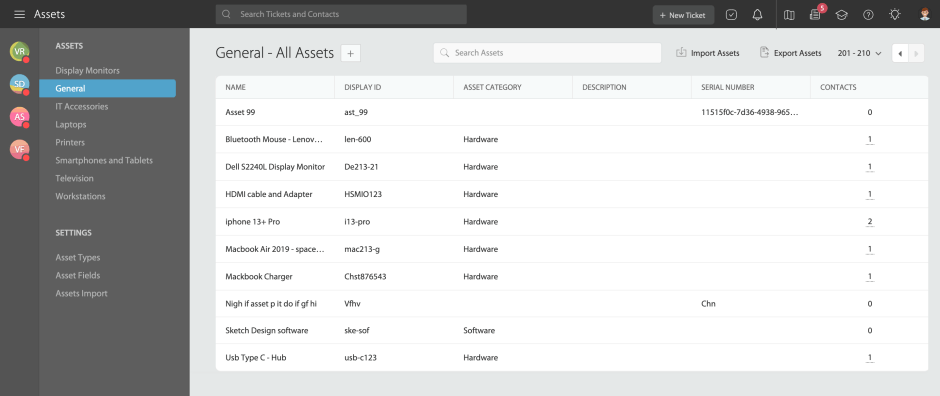
HappyFox’s built-in asset management eliminates the need for separate tracking systems by providing:
- Complete hardware and software inventory with detailed specifications and configurations
- Asset-user relationships automatically linked to support tickets for instant context
- Warranty and license tracking with automated expiration alerts and compliance monitoring
- Historical support data tied to each asset for pattern recognition and proactive maintenance
- Real-time asset intelligence showing support costs, reliability metrics, and replacement planning
- Seamless integrations with Active Directory, Microsoft Intune, Lansweeper, and existing IT infrastructure
Pricing: Starts at $24/agent/month for the Basic plan
Real-World Success Story: Dartmouth University
Dartmouth University, an Ivy League institution with 6,744 students and over 4,200 staff, transformed their facilities management operations using HappyFox’s integrated help desk and asset management platform.
The Challenge: Manual coordination, disorganized systems, and lack of integrated asset tracking for campus facilities and equipment repairs.
The Solution: HappyFox’s integrated platform with custom workflows, automated work orders, asset management, and real-time request tracking.
Results:
- Substantial cost reductions through improved efficiency
- Faster response times for facilities repairs
- Decreased staff workload via automation
- Enhanced user experience with transparent request tracking
Transitioning to HappyFox was transformative, streamlining our workflow and expediting response times for facilities-related repairs. We enthusiastically recommend HappyFox for asset and service management optimization.
– Justin Gere, Manager of IT Operations, Dartmouth University
2. Freshdesk
Ideal for: Teams transitioning from email-based support to their first ticketing system
Freshdesk offers an approachable entry point for small teams new to formalized help desk software. Its free tier provides essential functionality, with paid plans unlocking more advanced features as needs evolve.
Key Features for Small Teams:
• User-friendly interface: Minimal learning curve for teams with limited time
• Ticket collision detection: Prevents multiple agents working on the same issue
• Scenario automation: Simple “if-then” rules for handling routine tasks
• Time tracking: Monitor support activities for resource planning
• Mobile app: Provide support while away from the desk
Pricing: Growth plan starts at $15/agent/month
Learn more: HappyFox vs Freshdesk – Ideal choice for Customer Support?
3. Zendesk
Ideal for: Teams seeking comprehensive omnichannel support capabilities
Zendesk offers scalability from small teams to enterprise operations, making it suitable for organizations with growth plans. The platform provides robust customization options but requires more setup time and resources.
Key Features for Small Teams:
• Comprehensive ticketing: Advanced organization and workflow capabilities
• Extensive marketplace: Add-ons for specialized functionality
• Advanced reporting: Detailed performance analytics
• Omnichannel support: Unified management across communication channels
• Customization options: Highly adaptable to specific departmental needs
Pricing: Team plan starts at $55/agent/month
Learn More: 15 Zendesk Alternatives for Better Customer Support
4. Spiceworks Help Desk
Ideal for: IT Teams with limited budgets requiring basic ticketing and asset tracking
Spiceworks offers a free help desk solution specifically designed for IT departments. The platform includes both ticketing and comprehensive inventory management functionality, making it particularly suitable for teams like the county Parks department mentioned in the Reddit thread.
Key Features for Small Teams:
• Integrated asset management: Track hardware/software inventory
• Ticket management: Basic workflow for IT support requests
• Self-service portal: User-facing portal for ticket submission
• Network monitoring: Proactive issue identification
• No per-agent cost: Free solution regardless of team size
Pricing: Free (ad-supported)
5. Zoho Desk
Ideal for: Budget-conscious teams seeking balanced functionality
Zoho Desk provides solid ticketing capabilities with strong automation features at a competitive price point. The platform works well for public sector organizations and educational institutions with limited budgets.
Key Features for Small Teams:
• Multi-channel ticketing: Manage requests from various sources
• Workflow automation: Streamline repetitive tasks
• Team collaboration tools: Efficiently work together on resolutions
• Custom ticket views: Tailor interfaces for different roles
• Service-level agreement management: Track response commitments
Pricing: Standard plan starts at $14/agent/month
How to Implement Help Desk Software for Small Teams
Step-by-step implementation process:
- Assessment: Document current workflows and pain points (1-2 weeks)
- Selection: Research options and conduct trials (2-3 weeks)
- Implementation: Start with core functionality (2-4 weeks)
- Training: Focus on daily workflows (1 week)
- Launch: Begin with one department before full rollout
Choosing the Right Help Desk Software: Decision Framework
When selecting help desk software for a small IT team with limited resources, consider these factors:
Primary Selection Criteria
Help desk software selection criteria:
• Current team size and projected growth
• Budget constraints and long-term ROI
• Required vs. optional features
• Implementation resources available
• Integration requirements with existing systems
• Asset management needs
Key Questions to Ask Vendors
• How does your software handle asset management and user associations?
• What automation capabilities are available for routine tasks?
• What is the typical implementation timeline for a team of our size?
• How customizable are ticket workflows and forms?
• What ongoing support is provided after implementation?
Conclusion: Finding Your Ideal Help Desk Solution
For small IT teams facing challenges like replacing inadequate systems and needing combined help desk and asset management capabilities, finding the right solution makes a dramatic difference in daily operations.
The key is selecting software that addresses your specific challenges—whether that’s tracking assets for county departments, streamlining workflows for a three-person team, or preparing for future growth.
Ready to transform your support operations? Consider starting with a demo with HappyFox to experience how the right help desk software can multiply your small team’s effectiveness while solving the asset management challenges faced by IT managers in similar situations.





