


Your enterprise support team resolves countless tickets, but gathering meaningful customer feedback remains a challenge. With manual surveys, responses trickle in slowly, feedback patterns go unnoticed, and opportunities for service improvements slip away. The solution? Enterprise CSAT automation.
Enterprise CSAT automation streamlines how large support teams collect, analyze, and act on customer feedback. By automating survey triggers, response collection, and analysis, enterprises can transform scattered feedback into actionable insights that drive service improvements.
Why Manual CSAT Surveys Don’t Scale
Before diving into automation strategies, let’s address why traditional manual CSAT processes fall short for enterprise teams:
– Inconsistent survey timing
– Survey fatigue from poor targeting
– Delayed feedback collection
– Manual data analysis bottlenecks
– Missed opportunities for real-time intervention
7 Proven Ways to Automate Your Enterprise CSAT Surveys
1. Smart Survey Triggers
Gone are the days of manually sending satisfaction surveys. Modern enterprise CSAT automation leverages intelligent triggers based on specific customer interactions:
– Every agent interaction triggers
– Status-based automation (e.g., resolution)
– Combined triggers (status + agent reply)
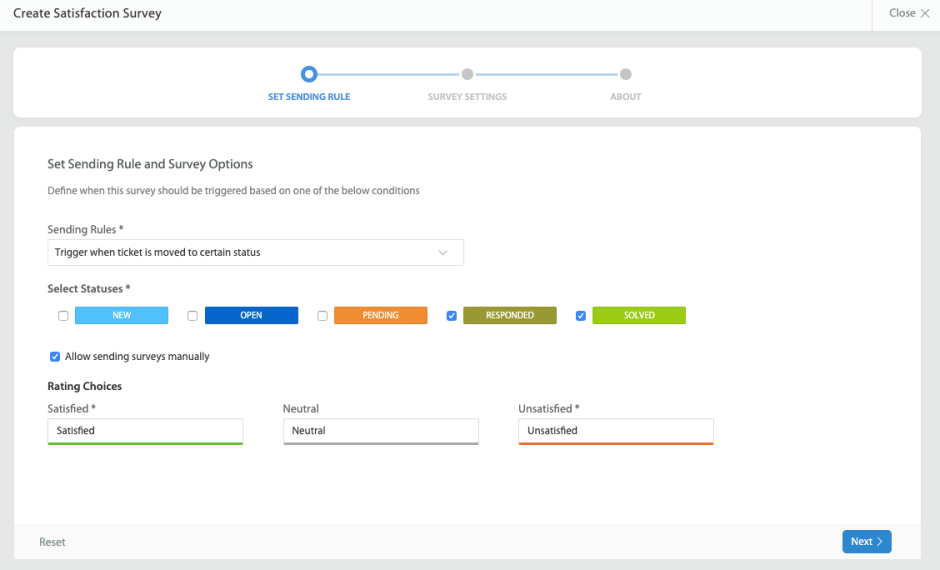
– Smart Rules integration for complex workflows
– Department-specific status triggers
2. Dynamic Survey Templates
One size doesn’t fit all when it comes to enterprise feedback collection. Automated survey templates should adapt based on:
Automate your CSAT surveys with status-based triggers that ensure timely feedback collection:
- Resolution status surveys
- Ticket closure feedback
- Status transition triggers
- Combined status and reply triggers
- Custom status workflow automation

Implementation Checklist:
– Identify critical status points for feedback collection
– Configure automated status-based triggers
– Set up status transition rules
– Test automated survey workflows
– Monitor trigger effectiveness
3. Automated Response Analysis
Transform raw survey data into actionable insights with automated analysis:
– Trend identification
– Customer satisfaction patterns
– Agent performance metrics
– Department-level insights
4. Intelligent Workflow Integration
Connect CSAT automation with your support workflows:
– Trigger follow-up actions for negative feedback
– Route escalations to team leaders
– Update customer records automatically
– Generate performance reports
– Schedule review meetings
5. Proactive Intervention System
Don’t wait for problems to escalate. Implement automated alerts and actions:
– Instant notifications for low CSAT scores
– Automated ticket escalation rules
– Supervisor intervention triggers
– Customer recovery workflows
– Feedback loop automation
6. Multi-Channel Survey Distribution
Automate survey distribution across channels:
– Email surveys
– In-app feedback
– SMS surveys
– Web portal surveys
– Post-interaction popups
7. Automated Reporting and Analytics
Transform CSAT data into actionable insights automatically:
– Real-time dashboards
– Scheduled report generation
– Custom metric tracking
– Department-level insights
– Category-based performance analysis
Implementation Guide: Getting Started with Enterprise CSAT Automation
Follow these steps to successfully automate your CSAT processes:
1. Audit Current Process
– Map existing survey workflows
– Identify automation opportunities
– Document pain points
– Set baseline metrics
2. Configure Automation Rules
– Define trigger conditions
– Set up survey templates
– Configure routing rules
– Establish escalation paths
3. Test and Optimize
– Run pilot programs
– Gather agent feedback
– Monitor response rates
– Adjust triggers as needed
4. Scale and Improve
– Expand to all departments
– Refine automation rules
– Monitor performance
– Iterate based on results
Best Practices for Enterprise CSAT Automation
1. Timing is Everything
– Send surveys within 24 hours of resolution
– Avoid survey overlap
– Consider time zones
– Respect customer preferences
2. Keep it Simple
– Use clear, concise questions
– Limit survey length
– Provide mobile-friendly options
– Enable one-click responses
3. Maintain the Human Touch
– Personalize survey content
– Enable easy escalation to humans
– Follow up personally on negative feedback
– Show appreciation for responses
HappyFox CSAT Survey Features for Enterprise
HappyFox’s enterprise CSAT automation solution comes packed with features designed specifically for large support teams:
Intelligent Survey Triggering
– Multiple automated trigger conditions
– Smart Rules integration for complex workflows
– Department-specific trigger rules
– Multi-stage survey workflows
– Manual override options for escalated cases
Enterprise-Grade Customization
– Category-specific survey templates
– Multi-brand support
– Custom redirect options for different departments
– Granular permission controls
– Team-based survey management
Advanced Analytics and Reporting
– Category-level satisfaction trends
– Department performance metrics
– Agent performance leaderboards
– Cross-brand analysis
– Custom report generation
Integration Capabilities
– SurveyMonkey integration
– Smart ticket filtering by CSAT scores
– Comprehensive audit logs
– Multi-brand support
– API access for custom integrations
Pro Tip: Leverage category-based surveys to gather specialized feedback across different business units while maintaining consistent enterprise-wide satisfaction metrics.
Start Your CSAT Automation Journey Today
Enterprise CSAT automation doesn’t have to be complicated. HappyFox’s comprehensive solution provides everything you need to automate your satisfaction surveys while maintaining the personal touch your customers expect:
– Intelligent survey triggers
– Dynamic templates
– AI-powered analysis
– Real-time reporting
– Multi-channel distribution / Push surveys through email and support center
– Automated workflows
– Custom branding options
Ready to revolutionize your enterprise CSAT process? Schedule a demo with HappyFox today and discover how our automated CSAT solution can transform your customer satisfaction measurement and improvement initiatives.





