



Support teams waste precious minutes switching between multiple tools during ticket resolution. When agents need to refresh their screen repeatedly during high-volume periods or navigate through multiple interfaces just to handle a single ticket, efficiency plummets. While Freshdesk’s Slack integration offers basic connectivity, many teams find themselves needing more reliable, scalable solutions.
Let’s explore how the Freshdesk-Slack integration works and why leading support teams are considering more powerful alternatives.
The Reality of Freshdesk’s Slack Integration
Freshdesk’s integration with Slack provides basic functionality for support teams:
- Automated ticket notifications in Slack channels
- Basic ticket creation from Slack messages
- Simple ticket updates without leaving Slack
- Limited collaboration features for cross-team communication
Frantically switching between Freshdesk and Slack when an urgent support request pops up? Or maybe you’re tired of manually refreshing screens during high-volume periods just to see ticket updates? You’re not alone. Support teams often find themselves caught between Slack’s rapid communication and Freshdesk’s structured ticketing system.
While Freshdesk’s Slack integration has been a common solution, is it really the best fit for modern support teams? Let’s explore the world of help desk Slack integrations and discover what’s possible beyond basic connectivity.
Beyond Freshdesk Slack Integration: Why Teams Need More
While Freshdesk is popular for basic support needs, many teams find it lacking for modern support operations:
1. Performance Bottlenecks
– System struggles with high ticket volumes
– Search becomes unreliable as tickets grow
– Manual refreshes needed during peak periods
– Frequent slowdowns affecting productivity
2. Communication Silos
– Complex setup for different communication channels
– No unified agent workspace
– Fragmented customer communication view
– Limited integration capabilities
3. Workflow Constraints
– Basic automation capabilities
– Complex routing setup requirements
– Limited customization options
– No visual ticket management
4. Hidden Costs
– Essential features locked behind premium tiers
– Multiple paid add-ons required
– Expensive scaling with per-agent pricing
The Market Landscape: Understanding Your Options
- HappyFox
HappyFox transforms your Slack workspace into a powerful support hub with features designed for modern teams:
Streamlined Ticket Management
– Create tickets directly from Slack using simple commands:
/happyfox new_ticket [message]
/happyfox update [ticket-id] status=in_progress
– Reply to and update existing tickets without leaving Slack
– Take action on tickets using the built-in Slack interface
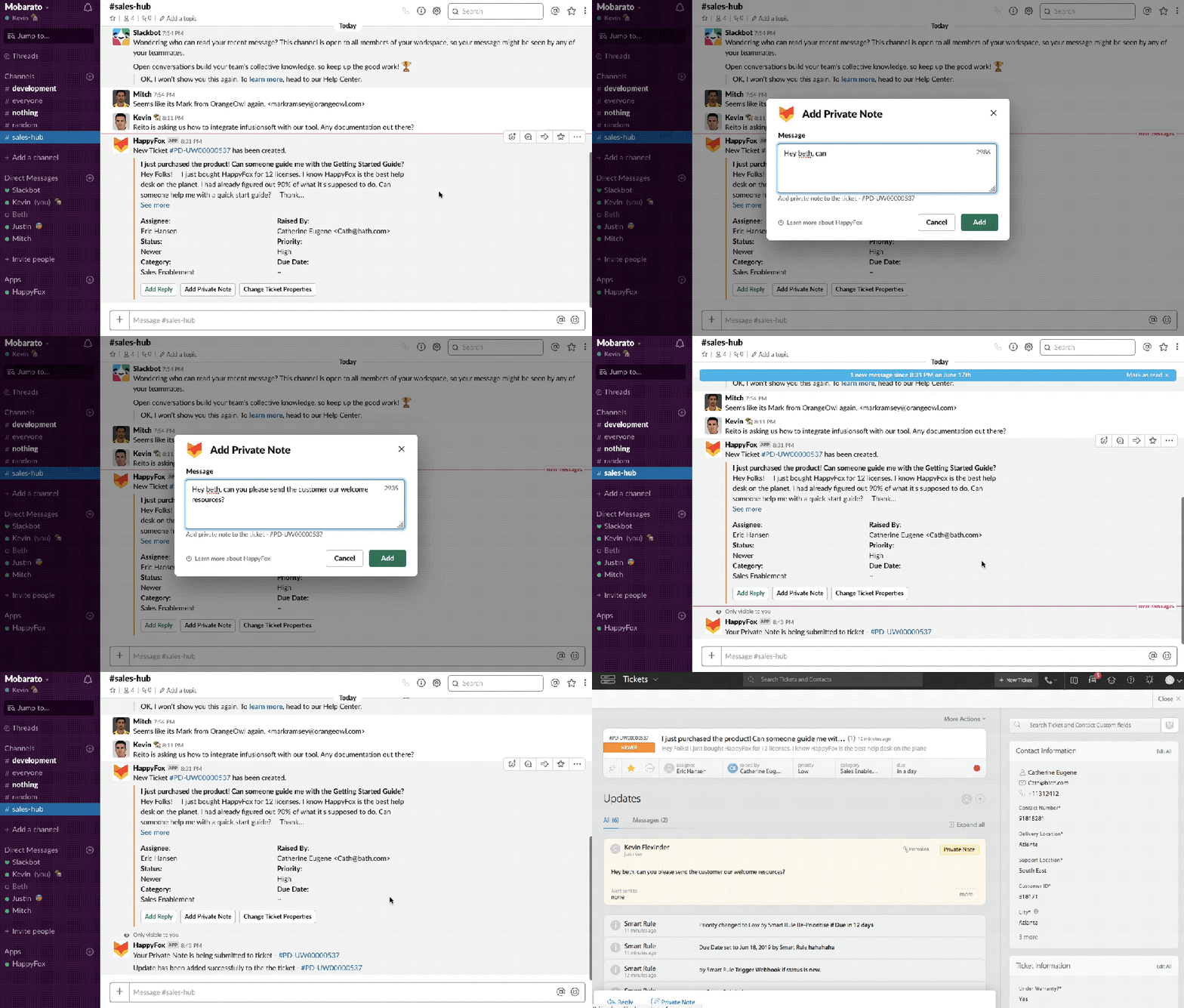
– Visual Kanban view for ticket management
Intelligent Notification System
– Instant notifications for ticket events in Slack channels
– Custom notifications using Smart Rules for complex, conditional alerts
– Keyword-based routing for critical issues
– SLA breach notifications
Knowledge at Your Fingertips
– Search articles directly in Slack with `/happyfox search_kb`
– AI-powered article suggestions
– Quick sharing in ticket threads
– Automatic knowledge gap identification
Seamless Team Synergy
– Real-time ticket discussions
– Cross-department communication
– Subject matter expert routing
– Unified conversation history
AI-Powered Innovation
– Smart ticket categorization
– Automated response suggestions
– Pattern recognition for common issues
– Proactive issue resolution
Beyond Tickets: Complete Department Solutions
– Asset Management: Track and manage company assets with Slack updates
– Custom Workflows: Department-specific processes that reflect in Slack
– Scheduled Tickets: Automate recurring tasks with Slack notifications
Learn more: HappyFox Slack Integration – A Comprehensive Guide
2. Zendesk
Zendesk’s Slack integration provides basic support functionality but comes with significant trade-offs:
– Create and update tickets from Slack messages
– Basic notification routing to channels
– Answer Bot for simple self-service queries
– Limited cross-team collaboration options
– Requires separate paid add-on for full Slack features
– Complex setup process
– Limited customization options
3. Help Scout
Help Scout provides straightforward Slack integration for small teams:
– Basic ticket notifications in Slack
– Limited knowledge base search
– Basic chat-to-ticket conversion
– No customizable routing or automation options
– Limited scalability
– Restricted workflow options
Your Path to Integration Success
Setup Blueprint
1. Channel Architecture
– [ ] Create priority-based support channels
– [ ] Set up department-specific channels
– [ ] Configure escalation channels
2. Alert Configuration
– [ ] Define priority routing rules
– [ ] Set up SLA breach alerts
– [ ] Configure team notifications
3. Process Optimization
– [ ] Create response templates
– [ ] Set up common ticket actions
– [ ] Define escalation paths
Pro Tip: Create dedicated Slack channels for different priority levels and configure smart routing rules to ensure urgent issues never slip through the cracks.
Learn how to setup Slack Integration with HappyFox
Measuring Your Success
Track these key metrics to measure impact:
– Average response time reduction
– First contact resolution rates
– Context switching reduction
– Team collaboration efficiency
– Customer satisfaction scores (CSAT)
Transform Your Support Experience
While Freshdesk’s Slack integration is a common choice, modern support teams need more robust solutions. HappyFox’s AI-powered integration offers the comprehensive features needed to provide faster, more efficient support while addressing the limitations that often hold teams back.
Ready to revolutionize your support operations? Schedule a demo to see how HappyFox can transform your team’s performance with intelligent Slack integration.





