


In today’s modern customer support, efficiency and personalization are non-negotiable. Yet, many teams still struggle with fragmented workflows, toggling between CRM and help desk systems to access critical customer information. This inefficiency isn’t just a time sink—it’s a barrier to delivering seamless support experiences.
CRM integration offers a practical solution to this challenge, creating a unified ecosystem where your help desk and CRM systems work in harmony. By merging customer interaction history, contact information, and support tickets into a single interface, integrations empower support teams to respond faster, resolve issues more effectively, and deliver deeply personalized service.
This blog explores how integrating HappyFox Help Desk with leading CRMs can redefine your customer support strategy, from streamlining workflows to enhancing customer satisfaction. Let’s dive into the key benefits, real-world success stories, and best practices for maximizing the value of CRM integration.
Why Your Support Team Needs CRM Integration
Imagine this: Sarah, a support agent, receives a ticket from a high-value customer. Without CRM integration, she must:
- Open the CRM software,
- Search for the customer,
- Switch between multiple windows,
- Copy-paste information, and
- Risk missing crucial context.
Now, contrast this with a scenario where CRM integration is in place. All customer data—from purchase history to recent interactions—appears directly within her help desk ticket. No switching, no searching, no stress.
This streamlined access transforms the way your team delivers support, saving time and improving accuracy.
The Real Impact of Disconnected Systems
Disconnected systems cost your team more than just time. Here’s why integration is essential:
- Time Drain: Support agents spend an average of 15% of their time searching for customer information across platforms.
- Customer Frustration: A staggering 84% of customers get frustrated when agents don’t have their information readily available.
(Source: Forrester Research 2023; Microsoft’s State of Global Customer Service Report). These statistics highlight the urgency of adopting a unified system.
Key Benefits of Help Desk-CRM Integration
1. Enhanced Customer Context
CRM integration gives your team instant access to critical customer information, including:
- Contact information from CRM
- Case Records
- Recent interactions, and
- Sales pipeline status.
With this context, your team can make better-informed decisions and deliver more personalized support.
2. Improved Response Quality
When agents have complete context, they can:
- Personalize responses,
- Prioritize VIP customers, and
- Understand past interactions.
Pro Tip
Train your support team to scan CRM data for recent sales activities before responding to tickets. It helps ensure responses are more relevant and timely.
3. Streamlined Workflow
Integration simplifies workflows by automating repetitive tasks. For example, with HappyFox’s CRM integration, you can:
- Synchronize contact updates,
- Maintain unified customer profiles, and
- Enable real-time data flow.
How HappyFox Makes CRM Integration Simple
HappyFox Help Desk is designed to seamlessly integrate with leading CRM systems, making it a powerful ally in unifying your support and sales operations. With integrations for Salesforce, Pipedrive, Microsoft Dynamics 365, HubSpot, and more, HappyFox ensures your support team has instant access to the customer data they need, right where they need it. Let’s break down how these integrations work and their specific benefits.
1. Salesforce CRM Integration: Powering Unified Support and Sales
HappyFox’s integration with Salesforce bridges the gap between your support and sales teams, offering a 360-degree view of customer interactions.
- View salesforce customer(contact) information on HappyFox ticket.
- From a HappyFox contact, access salesforce contact information including custom fields.
- Push HappyFox ticket information to salesforce case records.

2. Pipedrive CRM Integration: Streamlining Lead and Deal Management
Pipedrive users can leverage HappyFox’s integration to connect their sales pipeline with customer support effortlessly.
- Link support tickets to active deals, providing sales teams with critical customer insights.
- View Pipedrive contact information from HappyFox ticket-detail, contact-detail screens and new-ticket form.
- Eliminate redundancy with real-time synchronization of contact details between systems.

3. Microsoft Dynamics 365 Integration: A Scalable Solution for Enterprise Needs
With the Microsoft Dynamics 365 integration, HappyFox enables larger organizations to unify support and customer relationship data seamlessly. With Happyfox – MS Dynamics integration, your agents can
- Automatically fetch customer information from Microsoft Dynamics and display in HappyFox ticket detail page. Optionally, an Account can also be manually linked to fetch this information if automatic mapping is not desirable.
- View MS Dynamics customer information on HappyFox ticket-detail screen, contact-detail screen and new ticket form if automatic mapping is enabled.
- Push HappyFox ticket information and subsequent updates to MS Dynamics case records.

4. HubSpot CRM Integration: Perfect for Growth-Focused Teams
HubSpot’s integration with HappyFox brings marketing, sales, and support teams into a single ecosystem for cohesive customer interactions.
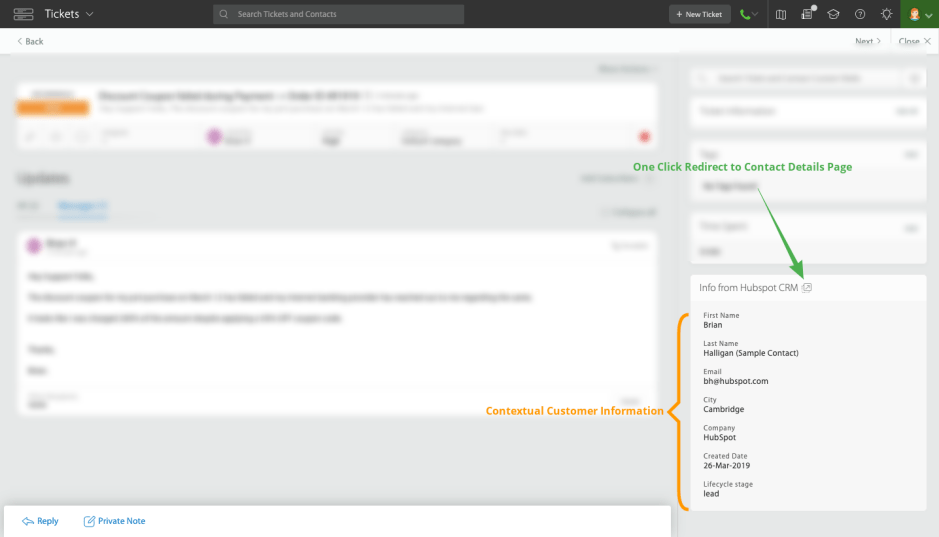
- Information from HubSpot CRM is contextually available in the Ticket Details Page and the Create New Ticket Form.
- Ticket information such as Status, Subject, Ticket ID, Ticket Replies is pushed into HubSpot CRM as notes listed against the corresponding contact.
5. Additional CRM Integrations
HappyFox extends its CRM compatibility to a range of other platforms, including:
- Zoho CRM: Sync contact details and manage ticket creation for Zoho users.
- SugarCRM: Streamline ticketing and unify customer data with SugarCRM’s powerful features.
- Highrise: Simplify customer information access for Highrise users.
Conclusion
CRM integration bridges the gap between your help desk and customer relationship management, empowering your team with context, efficiency, and clarity. With HappyFox HelpDesk, the integration process is not only simple but transformative.
Want to see how HappyFox can revolutionize your customer support? Sign up for a personalized demo and let’s discuss your needs.





