



Your support team spends hours on repetitive tasks – from manual ticket routing and recurring ticket creation to response management. These manual processes not only increase response times but also the risk of errors. Before rushing to implement help desk automation, you need to ask the right questions to ensure you’re making a strategic decision that will truly benefit your support operations.
Why These Questions Matter
Support leaders who skip proper evaluation of ticket automation often face:
– Frustrated agents struggling with rigid systems
– Inconsistent ticket management
– Poor integration with existing workflows
– Wasted investment in unsuitable solutions
Let’s explore the critical questions you need to answer before implementing help desk ticket automation.
1. How Will Automation Align with Your Current Support Workflows?
Consider your existing processes:
– What types of tickets do you create most frequently?
– What are your standard ticket handling procedures?
– How do tickets flow between teams and departments?
Pro Tip:
Map out your current ticket creation process, identifying repetitive tasks that could benefit from automation while noting workflow steps that require human oversight.
Implementation Checklist:
– [ ] Document current ticket creation workflows
– [ ] Identify high-volume ticket types
– [ ] List manual tasks that delay ticket resolution
– [ ] Note interdepartmental ticket routing requirements
2. What Level of Customization Do You Need?
Your automated ticketing system should adapt to your needs, not the other way around. Consider:
– Ticket template requirements
– Scheduling flexibility needs
– Routing and assignment rules
– Intelligent response templates
– Contact management preferences
Feature Spotlight: Ticket Templates
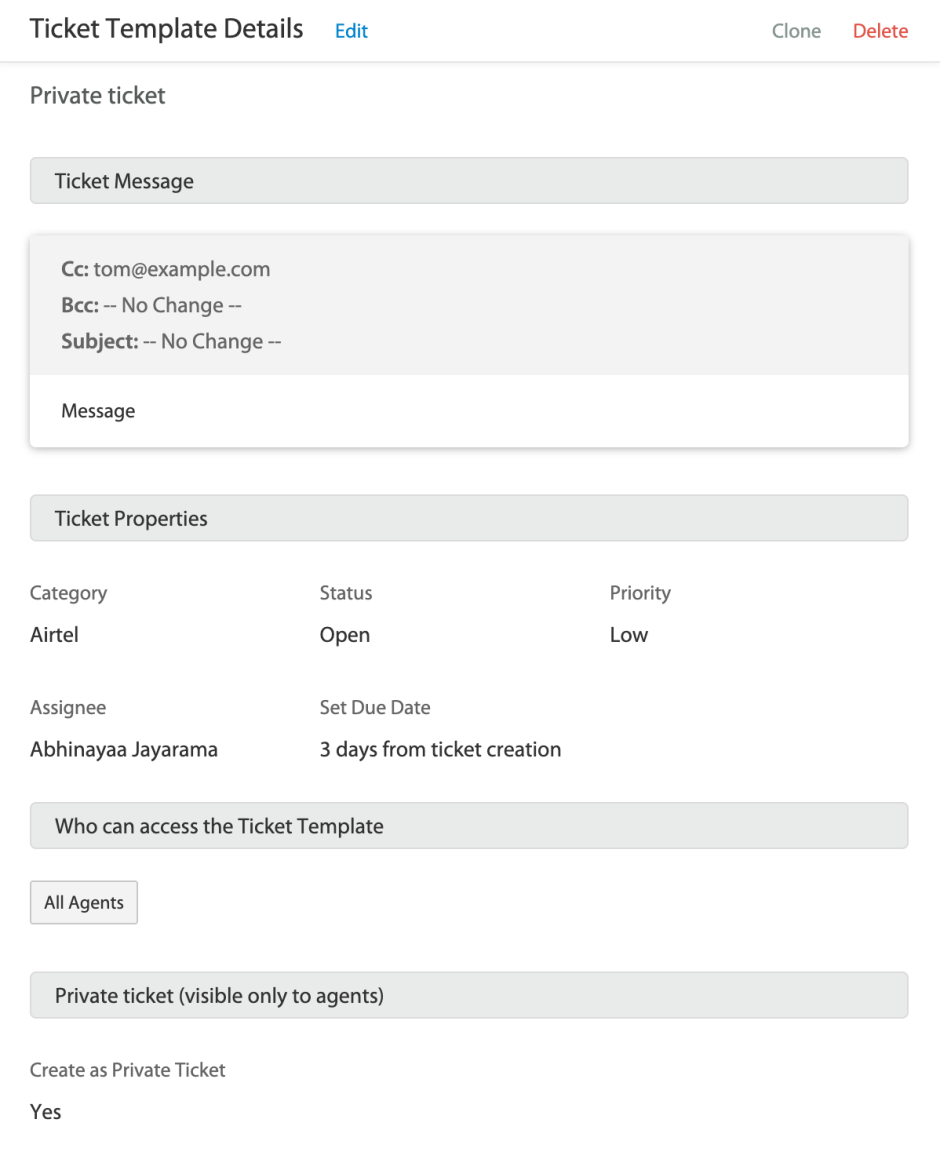
Look for systems that allow you to:
– Create and manage multiple ticket templates
– Set standard field values
– Define contact information
– Apply templates to scheduled tickets
3. How Will You Handle Different Time Zones and Business Hours?
Global support operations require careful scheduling considerations:
– Do you need timezone-specific ticket creation?
– How will automation handle holidays and off-hours?
– What about different business hours across locations?
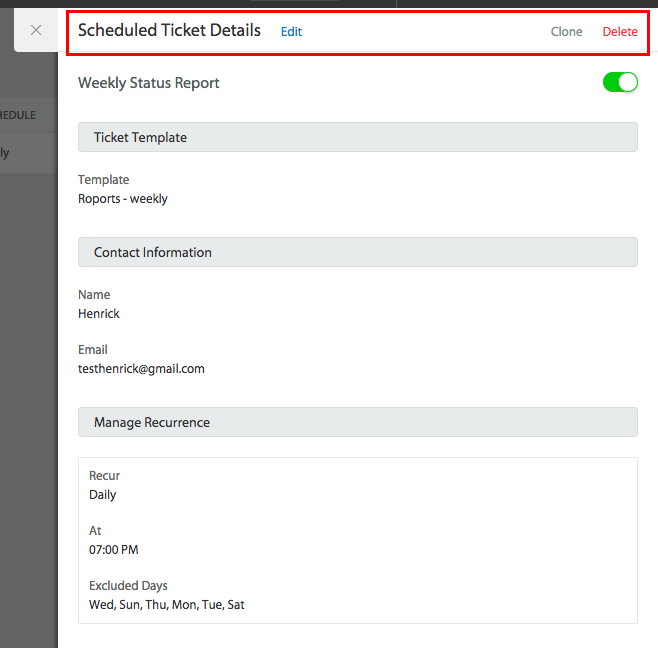
Pro Tip:
Ensure your automation system allows you to configure timezone settings and exclude specific days from ticket creation schedules.
4. What Integration Capabilities Do You Require?
Evaluate how ticket automation will connect with:
– Existing help desk software
– Current support tools
– Team collaboration platforms
– Knowledge base systems
Learn more: 8 Critical Enterprise Integrations for Team Collaboration
Implementation Checklist:
– [ ] List current tools requiring integration
– [ ] Identify data synchronization needs
– [ ] Assess integration requirements
– [ ] Plan for workflow connections
5. How Will You Measure Success?
Define clear metrics for evaluating automation impact:
– Ticket resolution time improvements
– Agent productivity gains
– SLA compliance
– Error rate reduction
– Customer satisfaction changes
Pro Tip: Set baseline metrics before implementation to accurately measure the impact of automation on your support operations.
6. What Security and Compliance Requirements Must You Meet?
Consider data protection needs:
– Customer data handling
– Compliance requirements
– Access control needs
– Permission management

Implementation Checklist:
– [ ] Review data protection regulations
– [ ] Document security requirements
– [ ] Identify access control needs
– [ ] Plan permission structure
Learn more: 10 Ways to Improve Customer Service Security
7. How Will You Train and Support Your Team?
Plan for successful adoption:
– Training requirements
– Documentation needs
– Ongoing support resources
– Change management strategies
Pro Tip: Create a comprehensive training plan that includes both initial onboarding and ongoing skill development.
How HappyFox Automation Suite Addresses Your Key Questions
As a comprehensive help desk solution offering advanced ticketing and AI-powered support features, HappyFox provides an extensive automation suite that directly addresses the questions we’ve explored:
1. Workflow Alignment
HappyFox’s Smart Rules engine powers sophisticated workflow automation:
– Intelligent ticket routing and assignment (round-robin, load-balanced, skill-based)
– Scheduled ticket creation for recurring tasks
– Automated notifications and updates
– Webhook integration for external systems
2. Customization Capabilities
Extensive customization options include:
– Customizable templates for tickets and schedules (daily, monthly, quarterly, yearly)
– Canned actions for quick responses and updates
– Flexible SLA configurations for different categories and statuses
3. Time Zone and Business Hours Management
Comprehensive work schedule management:
– Time zone-specific operations
– Holiday and PTO handling
– Out-of-office automation
– Business hour-aware SLAs with excluded days support
4. Integration and Automation
Rich automation features that connect your support ecosystem:
– Smart rules integration with external systems
– Webhook integrations
– Intelligent workload distribution
– Subject and keyword-based ticket routing
5. Performance Tracking
Built-in SLA automation:
– Configurable SLA timers and alerts
– Multiple service levels
– Category-based tracking and reporting
6. Security and Compliance
Robust permission controls:
– Granular access management
– Role-based permissions
– Secure configurations with audit trails
7. Team Support and Efficiency
Features designed for productivity:
– Intelligent response templates
– Automated workload distribution
– Skill-based routing
– Work schedule optimization
This comprehensive automation suite works seamlessly together, allowing you to:
– Streamline routine and recurring tasks
– Reduce manual ticket handling
– Ensure consistent support quality
– Maximize team efficiency
– Maintain service level agreements
– Scale your support operations efficiently
Make the Right Choice for Your Support Team
Automated ticket creation can transform your support operations, but success depends on choosing the right solution. By carefully considering these seven questions, you’ll be better equipped to select and implement a system that truly meets your needs.
HappyFox’s comprehensive ticket automation features address these critical questions while providing the flexibility and control your team needs. Ready to revolutionize your ticket management?
Schedule a demo with HappyFox and discover how our automated ticket creation can streamline your support operations.
FAQ’s
- What is help desk automation?
Help desk automation is the use of software to handle repetitive support tasks-like ticket assignment, prioritization, and status updates-without manual effort. It improves agent productivity, speeds up resolution, and ensures consistent customer service delivery. - How does help desk automation work?
Help desk automation uses rule-based triggers, workflows, and AI tools to process incoming tickets, route them to the right agents, and send automated updates. This reduces repetitive manual actions and helps teams focus on resolving complex customer issues faster. - What are the benefits of help desk automation?
Help desk automation enhances response times, reduces agent workload, and minimizes human error. It helps teams meet SLAs, improve customer satisfaction, and gain visibility through automated reports. Businesses also save time and costs by streamlining routine processes. - How can businesses implement help desk automation effectively?
Start by identifying repetitive tasks, setting clear automation goals, and mapping workflows. Choose software that integrates with your existing tools and offers flexible triggers. Pilot small processes first, measure outcomes, and refine based on agent and customer feedback. - What are common mistakes to avoid in help desk automation?
Avoid over-automating interactions that need human empathy. Failing to monitor automated workflows or not updating triggers as processes evolve can cause errors. Regular audits and human oversight ensure automation enhances-not replaces-customer experience.




