


Losing track of urgent support requests? Support teams handling hundreds of tickets daily face a common challenge: staying organized while delivering fast, effective support. But there’s more to efficient ticket management than just responding quickly. Your agents juggle multiple tools, switching between screens, trying to stay organized. Meanwhile, response times lag and customer satisfaction takes a hit. Sound familiar?
Effective help desk ticket management isn’t just about responding to tickets—it’s about having the right tools and processes to handle them efficiently. Let’s explore six critical ticket actions that can transform your support team’s productivity and help you deliver exceptional customer service.
6 Essential Ticket Actions That Transform Support Team Efficiency
Support teams handling hundreds of tickets daily face a common challenge: staying organized while delivering fast, effective support. Understanding and mastering key ticket actions can dramatically improve your team’s efficiency and customer satisfaction.
1. Quick Ticket Status Control
Keep tickets moving through your support pipeline by effectively managing statuses, priorities, and due dates – the core elements that drive ticket resolution.
Key Capabilities:
– Change ticket status with one click
– Set and adjust priorities based on urgency

– Assign appropriate categories for routing
– Set due dates for timely follow-up
Pro Tip:
Create custom status workflows that match your team’s process. For example, add statuses like “Awaiting Customer” or “In Development” to better reflect your resolution journey.
2. Smart Ticket Consolidation
Handle multiple tickets efficiently while maintaining clear communication trails, and ensuring no customer communication is lost.
Advanced Features:
– Merge multiple tickets from the same contact
– Clone tickets for similar issues with customization
– Preserve complete ticket history and attachments
– Track related ticket threads
Use Case: When a product outage occurs, multiple customers report the same issue. Merge related tickets to maintain a single source of updates, then use this master ticket to communicate resolution to all affected customers simultaneously.
Best Practice: When merging tickets, use tags to mark the original issues for future reference and trend analysis.
Learn more: Must-have features for collaborative inbox software
3. Internal Collaboration Tools
Keep your team aligned with clear internal communication through private notes and internal updates while keeping customer conversations separate and professional.
Essential Actions:
– Add private notes for team visibility
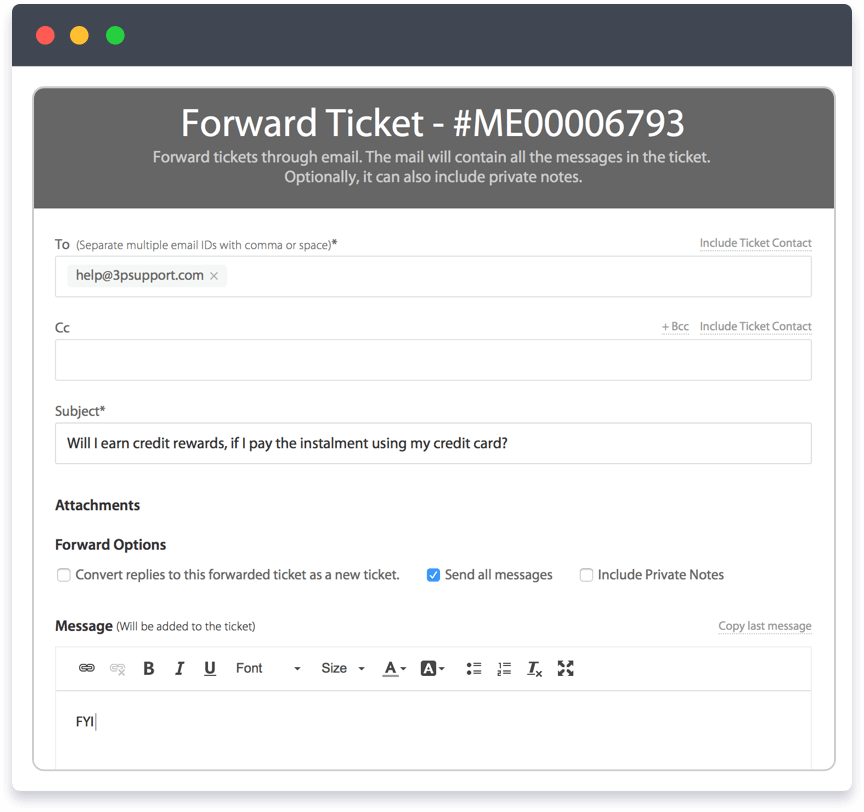
– Forward tickets to relevant stakeholders
– Print comprehensive ticket details
– Share updates without exposing internal discussions
Implementation Tip:
Use standardized internal note formats to make information easily scannable for other team members.
4. Response Time Optimization
Track and improve your team’s efficiency with advanced time management that helps maintain service levels and manage team workload.
Advanced Capabilities:
– Log time spent on each ticket
– Monitor response times against SLAs
– Track resolution metrics
– Identify bottlenecks in your process
Pro Tip:
Set up time tracking categories to understand where your team spends most of their support time.
Learn more: What is an enterprise help desk?
5. Intelligent Ticket Organization
Keep your support queue organized and easily searchable with intelligent tagging and categorization that speeds up ticket processing.
Key Features:
– Add descriptive tags for easy searching
– Smart assignment based on expertise
– Organize tickets by categories
– Quick-filter ticket views
Best Practice: Develop a consistent tagging system that helps identify common issues and trends.
Use Case: For a software release, tag all related tickets with “v2.0-release”. When customers report bugs, quickly find all related issues by filtering this tag, helping identify patterns and prioritize fixes.
6. Advanced Team Communication
Leverage sophisticated notification and collaboration features to keep relevant team members informed without overwhelming them.
Smart Features:
– @mention specific team members
– Add strategic subscribers for updates
– Customize notification preferences
– Enable cross-team collaboration
Implementation Tip: Create notification rules that keep relevant team members informed without causing alert fatigue.
HappyFox’s Comprehensive Ticket Actions
HappyFox brings these essential and advanced ticket actions together in an intuitive help desk interface:
– Smart Status Management: Quick-access controls with custom workflows
– Advanced Merging Tools: Intelligent ticket consolidation with history tracking
– Team Collaboration Suite: Seamless internal communication tools
– Time Tracking Analytics: Comprehensive performance monitoring
– Intelligent Organization: Smart tagging and categorization
– Advanced Notification System: Customizable team alerts
Transform Your Support Operations
Mastering these ticket actions can significantly improve your team’s efficiency and response times. While basic actions form the foundation of good ticket management, advanced features help scale your support operations effectively.
Ready to take your ticket management to the next level? Schedule a demo with HappyFox to see these features in action and learn how they can transform your support workflow.





