



Missing laptops, unclear equipment assignments, endless email chains about software requests – sound familiar? For HR teams, asset management has become a major pain point that’s draining valuable time and resources. But here’s the good news: the right help desk solution can transform these HR asset management challenges into streamlined processes.
Understanding HR Help Desk Solutions for Asset Management
Help desk software for HR asset management refers to a systematic solution that streamlines equipment requests, tracks assets, automates workflows, and provides comprehensive reporting through a centralized ticketing system. This technology enables HR teams to manage workplace resources efficiently while reducing manual effort through automation and self-service capabilities.
Let’s explore the six most pressing asset management challenges HR departments face in 2026, and how a robust ticketing system can solve them.
1. Asset Request & Distribution Management
HR teams struggle daily with:
– Managing equipment and resource requests
– Tracking approval status
– Coordinating distribution
– Documenting asset assignments
Pro Tip:
Set up automated workflows that route asset requests to the right approvers and track the entire process from request to delivery. Create custom ticket fields to capture all necessary asset details and automate status updates to stakeholders.
2. Onboarding and Offboarding Asset Tracking
Employee transitions create significant asset management complexity:
– Coordinating new hire equipment setup
– Tracking returned assets during offboarding
– Managing access provisioning and revocation
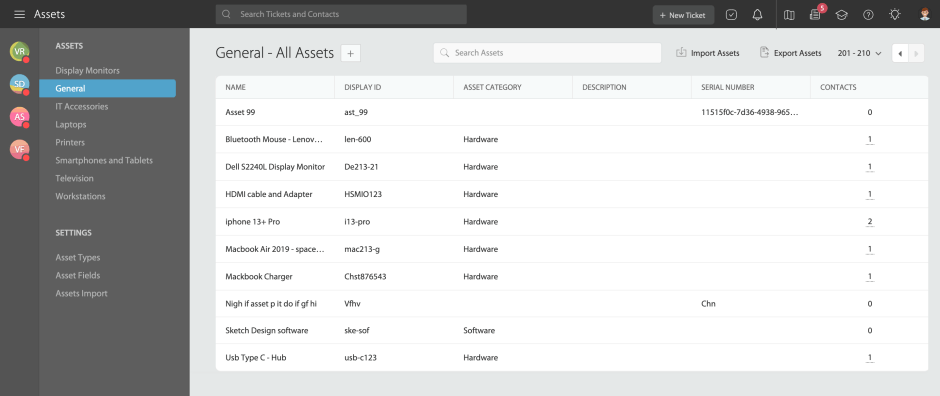
– Maintaining accurate asset assignment records
Implementation Checklist:
– [ ] Create standardized asset request templates
– [ ] Set up automated onboarding workflows
– [ ] Define offboarding asset return procedures
– [ ] Establish asset reconciliation processes
Learn more about creating, editing and linking assets in this comprehensive knowledge article.
3. Support Ticket Management for Asset Issues
Equipment problems require systematic handling:
– Processing repair requests
– Tracking maintenance tickets
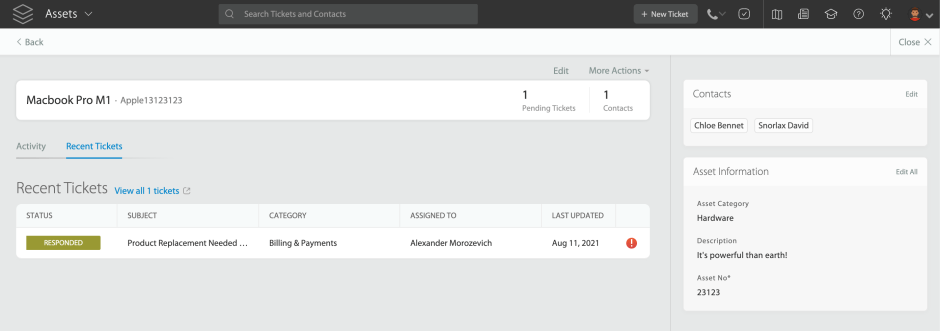
– Managing replacement requests
– Documenting issue resolutions
Feature Spotlight: Smart Rules
Automatically route asset-related tickets to appropriate teams while SLA management helps track and monitor resolution times.
Smart Rules can:
– Assign priorities based on request type
– Trigger notifications to relevant stakeholders upon asset request submission, pending approvals, status changes, and SLA breaches
– Update ticket status automatically
– Generate maintenance schedules
4. Knowledge Base Management for Asset Procedures
Maintaining and sharing asset management information:
– Documenting equipment policies
– Creating self-service resources
– Updating procedure guides
– Managing access to documentation
Pro Tip:
Organize your knowledge base with clear categories for different types of assets and processes. Include common troubleshooting steps to reduce repeat tickets.
Learn more: Lansweeper integration for streamlining IT help desk
5. Asset Communication and Updates
Keeping stakeholders informed about asset status:
– Notifying users about request status
– Communicating maintenance schedules
– Updating departments on asset availability
– Managing asset-related queries
Implementation Checklist:
– [ ] Set up automated notification templates
– [ ] Create status update workflows
– [ ] Configure escalation rules
– [ ] Establish communication channels
6. Reporting and Analytics for Asset Management
Getting visibility into asset operations:
– Tracking request volumes
– Measuring resolution times
– Analyzing common issues
– Identifying process bottlenecks
How HappyFox Streamlines HR Asset Management
HappyFox’s help desk solution transforms asset management through:
Comprehensive Ticketing System
Centralized request management with customizable categories for different asset types
Custom ticket fields to capture detailed asset information (serial numbers, warranties, locations)
Smart routing rules based on asset type, request category, or department
SLA monitoring with automated escalations and breach notifications
Priority-based queuing to handle urgent asset requests efficiently
Rich text editing for detailed asset documentation
Bulk ticket actions for managing multiple asset requests simultaneously
Smart Automation
Custom workflow creation with conditional actions and triggers
Automated request assignment based on team expertise and workload
Triggered notifications at key stages (request submission, approval pending, status updates, SLA alerts)
Status update automation based on predefined conditions
Task scheduling for routine asset maintenance
Auto-responses for common asset inquiries
Customizable approval workflows for different asset types
Knowledge Base Integration
Comprehensive asset policy documentation
Self-service resource center with categorized asset guides
Searchable procedure guides with rich media support
Automated article suggestions based on ticket context
Public and private knowledge base options
Multi-format content support (text, images, videos)
Multi-Channel Support
Email ticket creation with attachment support
Intuitive web portal for asset requests and tracking
Mobile-responsive interface for on-the-go access
Integration with popular business tools
In-built asset request forms
Real-time chat support option
Seamless ticket conversion from any channel
Real-Time Reporting
Custom report creation with flexible parameters
Asset request analytics by type, department, and status
Resolution time tracking with detailed breakdown
Trend analysis for identifying common asset issues
SLA compliance monitoring and reporting
Team performance metrics
Exportable reports in multiple formats
Implementation Guide: Getting Started
1. Assess Current Processes
– Document existing workflows
– Identify bottlenecks
– List common request types
– Note reporting needs
2. Configure Your System
– Set up ticket categories
– Create custom fields
– Define automation rules
– Build knowledge base structure
3. Launch and Optimize
– Train team members
– Monitor metrics
– Gather feedback
– Refine workflows
Transform Your HR Asset Management
Effective asset management doesn’t require complex specialized systems. With the right help desk solution, HR teams can transform asset-related chaos into streamlined, automated processes that save time and improve employee satisfaction.
By implementing a centralized help desk system, you can:
– Automate routine asset management tasks
– Improve request tracking and resolution times
– Create a searchable knowledge base of asset information
– Generate comprehensive reports for better decision-making
– Enhance overall employee experience
Ready to see how HappyFox can revolutionize your HR asset management? Schedule a demo to explore our solution in action and discover how we can address your specific asset management challenges.





