


When internal support operates in departmental silos, enterprises face mounting challenges: IT teams struggle with request backlogs, HR departments can’t keep pace with policy questions, and facilities management becomes increasingly complex. The modern solution? A unified internal help desk platform that brings order to cross-departmental support.
This implementation guide explores how enterprise teams are using internal help desk software to streamline operations, reduce response times, and improve employee satisfaction through centralized support management.
Why Traditional Enterprise Support Systems Fall Short
Traditional internal support approaches often fail to meet enterprise needs due to:
– Siloed Communications: Departments using separate tools create information gaps
– Manual Processes: Valuable time wasted on tasks that could be automated
– Poor Visibility: No unified view of support metrics across departments
– Inconsistent Service: Variable response times and support quality
– Resource Drain: Support teams spending time on low-value activities
Enterprise-Grade Features for Internal Support Excellence
1. Advanced Multi-Department Support
– Smart Ticket Assignment & Routing
– Automatic ticket distribution based on department rules
– Round-robin assignment for workload balancing
– Skills-based routing to subject matter experts
– Custom assignment rules per department
– Custom SLA Management
– Department-specific SLA definitions
– Multiple SLA policies
– Automated escalation workflows
– Role-Based Access Control
– Granular permission settings
– Department-level access restrictions
– Custom agent roles and privileges
– Multi-level approval workflows
Learn more: 8 Key Scenarios Every Enterprise Must Automate
2. Enterprise Knowledge Management
– Departmental Knowledge Bases
– Separate knowledge portals per department

– Controlled content access and visibility
– Smart Content Suggestions
– AI-powered article recommendations
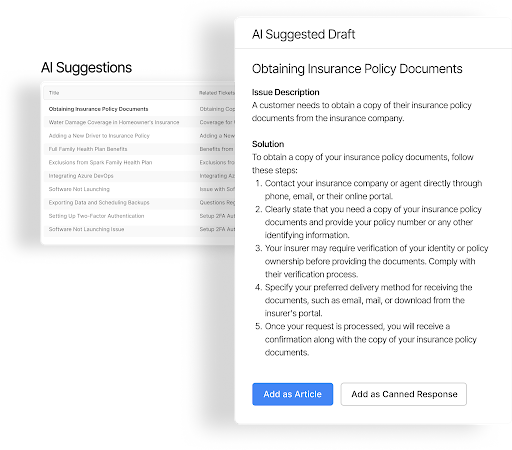
– Automated content gap analysis
– Content effectiveness metrics
3. Advanced Automation Capabilities
– Smart Rules Engine
– Complex condition-based automations
– Multi-step workflow automation
– Time-triggered actions
– Automatic ticket routing
– Business hour management
– Business Process Automation
– Visual workflow designer
– Conditional branching logic
– Multiple trigger conditions
– Cross-department process flows
4. Enterprise Security & Compliance
– Advanced Security Controls
– SSO/SAML integration
– Two-factor authentication
– IP-based access restrictions
– Session management controls
Learn more: 10 Ways to Improve Customer Service Security
– Compliance Features
– Comprehensive audit logs
– Custom data retention policies
– GDPR compliance tools
– Data export capabilities
5. Enterprise Integration Capabilities
– Robust API Access
– RESTful API support
– Custom webhook integration
– Batch operation support
– Rate limiting controls
– Enterprise System Integration
– Active Directory/LDAP sync
– HRIS system integration
– Asset management connection
– Email system integration
6. Advanced Analytics & Reporting
– Custom Analytics
– Department-specific dashboards
– Custom report builder
– Scheduled report delivery
– Data visualization tools
– Performance Metrics
– Agent productivity tracking
– Department benchmarking
– SLA compliance reporting
– Trend analysis tools
Implementation Guide: Setting Up Enterprise Internal Help Desk
Phase 1: Support Structure Analysis
Implementation Checklist:
– [ ] Map all departments providing internal support
– [ ] Document common request types by department
– [ ] Identify approval workflows and escalation paths
– [ ] List integration requirements with existing tools
– [ ] Define service level agreements (SLAs)
Phase 2: Configuration Best Practices
1. Department Structure Setup
– Define department hierarchies
– Configure routing rules
– Set up approval workflows
– Establish SLA policies
2. Knowledge Base Organization
– Create department sections
– Configure access controls
– Define content standards
3. Automation Configuration
– Implement ticket routing rules
– Set up auto-assignment logic
– Configure SLA automations
– Create workflow triggers
Pro Tip: Start with automating your highest-volume routine tasks first. This provides immediate ROI and helps build momentum for broader adoption.
Phase 3: Integration Setup
Essential enterprise integrations include:
– Identity Management
– SSO configuration
– User provisioning setup
– Access control mapping
– Authentication rules
– Communication Systems
– Email integration
– Chat platform connection
– Notification setup
– Alert configuration
Best Practices for Enterprise Deployment
1. Phased Rollout Strategy
– Start with pilot departments
– Document lessons learned
– Refine processes iteratively
– Scale gradually
2. Change Management Focus
– Provide comprehensive training
– Create department champions
– Monitor adoption metrics
– Gather user feedback
3. Continuous Optimization
– Review automation effectiveness
– Update knowledge content
– Refine workflows
– Monitor performance KPIs
HappyFox Enterprise Internal Help Desk Features
HappyFox offers a comprehensive suite of enterprise-grade features specifically designed for internal support:
HappyFox Enterprise Features for Internal Help Desk
Unified Ticket Management
– Smart Routing: Automatically direct tickets to appropriate departments
– Custom Workflows: Department-specific processes and approvals
– SLA Management: Track and enforce response time commitments
– Automation Rules: Streamline routine tasks and assignments
Enterprise Knowledge Base
– Department Portals: Separate knowledge bases for each team
– Access Controls: Role-based content visibility
– Multi-Language Support: Global workforce support
Security & Integration
– SSO/SAML Integration: Enterprise authentication support
– API Access: Connect with existing enterprise systems
– Role-Based Access: Granular permission controls
– Audit Trails: Comprehensive tracking of system activities
Analytics & Reporting
– Department Dashboards: Team-specific performance metrics
– Custom Reports: Tailored reporting for enterprise needs
– SLA Monitoring: Track service level compliance
– Resource Analytics: Optimize support team allocation
Transform Your Enterprise Support Operations
With these powerful features, HappyFox provides the robust functionality, security, and scalability needed to deliver exceptional support across large organizations. Our enterprise solution streamlines support operations, enhances productivity, and improves service quality across all departments.
Ready to revolutionize your internal support operations? Schedule a demo with our enterprise solutions team to see HappyFox in action.





