


Your support team receives an urgent ticket – an executive’s laptop isn’t working. But finding critical details becomes a frustrating search. When was it purchased? What repairs were done last month? Which accessories came with it?
To make matters worse, three departments need monitor upgrades, but your inventory system can’t tell you what’s actually available.
If this sounds painfully familiar, you’re not alone. These IT asset management headaches plague even the most organized support teams. Let’s explore these challenges and discover practical solutions to transform your asset management.
Challenge 1: Fragmented Asset Data
Problem: Support teams struggle with scattered asset information across multiple systems, making it difficult to access complete asset histories during ticket resolution.
Solution: Implement a centralized asset management system integrated with your help desk.
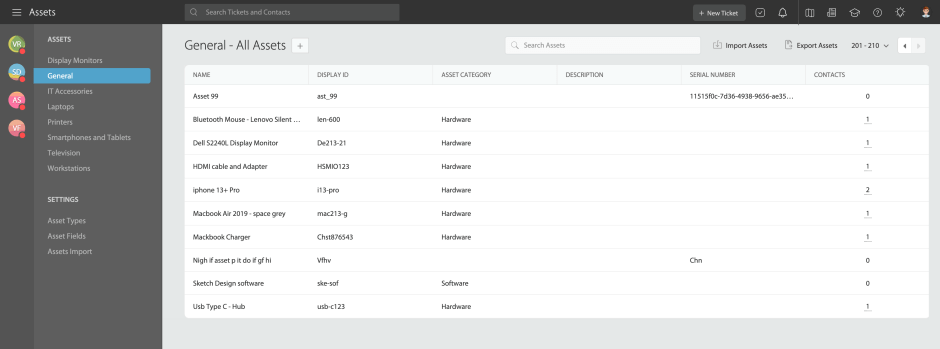
Implementation Checklist:
– [ ] Audit current asset data sources
– [ ] Define standardized asset data fields
– [ ] Set up asset types and custom fields
– [ ] Establish naming conventions
– [ ] Train team on new unified system
Pro Tip:
Use HappyFox’s built-in asset management module to create a single source of truth for all asset-related information, with custom fields and asset types directly accessible within support tickets.
Challenge 2: Poor Asset-Ticket Association
Problem: Difficulty linking support tickets to specific assets leads to incomplete problem tracking and inefficient resolution processes.
Solution: Establish standardized asset-ticket relationships and tracking procedures.

Feature Spotlight: Asset-Ticket integration
HappyFox enables asset association with tickets through:
* Multiple asset linking capabilities
* Quantity tracking per ticket
* Activity logging for all changes
* Custom fields for detailed tracking
Challenge 3: Inadequate Asset Lifecycle Tracking
Problem: Support teams lack visibility into asset age, warranty status, and maintenance schedules, leading to reactive rather than proactive support.
Solution: Implement comprehensive lifecycle management with systematic tracking.

Feature Spotlight: Asset Fields
HappyFox provides comprehensive asset information tracking through:
– Asset-specific custom fields
– Status tracking fields (custom)
– Warranty and maintenance fields (custom)
– Basic lifecycle stage tracking
– Asset documentation storage
Challenge 4: Asset Knowledge Base Gaps
Problem: Support agents waste time searching for asset-specific troubleshooting information across multiple sources.
Solution: Create and maintain an integrated asset knowledge base.
Feature Spotlight: Asset Types
HappyFox’s flexible asset management lets you organize assets exactly how your business needs them:
– Custom asset type creation (Hardware, Software, etc.)
– Type-specific field configuration
– Contact association rules
– Ticket linking preferences
– Standardized templates
– Category-based organization
Challenge 5: Manual Asset Inventory Updates
Problem: Manual asset tracking leads to outdated information and inventory discrepancies.
Solution: Streamline asset inventory management.
Management Opportunities include:
– Centralized asset records
– Bulk data updates
– Status tracking
– Location management
– Regular audits
Learn more: Asset management integration – 5 expert tips
Challenge 6: Compliance and Security Risks
Problem: Inadequate asset tracking creates security vulnerabilities and compliance issues.
Solution: Implement role-based access controls and compliance tracking.
Security Framework:
– Role-based access permissions
– Asset activity logging
– Basic compliance reporting
– Asset-contact associations
– Audit trail maintenance
Best Practices for Success
1. Standardization
– Use consistent naming conventions
– Implement standardized processes
– Create uniform documentation
– Establish clear workflows
2. Organization
– Structure asset types logically
– Define clear categories
– Set up relevant custom fields
– Maintain data consistency
3. Integration
– Connect assets with tickets
– Link assets to contacts
– Establish clear relationships
– Maintain data accuracy
HappyFox Asset Management Capabilities
HappyFox’s Asset Management module, integrated directly within the help desk platform, provides key features to address these challenges:
Asset Organization
– Custom asset types and fields
– Standardized naming conventions
– Unique Display IDs
– Flexible categorization
Ticket Integration
– Asset-ticket linking
– Quantity tracking
– Activity logging
– Relationship management
Data Management
– Bulk import/export
– Search functionality
– Custom field support
Access Control
– Role-based permissions
– Asset-contact associations
– User management
Learn more: Manage IT assets within your organisation
Transform Your Asset Management Today
IT asset management challenges don’t have to hold your support team back. With HappyFox’s comprehensive asset management solution, you can:
– Centralize asset data and support operations
– Streamline asset-ticket relationships
– Generate actionable reports
– Ensure proper access control
– Improve team efficiency
Ready to overcome your IT asset management challenges? Schedule a demo with HappyFox today and discover how our integrated solution can transform your support operations.





