


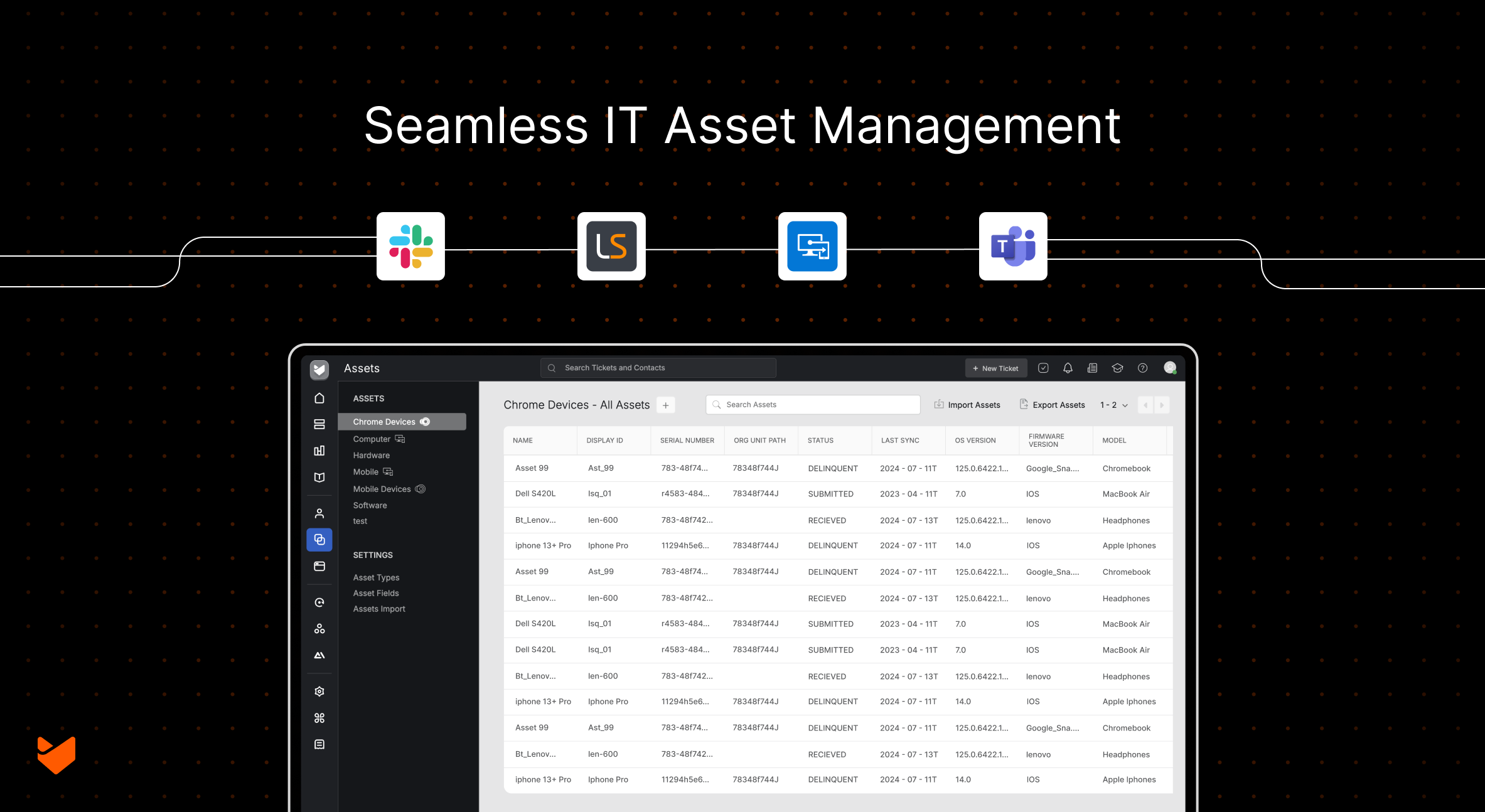
“Which laptop model does this user have?” “When was their last hardware upgrade?” “What software is installed?” If your IT support teams are constantly switching between asset management and help desk systems, they’re losing precious resolution time. Leading teams are eliminating these gaps by bringing asset data directly into their support workflow.
The solution isn’t just finding a better standalone asset management tool – it’s creating an integrated ecosystem where your asset data flows seamlessly between your discovery tools, help desk system, device management platform, and communication channels.
The Real Cost of Disconnected Asset Management
Before diving into integration solutions, let’s acknowledge the challenges of disconnected systems:
- Knowledge silos: When asset information lives only in one person’s head or spreadsheets only they understand
- Time drain: Support agents spending more time searching for asset information than solving actual problems
- Compliance headaches: Struggling to produce accurate reports for audits or security assessments
- Lost assets: Equipment that disappears from tracking when checked out but never returned
- Scaling pains: Systems that work for 100 devices but break down completely at 1,000
What Makes an Integrated Asset Management Solution?
Modern asset management goes beyond simple inventory tracking. An integrated solution connects multiple specialized tools to create a unified view of your IT environment.
The key components include:
- Discovery and Inventory Tools: Platforms like Lansweeper that automatically scan and catalog your entire IT infrastructure, from servers to IoT devices.
- Device Management Systems: Solutions like Microsoft Intune that control device policies, security settings, and compliance across mobile and desktop endpoints.
- Communication Platforms: Tools like Slack and Microsoft Teams that keep your team coordinated and informed about asset-related activities.
- Help Desk Integration: The central hub that connects all these systems, ensuring asset context is available when and where support teams need it most.
When these components work together, they eliminate the data silos and context switching that plague traditional asset management approaches.
HappyFox: Comprehensive Asset Management with Seamless Integrations
HappyFox is a comprehensive help desk solution that serves as the perfect integration hub for your asset management needs. With built-in asset management capabilities and powerful integration features, HappyFox brings together all the components we’ve discussed into one unified platform.
Built-in Asset Management Features
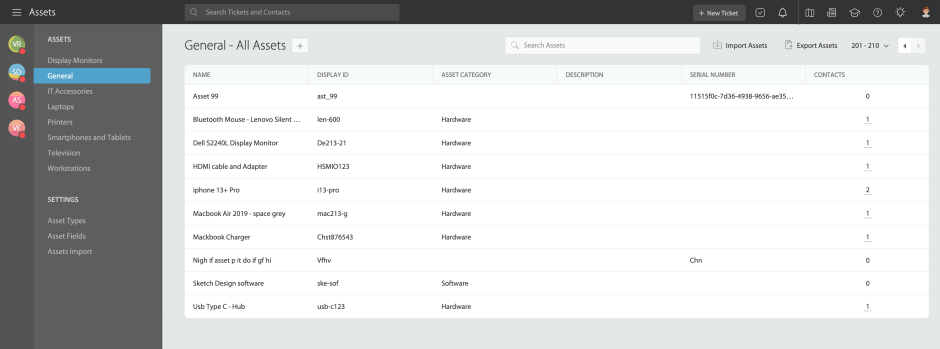
Asset Tracking & Organization
- Track hardware and software assets in one centralized location
- Categorize assets using customizable asset types (Hardware, Laptops, Software, Mobile devices)
- Link assets directly to support tickets for complete context
- Associate assets with users and contacts for better relationship management
- Dedicated Asset Manager mobile app for on-the-go asset tracking
Asset Lifecycle Management
- Monitor asset utilization and performance metrics
- Track maintenance history and schedule preventive maintenance
- Manage asset assignments and transfers between users
- Generate comprehensive reports on asset inventory and costs

Advanced Asset Features
- Filter tickets by linked assets to identify device-specific trends
- Gain visibility into assets owned by each contact when they raise tickets
- Customize asset types with unique attributes and fields
Why HappyFox for Integrated Asset Management
- Unified Platform Approach: Instead of juggling multiple standalone tools, HappyFox provides a single platform where asset management, help desk operations, and team communication converge. This eliminates data silos and reduces the complexity of managing multiple integrations.
- Flexible Automation: HappyFox’s Smart Rules engine allows you to create sophisticated automation workflows that span across all integrated systems. Set up rules that automatically create tickets based on asset status changes, route tickets based on device types, or notify teams when compliance issues arise.
- Comprehensive Reporting: Get insights into asset utilization, support trends, and operational efficiency through HappyFox’s powerful reporting capabilities. Track metrics like asset-related ticket volume, resolution times by device type, and maintenance costs across your entire infrastructure.
- Scalable Solution: Whether you’re managing 100 devices or 10,000, HappyFox scales with your organization. The platform’s robust architecture and flexible licensing ensure that your asset management solution grows alongside your business needs.
Now let’s explore how HappyFox’s powerful integrations enhance these capabilities.
1: HappyFox + Lansweeper – Complete Infrastructure Visibility
When a user reports their laptop is running slowly, support agents typically need to gather basic device information before they can help. HappyFox’s Lansweeper integration enables your support team to access asset information, track issues, and resolve tickets more efficiently. With device context already there – agents can see the device model, current disk usage, and software update status directly within the ticket interface.
Key Integration Capabilities
Unified Asset View
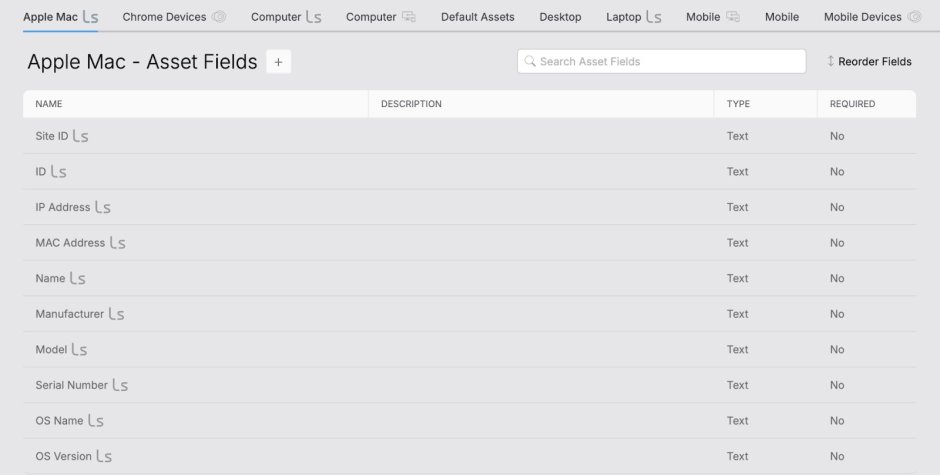
- Access Lansweeper device information directly within HappyFox tickets
- View device specifications, installed software, and configuration details without switching systems
- See complete asset history including maintenance, updates, and previous issues
Enhanced User Management
- Connect users with their devices automatically
- View complete device ownership history
- Streamline communication about device-specific issues
Streamlined Support
- Link tickets to specific devices for faster troubleshooting
- Access asset context immediately when tickets are created
- Track recurring issues across similar device types
Real-time Updates
- Maintain synchronized asset information between Lansweeper and HappyFox
- Automatic device sync with real-time status updates
- Complete asset inventory with device information access
How It Works
When a user submits a ticket about a device issue, your agents immediately see:
- Device Synchronization: Automatic device sync, real-time status updates, complete asset inventory, and device information access
- Ticket-Device Association: Link tickets to specific devices, track device issues, access asset history, and streamline resolution
The integration shows detailed asset fields including Site ID, IP Address, MAC Address, device name, manufacturer, model, serial number, OS details, and storage information – all within the HappyFox interface.
2: HappyFox + Microsoft Intune – Mobile Device Management
Organizations managing multiple mobile devices often struggle with providing effective support when device issues arise. HappyFox’s Microsoft Intune integration automatically syncing managed devices with the help desk system. When someone reports an issue with their company phone, agents can see the device model, compliance status, and management policies directly in the ticket.
Key Integration Capabilities
Unified Device Management
- Access all Intune-managed devices directly within HappyFox
- Automatic sync of all Intune-managed devices with real-time status updates
- Comprehensive device inventory management
Streamlined Support
- Link tickets to specific devices for faster issue resolution
- Track device-specific issues and resolution history
- Access device details directly from ticket interface
Enhanced User Management
- Connect user profiles with their assigned devices
- View complete device ownership history
- Associate users with their registered devices
Real-time Updates
- Maintain synchronized device information across both platforms
- Automatic device status and information updates
The Intune Integration in Action
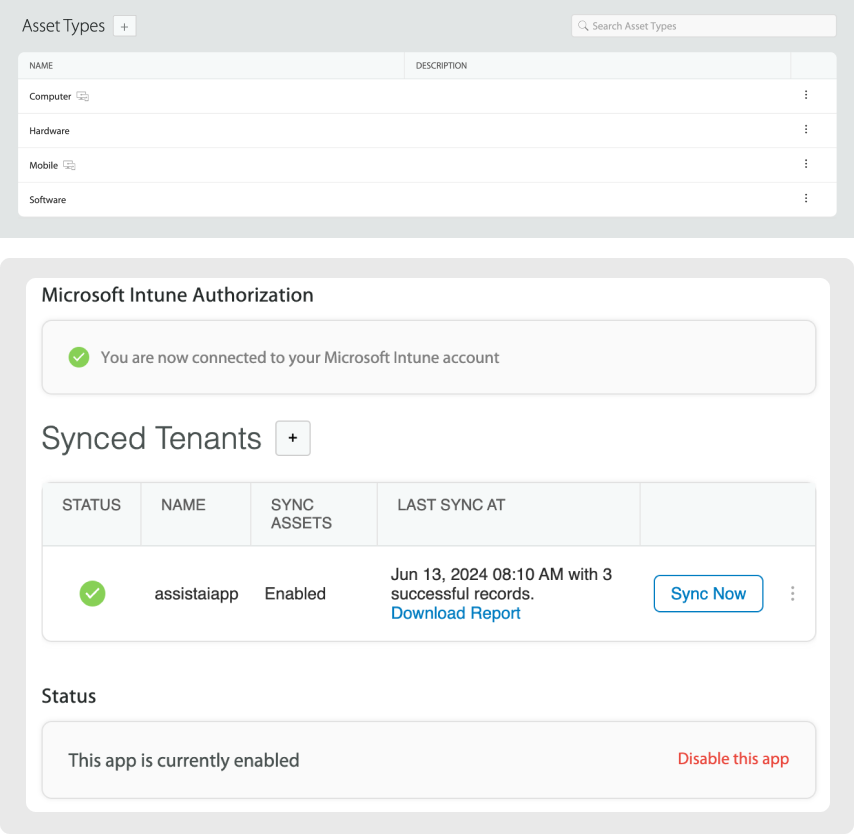
The integration provides a dedicated Microsoft Intune Authorization panel showing:
- Connection status to your Microsoft Intune account
- Synced Tenants with sync status and last sync timestamps
- Enabled/disabled status with easy management controls
Asset creation activities are automatically logged, showing details like:
- Asset creation through integration
- Display ID assignment (e.g., c3fd0f0f-6576-4b57-ac59-4621482c8738)
- Device type, manufacturer, and model information
- Operating system and storage details
- Compliance state tracking
Learn More: Top 5 Microsoft Intune Integrations for Better IT Asset Management
3: HappyFox + Slack – Real-Time Asset Communication
Many support teams use Slack as their primary communication platform throughout the day. HappyFox’s Slack integration allows these teams to handle support tasks without switching contexts. Users can create tickets using slash commands, search knowledge base articles, and receive notifications about asset-related issues directly within their Slack workspace.
Slack Integration Features
Create and Manage Tickets
- Create new tickets using /happyfox new_ticket [message] slash command
- Reply and leave notes using the built-in interface without leaving Slack
- Take action on tickets directly from Slack channels
Knowledge Base Access
- Search knowledge base articles using /happyfox search_kb [keyword]
- Access asset-specific documentation without switching platforms
- Get instant answers to common asset-related questions
Smart Notifications
- Setup instant notifications for ticket events with Smart Rules
- Configure complex conditional rules for asset-related notifications
- Route notifications to specific channels based on asset type or status
Real-World Slack Workflow
When an asset issue occurs:
- Immediate notification in designated Slack channel
- Quick ticket creation using slash commands
- Asset context automatically included
- Team collaboration in real-time
- Resolution updates shared across relevant channels
4. HappyFox + Microsoft Teams – Unified Collaboration
HappyFox’s Microsoft Teams integration enables support within the Teams environment. Users can create tickets, receive notifications about asset issues, and search for solutions using the HappyFox bot, all without leaving their primary collaboration platform.
Microsoft Teams Integration Benefits
Instant Ticket Notifications
- Setup notifications for every ticketing event using the HappyFox Bot
- Tailor notification preferences per channel
- Follow ticket progress within your Teams channels
Create Tickets in Teams
- Open the New Ticket Form directly within Microsoft Teams interface
- Start creating tickets with more context and keep different teams in sync
- Streamline asset-related incident reporting
Knowledge Base Integration
- Access knowledge base articles directly within Teams
- @mention the HappyFox Bot followed by search terms
- Get instant access to asset documentation and troubleshooting guides
Teams Workflow for Asset Management
For organizations using Microsoft ecosystem:
- Unified workspace for all asset-related communications
- Contextual notifications about device issues and maintenance
- Seamless escalation from Teams chat to formal tickets
- Knowledge sharing through integrated documentation access
Implementing Your Integrated Asset Management Solution
Now that we’ve explored these integration types, let’s discuss how to combine them into a comprehensive strategy that scales with your organization.
Step 1: Define Your Asset Management Goals
Before implementing any integrations, clarify what you want to achieve:
- Are you primarily focused on inventory tracking?
- Do you need to improve support response times for asset-related issues?
- Are you trying to automate asset lifecycle management?
- Do you need better visibility into asset utilization and costs?
Your specific goals will determine which integrations to prioritize and how to configure them.
Step 2: Map Your Asset Lifecycle Workflows
Document the entire lifecycle of your assets – from procurement to retirement – and identify where each integration fits:
- Procurement & Onboarding
- Use discovery tools for initial identification
- Configure asset types in your help desk system
- Set up automated asset-to-user assignment via device management
- Active Management
- Track compliance and security status via device management dashboards
- Monitor support trends through help desk reporting
- Configure automated maintenance alerts in communication platforms
- Retirement & Replacement
- Trigger end-of-life workflows based on asset age or status
- Automate asset recovery notifications in communication channels
- Use help desk reporting to analyze asset lifecycle costs
Step 3: Choose Your Integration Platform
When selecting a help desk system to serve as your integration hub, look for:
- Native integrations with major discovery and device management tools
- Robust API capabilities for custom integrations
- Flexible automation rules for asset-based workflows
- Comprehensive reporting and analytics capabilities
- Strong communication platform integrations
Step 4: Configure Smart Automation Rules
The real power of an integrated asset management system comes from automating routine tasks and notifications:
- Compliance Alerts: When a device falls out of compliance, automatically create a ticket and notify the IT team
- Asset Assignments: When a new user is provisioned, automatically assign standard assets and notify their manager
- Maintenance Scheduling: Based on asset age or usage metrics, automatically schedule maintenance tickets and notify the responsible team
Step 5: Train Your Team on the Integrated Workflow
Even the best system needs well-trained users. Create documentation and training materials that show:
- How to create and update asset records in each system
- The proper channels for different types of asset notifications
- How to leverage knowledge base articles for troubleshooting
- Best practices for asset lifecycle management
Learn More: 5 Expert Tips for IT Asset Management
Best Practices for Success
1. Asset Information Management
- Keep device records updated
- Track maintenance history
- Document configurations
- Monitor software inventory
- Maintain compliance records
2. Support Workflow Optimization
- Create device-specific templates
- Set up automated routing
- Define escalation paths
- Establish resolution procedures
- Document common solutions
3. Team Collaboration
- Share asset insights
- Coordinate maintenance
- Track device issues
- Update knowledge base
- Maintain communication flow
4. Data Quality Maintenance
- Regular asset audits
- Update device records
- Track changes
- Document modifications
Transform Your IT Support
Ready to bring asset management into your support workflow? HappyFox offers:
- Complete Lansweeper integration
- Real-time asset visibility
- Streamlined troubleshooting
- Enhanced support efficiency
Without integrated asset management, support teams face:
- Multiple systems to check
- Incomplete device information
- Delayed issue resolution
- Frustrated end users
- Inefficient troubleshooting
Remember, effective asset management isn’t just about tracking inventory – it’s about creating a seamless experience for both your IT team and your end users. The right integrations make this possible by connecting the tools your team already uses every day. Book a demo today to see how HappyFox can transform your IT support through seamless Lansweeper integration.





