


Your support team’s day looks familiar: juggling between Microsoft Teams chats and help desk tickets, copying information back and forth, and hoping nothing gets lost in the constant platform switching. This fragmented workflow isn’t just frustrating—it’s costing your team valuable time and potentially leading to missed customer issues.
Let’s explore how different help desk solutions, including Zendesk, handle Microsoft Teams integration – and why HappyFox might be the ideal solution for your team.
TL;DR
The Zendesk-Microsoft Teams Integration is designed to bring your communication and support solutions together to resolve tickets faster and simplify employee workflows across your organization. This robust integration is easy to integrate Microsoft Teams with Zendesk, ensuring you to allow for various interactions between Zendesk and Microsoft Teams without friction. Agents can create, view and update Zendesk tickets and process tickets faster without leaving Microsoft Teams and switching the environments.
The Power of Integrating Your Help Desk with Microsoft Teams
Before we dive into specific solutions, let’s understand why connecting your help desk to Microsoft Teams is crucial:
1. Streamlined Communication: Instantly share ticket information with team members without leaving your collaboration platform
2. Enhanced Visibility: Keep support and other departments aligned on customer issues and priorities
3. Faster Resolution Times: Reduce delays caused by switching between multiple systems
4. Improved Accountability: Clearly assign and track responsibilities across teams
5. Data-Driven Insights: Gain a holistic view of customer interactions across platforms
Features Of Microsoft Teams Integrations With Zendesk
Let’s examine how different help desk solutions approach Microsoft Teams integration:
Zendesk Microsoft Teams Integration
Zendesk’s Teams integration offers:
– View and create tickets within Teams
– Receive ticket notifications in Teams channels
– Add internal notes and attachments
– Access Answer Bot for self-service support
Limitations
– Complex setup process requiring multiple configuration steps
– Limited customization for notification preferences
– Additional costs for advanced integration features
– Notifications can be overwhelming without careful configuration
HappyFox Microsoft Teams Integration: A Comprehensive Alternative
HappyFox offers a robust Microsoft Teams integration with features designed for seamless collaboration:
Seamless Ticket Management
– Create and update tickets directly within Teams interface with rich formatting support and file attachment capabilities
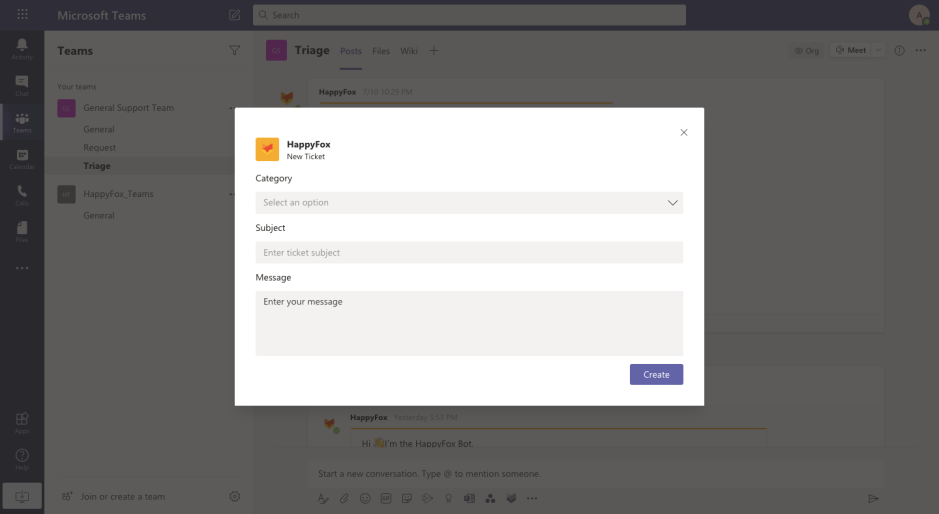
– Start tickets with more context to keep different teams in sync
– Track ticket progress within Teams channels
– Manage tickets without leaving your collaboration platform
Advanced Notification System
– Set up instant notifications for every ticketing event
– Tailor notification preferences per Teams channel
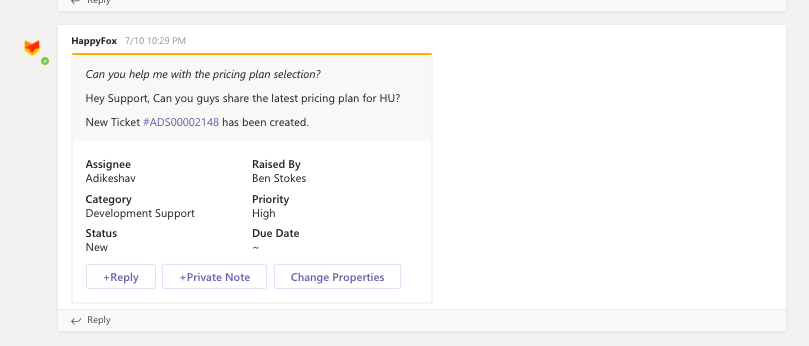
– Follow ticket progress directly within your Teams channel
– Customize notification content based on team needs
Knowledge Base Integration
– Search knowledge base articles without leaving Teams
– @mention the HappyFox Bot to find solution articles
– Quick access to your entire knowledge base
– Share relevant articles directly in Teams conversations
Customizable Workflows
– Configure notification rules based on ticket events
– Set up channel-specific notifications
– Automate ticket updates and team notifications
– Streamline support processes across platforms
Maximizing the Value of Your HappyFox Teams Integration
To get the most out of your HappyFox Microsoft Teams integration:
1. Optimize Channel Setup: Create dedicated Teams channels for different support functions and configure HappyFox notifications accordingly.
2. Leverage the HappyFox Bot: Train your team to use @mention functionality for quick knowledge base searches and ticket creation.
3. Customize Notifications: Set up channel-specific notification preferences to ensure relevant information reaches the right teams.
4. Streamline Workflows: Use the ticket creation feature within Teams to maintain conversation context while creating support tickets.
5. Monitor and Adjust: Regularly review your notification settings and adjust based on team feedback and efficiency metrics.
Implementation Checklist: Getting Started with HappyFox + Microsoft Teams
Ready to transform your support and collaboration workflow with HappyFox? Follow these steps:
1. [ ] Log in to your HappyFox account as an admin
2. [ ] Navigate to Apps > Chat > Microsoft Teams
3. [ ] Click “Install” and follow the authorization prompts
4. [ ] In the “Notify Teams” section, map HappyFox categories to Teams channels
5. [ ] Configure notification rules for different ticketing events (e.g., new ticket, agent reply)
6. [ ] Set up custom notification preferences per channel
7. [ ] Create test tickets and verify the information flow in Teams
8. [ ] Train your team on using the HappyFox Bot and knowledge base search
Learn more: Step-by-step guide on setting up Microsoft Teams Integration in HappyFox
Elevate Your Support with Seamless Teams Integration
While various help desk solutions offer Teams integration capabilities, HappyFox stands out with its comprehensive features designed for seamless collaboration. By choosing HappyFox, you’re implementing a solution that truly bridges the gap between your help desk and team communication platform.
The HappyFox Microsoft Teams integration empowers your support team to:
– Create and manage tickets without leaving Teams
– Access knowledge base articles instantly
– Receive customized notifications per channel
– Maintain context while creating support tickets
– Improve team collaboration and response times
Ready to see how HappyFox can transform your support and collaboration workflow?
Book a demo today and discover how HappyFox + Microsoft Teams integration can revolutionize your team’s productivity and effectiveness.
FAQ
Can you manage Zendesk tickets directly in Microsoft Teams?
Yes, the integration allows agents to create, view, and update tickets without leaving the Microsoft Teams interface. You can add internal notes, change ticket status, and receive real-time notifications in dedicated channels. This eliminates app-toggling, keeping support teams focused on fast resolution within their primary workspace.
How does Answer Bot work with Microsoft Teams?
The integration leverages an AI-powered Answer Bot to scale self-service. When employees ask questions in a Teams channel, the bot automatically suggests relevant articles from your Zendesk knowledge base. This deflects routine inquiries, allowing your human agents to prioritize complex issues that require personalized attention.
Is there a better option for Microsoft Teams ticketing?
While Zendesk offers a robust connection, many teams find the setup complex and the notification system overwhelming. HappyFox provides a more intuitive Microsoft Teams integration with granular notification controls and easier configuration. It allows for a seamless, “no-code” sync that often provides better value for mid-sized teams looking to scale.





