


Are complex support requests overwhelming your team? Do high-value clients need faster, more specialized attention? A well-designed 4-tier support model could be the solution you need. With HappyFox’s powerful help desk platform, implementing this model becomes seamless and efficient.
This guide will walk you through creating a 4-tier support model tailored for enterprises, showcasing how HappyFox’s features can elevate your support operations to new heights.
Why Enterprises Need a 4-Tier Support Model
Enterprises face unique support challenges:
– Diverse customer base with varying needs
– Complex product ecosystems leading to intricate issues
– Need for rapid response to critical problems
– Balancing resource allocation across support levels
A 4-tier support model addresses these challenges by:
– Efficiently routing issues to the right expertise level
– Reducing response and resolution times
– Improving customer satisfaction across all segments
– Optimizing resource allocation and support costs
Let’s explore how to build this model using HappyFox’s robust feature set.
Understanding the 4-Tier Support Model
Each tier in your support structure serves a specific purpose, creating a seamless escalation path for resolving issues:
Tier 0: Self-Service Support
– Purpose: Empower customers to find solutions independently
– Handles: Common issues, FAQs, basic troubleshooting
– Key HappyFox Features:
– AI-powered knowledge base with smart search
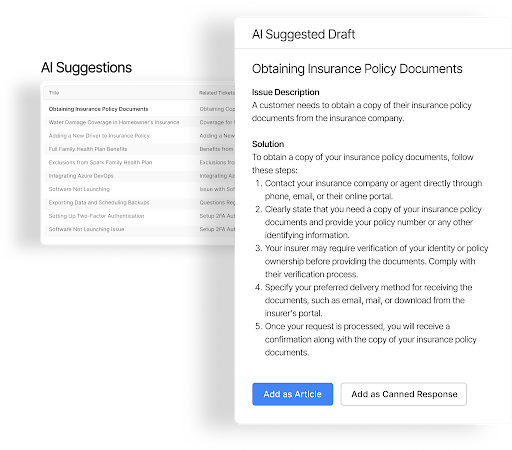
– Interactive troubleshooting guides
– Automated chatbot for instant responses
– Multi-language support capabilities
Tier 1: Front-Line Support
– Purpose: First human point of contact for all incoming issues
– Handles: Basic troubleshooting, account issues, known problems
– Key HappyFox Features:
– Smart ticket routing based on issue type
– Canned responses for common issues
– Knowledge base integration for quick solutions
– AI Agent Copilot for response suggestions
Tier 2: Advanced Technical Support
– Purpose: Handle complex technical issues beyond Tier 1’s scope
– Handles:
– Advanced troubleshooting
– Technical configurations
– Complex customer issues
– System-specific problems
– Key HappyFox Features:
– Advanced ticket categorization
– Internal collaboration tools including private notes, agent collision detection

– Custom SLA tracking
– Technical asset management
Tier 3: Expert/Specialized Support
– Purpose: Handle the most complex and critical issues
– Handles:
– Critical system issues
– Major incidents
– Product development escalations
– Key HappyFox Features:
– Custom workflows for critical issues
– Advanced SLA management
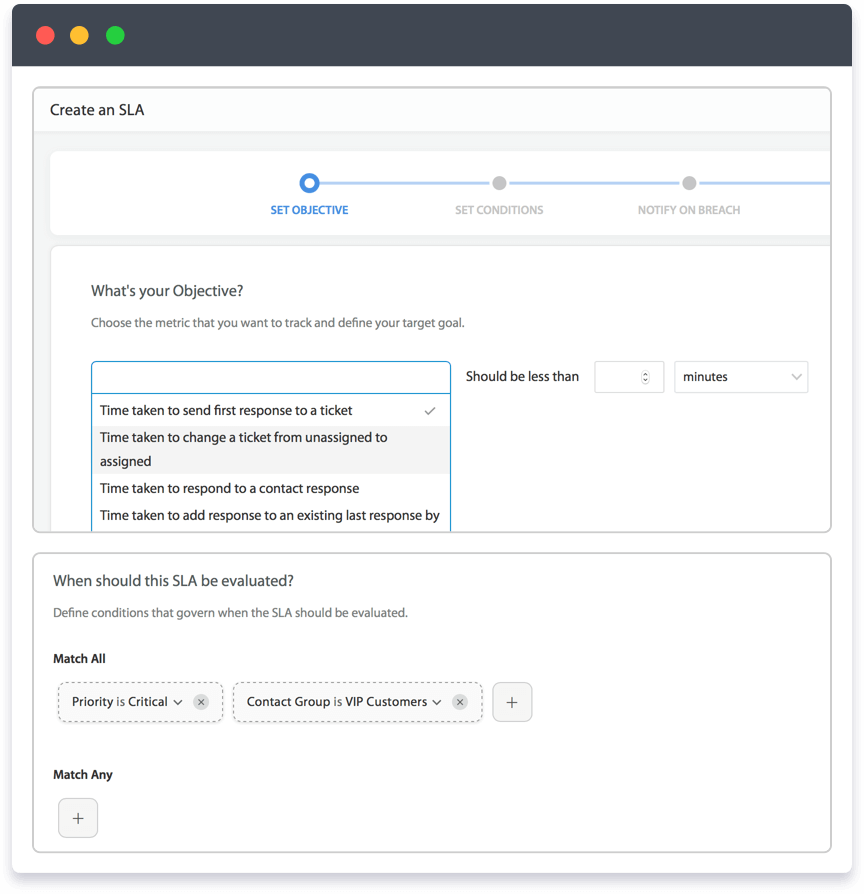
– Integration with development tools
– Comprehensive reporting and analytics
Implementing Clear Escalation Paths
A successful 4-tier model relies on well-defined escalation paths. Here’s how to set them up in HappyFox:
1. Tier 0 to Tier 1 Escalation
– Configure smart rules to create tickets when self-service fails

– Set up automated routing based on issue type and customer segment
– Enable AI-powered categorization for accurate initial routing
2. Tier 1 to Tier 2 Escalation Triggers
– Agent lacks required expertise
– Issue complexity exceeds Tier 1 scope
– SLA approaching breach
– Multiple related tickets indicate systemic issue
3. Tier 2 to Tier 3 Escalation Triggers
– Complex technical issues requiring expert intervention
– Critical system impacts
– Major incidents affecting multiple users
– Need for advanced system access or involvement of development team
Setting Up Your 4-Tier Model in HappyFox
1. Define Escalation Criteria
– Create custom fields for escalation reasons
– Set up time-based triggers for SLA compliance
– Configure priority-based routing rules
2. Establish Notification Workflows
– Set up automated notifications for ticket updates and status changes
– Configure escalation notifications for team leads
– Create communication templates for each tier
Learn more: 8 Workflow scenarios to automate for every enterprise
3. Implement Tracking Mechanisms
– Monitor time spent at each tier
– Track escalation patterns
– Measure resolution times
Advanced Features for Each Tier
Tier 0: Self-Service Optimization
– AI-powered article suggestions
– Smart search functionality
– Interactive troubleshooting flows
– Analytics for content improvement
Tier 1: Front-Line Efficiency
– Quick-access knowledge base

– Automated response templates
– Real-time collaboration tools
– Performance monitoring dashboards
Tier 2: Advanced Technical Support Tools
– Custom fields and ticket properties for detailed issue tracking
– Integration with technical systems
– Collaborative problem-solving tools
– Custom workflow management
Tier 3: Expert Support Tools
– Custom critical issue workflows
– Advanced SLA management
– Integration with development tools
– Comprehensive reporting capabilities
Measuring Success Across Tiers
Track these key metrics to ensure your 4-tier model is working effectively:
1. Tier-Specific Metrics
– Self-service success rate (Tier 0)
– First-contact resolution rate (Tier 1)
– Technical resolution time (Tier 2)
– Critical issue resolution time (Tier 3)
2. Cross-Tier Metrics
– Escalation rates between tiers
– Time to escalation
– SLA compliance at each level
– Customer satisfaction by tier
Optimizing Your 4-Tier Support Model
1. Regular Review and Refinement
– Monitor performance metrics at each tier
– Adjust routing rules based on patterns
– Update knowledge base content regularly
– Fine-tune escalation criteria
2. Team Training and Development
– Train agents on tier-specific responsibilities
– Develop clear paths for career progression
– Regular skill assessments and updates
– Cross-training opportunities between tiers
3. Continuous Improvement
– Regular analysis of escalation patterns
– Feedback collection from all support tiers
– Knowledge base optimization
– Process refinement based on metrics
The HappyFox Advantage
HappyFox elevates your 4-tier support model with:
1. Unified Omnichannel Support
– Manage tickets from email, chat, phone, and social media in one centralized platform
– Maintain context and consistency across all support channels and tiers
2. AI-Powered Efficiency
– Leverage AI for ticket categorization, routing, and response suggestions across all tiers
– Continuously improve support quality with machine learning insights
3. Customization and Scalability
– Tailor HappyFox to your specific enterprise needs with custom fields, workflows, and integrations
– Easily adapt your support model as your business grows
4. Comprehensive Analytics
– Gain deep insights into your support operations across all tiers
– Make data-driven decisions to continuously optimize your support model
Conclusion
Implementing a 4-tier support model with HappyFox empowers your enterprise to:
– Efficiently manage support requests of varying complexity
– Improve customer satisfaction through faster, more accurate resolutions
– Optimize resource allocation across your support team
– Continuously enhance your support processes with data-driven insights
Don’t let support challenges hold your enterprise back. With HappyFox, you have all the tools needed to design and implement the perfect 4-tier support model.
Ready to revolutionize your enterprise support operations?





