Managing customer support across multiple email inboxes can quickly become overwhelming. As your business expands, the volume of customer inquiries increases, making it challenging for your team to efficiently handle and track all communications. If this scenario sounds familiar, it’s time to consider a solution that brings order to your support operations.
Enter the shared inbox – a powerful tool designed to consolidate and streamline your customer support workflow, boosting team productivity and ensuring no email is overlooked. In this article, we’ll explore how HappyFox’s shared inbox can transform your support operations, turning email management from a complex task into a smooth, organized process.
The Shared Inbox Challenge
Before we dive into the solution, let’s examine the common challenges support teams face when juggling multiple inboxes:
- Email dispersion: With messages spread across various inboxes, it’s easy for important emails to get lost or overlooked.
- Lack of accountability: When multiple team members access different inboxes, it’s unclear who’s responsible for which inquiries, leading to missed messages and duplicate responses.
- Inefficient collaboration: Team members struggle to work together on complex issues, often resorting to forwarding emails or CC’ing colleagues, further cluttering inboxes.
- Inconsistent prioritization: Important emails get buried among less urgent ones across different inboxes, resulting in delayed responses to critical issues.
- Limited visibility: Managers lack a comprehensive view of support operations, making it challenging to identify bottlenecks and areas for improvement.
- Inconsistent responses: Without a centralized system, team members may provide conflicting information to customers across different inboxes.
- Scalability hurdles: As your business grows and new email addresses are added, managing support across multiple inboxes becomes increasingly complex.
These challenges can lead to reduced productivity, inefficient workflows, and ultimately, a less-than-optimal customer experience. But there’s a smarter way to manage your emails.
Why Choose HappyFox for Your Team Inbox?
HappyFox’s shared inbox is designed to address these pain points head-on, offering a comprehensive solution that organizes your workflow and empowers your support team. Here’s why HappyFox stands out:
- Intuitive interface: Easy to learn and use, ensuring quick adoption by your team
- Powerful automation: Streamline repetitive tasks and focus on what matters most
- Flexible customization: Tailor the system to fit your unique workflow and processes
- Comprehensive reporting: Gain actionable insights to continually improve your support operations
- Scalability: Grows with your business, from startup to enterprise
- Omnichannel support: Manage inquiries from multiple channels in one unified platform
Now, let’s explore the seven ways HappyFox’s shared inbox organizes your workflow and transforms your support operations.
1. Centralized Ticket Management
HappyFox converts all incoming emails into trackable tickets, creating a centralized hub for managing customer inquiries. This approach offers several benefits:
- Clear overview: At a glance, see all open, pending, and resolved issues
- Easy prioritization: Categorize and tag tickets based on urgency or topic
- Efficient handling: Assign tickets to specific team members or departments
- Context preservation: Maintain full conversation history for each ticket

2. Smart Queues for Automated Sorting
Say goodbye to manual email sorting. HappyFox’s Smart Queues feature automatically organizes incoming tickets based on customizable rules. This powerful tool ensures that the right issues get to the right agents quickly.
Benefits of Smart Queues:
- Efficient distribution: Route tickets to appropriate departments or specialists
- Priority management: Automatically escalate urgent issues
- Workload balancing: Evenly distribute tickets among team members
- Customizable rules: Create sorting criteria based on keywords, customer attributes, or ticket properties
3. Collaboration Tools for Seamless Teamwork
HappyFox’s shared inbox is built with collaboration in mind. Say goodbye to confusing email chains and hello to streamlined communication.
Key collaboration features:
- Private notes: Discuss tickets privately within your team
- @mentions: Notify specific team members for input or action
- Collision detection: Prevent duplicate work by alerting agents when someone else is viewing or responding to a ticket
- Shared drafts: Collaborate on responses to complex inquiries
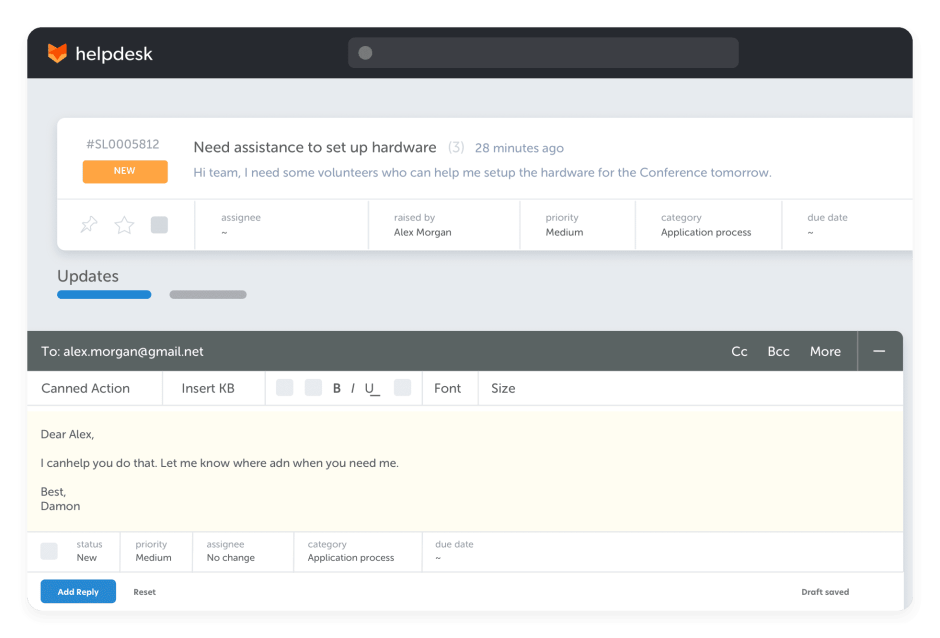
4. Powerful Automation with Smart Rules
Automation is key to scaling your support operations efficiently. HappyFox’s Smart Rules engine allows you to create sophisticated workflows that save time and ensure consistency.
Examples of Smart Rules in Action:
- Automatic ticket assignment: Route tickets to the right agent based on expertise or workload
- SLA management: Set up alerts for approaching deadlines and automate escalations
- Canned responses: Create pre-written replies for common inquiries
- Status updates: Automatically change ticket status based on certain actions or time thresholds
5. Integrated Knowledge Base for Consistent Responses
Say goodbye to conflicting information and hello to a single source of truth. HappyFox’s integrated knowledge base empowers your team to provide accurate, consistent responses every time.
Benefits of an integrated knowledge base:
- Quick access: Agents can easily find and share relevant articles while responding to tickets
- Self-service options: Reduce ticket volume by allowing customers to find answers themselves
- Continuous improvement: Identify knowledge gaps and create new articles based on common inquiries
- Version control: Ensure all team members are using the most up-to-date information
6. Comprehensive Reporting and Analytics
Gain valuable insights into your support operations with HappyFox’s robust reporting tools. Make data-driven decisions to improve team performance and customer satisfaction.
Key metrics and reports:
- Ticket volume and trends: Track support demand over time
- Response and resolution times: Measure how quickly your team handles inquiries
- Agent performance: Identify top performers and areas for improvement
- Customer satisfaction: Monitor feedback and satisfaction scores
- SLA compliance: Ensure you’re meeting your service level agreements
7. Omnichannel Support Integration
In today’s multi-channel world, customers expect support wherever they are. HappyFox’s shared inbox brings all your support channels into one unified platform.
Supported channels:
- Live chat
- Phone (via integrations)
- Social media (Facebook, Twitter)
- Web forms
Benefits of omnichannel support:
- Consistent experience: Provide seamless support across all channels
- Complete context: View a customer’s entire interaction history, regardless of the channel
- Efficient management: Handle all inquiries from a single interface
- Channel preferences: Identify and optimize for your customers’ preferred communication methods
Conclusion: Transform Your Support with HappyFox
Email chaos doesn’t have to be the norm for your support team. By implementing HappyFox’s team inbox, you can bring order to your workflow, boost productivity, and deliver exceptional customer experiences.
From centralized ticket management and smart automation to powerful collaboration tools and comprehensive analytics, HappyFox provides everything you need to streamline your support operations and scale with confidence.Ready to say goodbye to email mayhem and hello to organized, efficient customer support? Take the first step towards transforming your support workflow. Book a demo with HappyFox today and discover how our team inbox solution can revolutionize your customer support operations.