



As a support or operations manager, you’ve probably started with an Outlook shared mailbox. It’s a common first step for many growing businesses. At first, it seems like the perfect solution: a central place for all customer emails, accessible by your whole team. Simple, right?
But as your business grows, cracks start to appear:
1. Lack of Accountability: With everyone accessing the same inbox, it’s hard to know who’s responsible for what. Emails slip through the cracks, and customers are left waiting.
2. No Clear Ownership: You’ve probably had those “I thought you were handling that!” moments. Without assigned ownership, important issues can go unresolved.
3. Limited Collaboration: Team members can’t easily see who’s working on what, leading to duplicated efforts or missed follow-ups.
4. Manual Workload: Sorting, assigning, and tracking emails becomes a full-time job in itself. Your team spends more time managing emails than solving customer issues.
5. Reporting Nightmares: Try getting meaningful metrics from a shared mailbox. Response times, resolution rates, team performance – it’s all guesswork.
6. Scalability Issues: As your team grows, the shared mailbox becomes more chaotic. What worked for 5 people falls apart with 15 or 50.
Sound familiar? If you’re nodding along, you’re not alone. I’ve been there, and so have countless other support teams. The good news? There are better solutions out there.
In this article, we’ll explore seven alternatives to Outlook shared mailboxes that can transform your support operations. These tools are designed to address the limitations of shared mailboxes and provide the structure, automation, and insights that growing support teams need.
Let’s dive in and discover how you can take your support game to the next level.
1. HappyFox: Comprehensive Help Desk Solution
HappyFox stands out in the support ticket software category, combining comprehensive helpdesk capabilities with an intuitive design. Serving over 2,000 organizations across 70+ countries, it’s versatile enough for various teams and industries.

Key Features:
- Omnichannel ticketing: Converts requests from email, web, phone, chat, and social channels into tickets
- Knowledge base: Customizable support center with easy-to-create, search, and share KB resources
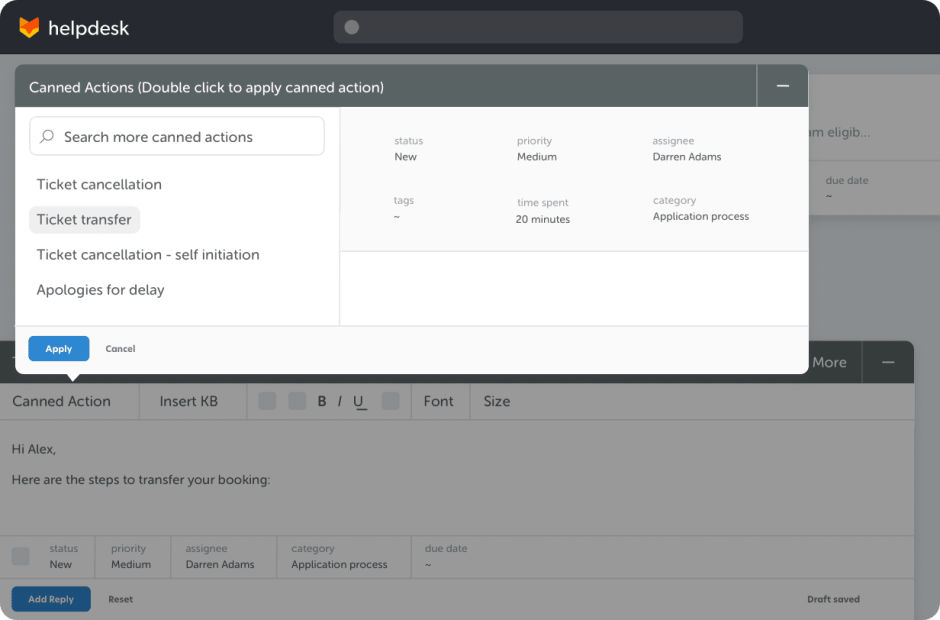
- Smart automations: Time and event triggers, canned actions, SLA management, and more
- Collaboration tools: Ticket threads with private notes and agent collision detection
- Extensive integrations: Connects with over 50 popular SaaS applications
- Advanced reporting: Ready-to-use reports on ticket inflow, agent performance, SLAs, and more
- Multi-brand support: Centrally manage multiple brands with personalized portals
2. Zendesk: Popular Choice for Customer Support
Zendesk is a popular choice for external support teams.
Key Features:
- Omnichannel support
- Self-service options
- Ticketing with automations, routing, and SLA management
- Reporting and analytics for data-driven decisions
- Agent collaboration tools and training resources
How it Compares to HappyFox:
While Zendesk offers similar core features, many users find HappyFox more intuitive, flexible and easier to set up. Plus, HappyFox’s pricing is often more flexible with no hidden costs.
3. Freshdesk: User-Friendly Ticketing System
Freshdesk offers a clean interface and solid features, including:
Features
- Unified ticketing system across multiple channels
- Self-service options with knowledge base and community forums
- Automation for ticket assignment and prioritization
- Pricing: Start at $15/agent/month
How it Compares to HappyFox:
Freshdesk is a solid choice, but HappyFox often wins out in terms of customization options and the depth of its reporting tools.
4. Help Scout: Simple and Straightforward
Help Scout focuses on providing a personal support experience:
Key Features:
- Shared inboxes for collaborative support
- Conversational ticketing with threaded conversations
- Built-in live chat and email functionality
- Pricing: Starts at $20/user/month
How it Compares to HappyFox:
While Help Scout is great for small teams, HappyFox scales more effectively as your support needs grow. HappyFox also offers more advanced automation options.
5. Kayako: Emphasis on Customer Journey
Kayako focuses on delivering a cohesive support experience:
Key Features
- Context-driven support for personalized service
- Omnichannel support management
- Customer journey tracking and engagement
- Pricing: Starts at $15/user/month
How it Compares to HappyFox:
Kayako has decent features, but HappyFox often edges it out in ease of use and the breadth of features for scaling teams.
6. Zoho Desk: SMB Friendly Solution
Zoho Desk is a great choice as a budget-friendly customer support solution.
Key Features:
- Comprehensive set of features for managing customer support needs
- Built-in self-service options for customer self-resolution
- Inventory management functionalities for ecommerce businesses
- Pricing: Free plan available, paid plans start at $14/user/month
How it Compares to HappyFox:
While Zoho’s features are impressive, HappyFox’s overall package often provides better value, especially when it comes to ease of setup and use.
7. Jira Service Management: For Tech-Savvy Teams
Jira Service Management is ideal for IT teams and software companies.
Key Features:
- ITIL-aligned processes
- Asset and configuration management
- Advanced reporting
How it Compares to HappyFox:
Jira is powerful but can be complex. HappyFox offers a more balanced approach, suitable for both technical and non-technical teams.
Why HappyFox Stands Out
After exploring these alternatives, it’s clear why HappyFox is a top pick:
1. Intuitive Interface: Easy to learn, easy to use.
2. Powerful Automation: Smart Rules save hours of manual work.
3. Flexible Customization: Adapt HappyFox to your workflow, not vice versa.
4. Comprehensive Reporting: Gain insights to continually improve your support.
5. Scalability: Grows with your team, from startup to enterprise.
If a business is facing similar problems to ours in terms of tracking incoming emails or a high number of incoming emails from the same customers or suppliers, in my opinion HappyFox really is the best solution to resolve this. – Pankaj Kumar, Manager, Whilrlpool Global Finance Center
Making the Switch: Easier Than You Think
I get it. The thought of migrating from your familiar Outlook setup can be daunting. But here’s the truth: the transition is smoother than you’d expect, and the benefits are game-changing.
HappyFox makes the switch painless:
- Data migration tools to transfer your existing emails and contacts
- Intuitive interface that your team can master quickly
- Dedicated support to guide you through setup and beyond
Ready to Transform Your Support Workflow?
Don’t let your Outlook shared mailbox hold you back any longer. Take the first step towards revolutionizing your support operations.
Ready to see HappyFox in action? Book a demo today at https://www.happyfox.com/demo/. Experience firsthand how our powerful, intuitive platform can transform your support workflow.
Remember, great customer support isn’t just about managing emails – it’s about creating exceptional experiences. It’s time to give your team the tools they deserve to make that happen.





