



When your support team handles thousands of tickets monthly across multiple time zones and complex systems, the pressure can be overwhelming. High-stakes incidents, constant escalations, and the need to maintain enterprise-grade SLAs create a perfect storm for burnout.
But here’s the good news: with the right enterprise-grade tools and strategies, you can significantly reduce IT support team burnout while maintaining the high performance demands of enterprise support operations.
Understanding IT Support Team Burnout in Enterprise Environments
IT support team burnout in enterprise environments is a systemic condition where support staff experience severe physical and mental exhaustion due to:
– Managing high-volume, complex technical issues across multiple time zones
– Maintaining strict enterprise SLAs and compliance requirements
– Handling critical system incidents that affect thousands of users
– Coordinating with multiple departments and stakeholders
– Supporting diverse technology stacks and legacy systems
How Does Burnout Affect Enterprise Support Operations?
Enterprise support team burnout impacts three critical areas:
1. Operational Impact
– Compromised handling of business-critical systems
– Enterprise SLA breaches across multiple service tiers
– Increased security and compliance risks
– Delayed resolution of complex, cross-departmental issues
2. Team Impact
– Loss of specialized enterprise system knowledge
– Breakdown in global team coordination
– Reduced capacity for knowledge transfer
– Resistance to large-scale system changes
3. Business Impact
– Disruption to enterprise-wide services
– Compromised customer experience across regions
– Increased operational risks in critical systems
– Reduced business continuity capabilities
15 Enterprise Strategies to Prevent IT Support Team Burnout
1. Smart Ticket Management
Transform ticket handling through intelligent routing and analysis:
– Skills-based distribution
– Workload-aware routing
– Priority-based allocation
– AI-powered ticket and root cause analysis
– Context-aware suggestions for tickets
Feature Spotlight: HappyFox Smart Rules automatically routes complex networking issues to available experts while considering current workload – ensuring no agent becomes overwhelmed with high-complexity tickets.
2. Automation Framework
Eliminate repetitive tasks through:
– Multi-condition workflows
– Automated ticket updates
– Scheduled actions
– Triggered notifications
Real-World Application:
Create workflows that automatically categorize tickets, assign appropriate priorities, and notify relevant team members – reducing manual overhead by up to 40%.
3. Knowledge Management
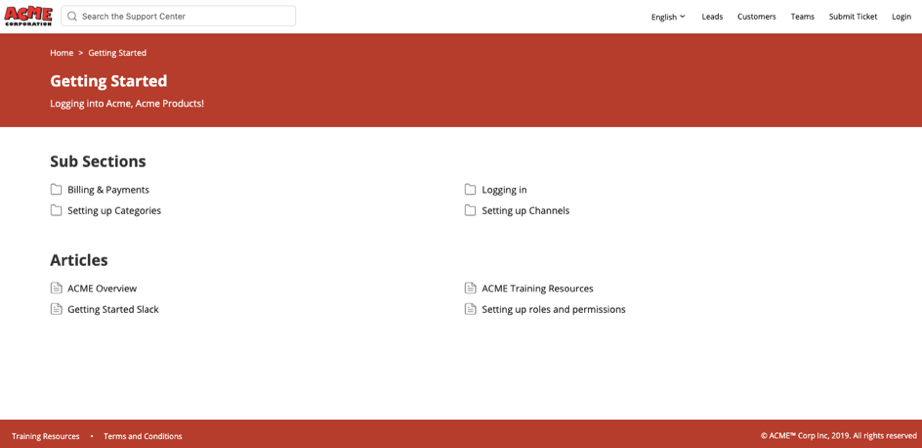
Build a comprehensive support knowledge base:
– Searchable solution library
– Quick-access templates
– Troubleshooting guides
– Process documentation
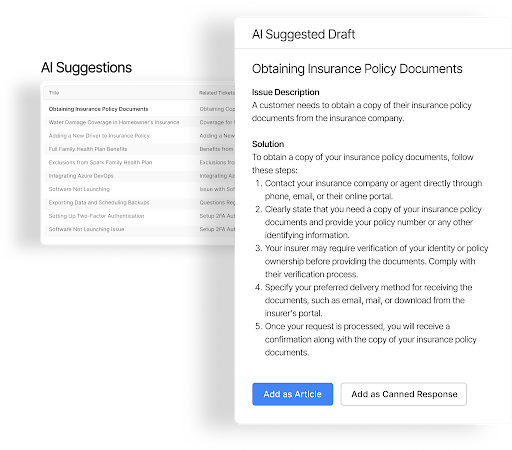
– AI-powered article suggestions
Learn more: Internal vs external knowledge base – which do you need?
Feature Highlight: HappyFox’s AI Knowledge automatically identifies gaps and suggests knowledge base drafts to agents, maintaining consistency and enhancing support.
4. Enterprise Workload Distribution
Balance support effort through:
– Real-time capacity monitoring
– Automated load balancing
– Agent availability tracking
– Task distribution rules
Example Use Case:
When an agent reaches their ticket threshold, the system automatically redirects new tickets to available team members, preventing individual overload.
5. Global Communication Hub
Deliver seamless global support through:
Omnichannel Communication
– Centralized email management
– Integrated live chat support
– Social media channel integration
– Phone system connectivity
Multilingual Capabilities
– Support in 35+ languages
– Advanced multilingual email parsing
– Language-based ticket routing
– Automatic language detection
– Multilingual knowledge base
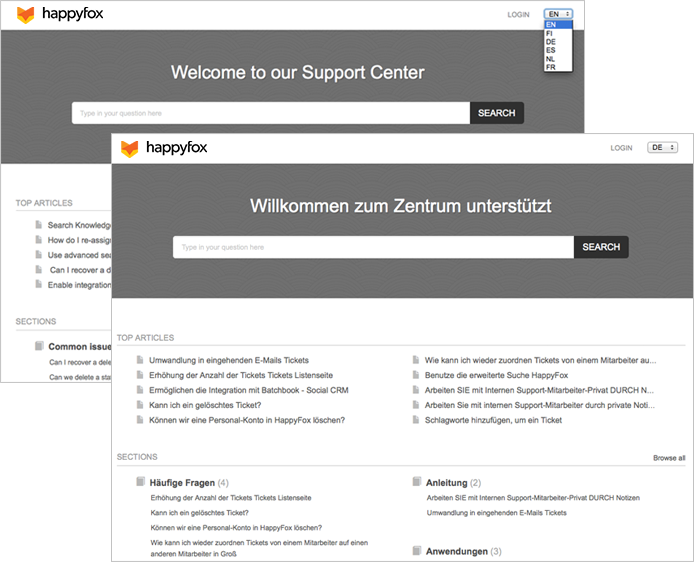
– Language-specific support portals
Feature Spotlight: Automatically detect incoming ticket language, route to appropriate language-skilled agents, and provide relevant knowledge base articles in the customer’s preferred language – all from a single unified interface.
6. Cross-Functional Collaboration Tools
Enable seamless teamwork using:
– Internal ticket notes

– @mention functionality
– Knowledge sharing tools
– Team chat integration
Feature Spotlight: Internal notes and @mentions allow agents to quickly get help from colleagues without leaving the ticket interface.
7. Enterprise SLA & Priority Management
Implement clear service standards with:
– Custom SLA policies
– Priority matrices
– Automated alerts
– Performance tracking
Real-World Application: Configure SLAs that automatically adjust based on ticket priority and business impact, ensuring clear handling expectations.
8. Process Standardization
Create consistent workflows using:
– Custom ticket fields
– Standardized processes
– Required information capture
– Structured response templates
Implementation Example: Standardized templates and required fields ensure agents collect all necessary information upfront, reducing back-and-forth communication.
9. Time & Effort Tracking
Monitor support activities through:
– Automatic time logging
– Task duration tracking
– Effort analysis
– Productivity metrics
Feature Highlight: Built-in time tracking provides insights into ticket handling patterns, helping identify areas for efficiency improvement.
10. Performance Analytics
Drive improvement using:
– Real-time dashboards
– Agent performance metrics
– Team productivity reports
– Trend analysis
Practical Application: Leverage custom dashboards to show key performance indicators, helping managers identify and address potential burnout situations early.
11. Self-Service Optimization
Reduce ticket volume via:
– Comprehensive knowledge base
– Customer portal
– Automated responses
Feature Spotlight: HappyFox’s AI Resolve automatically recommends relevant articles to agents based on ticket content, speeding up resolution time while maintaining consistency.
12. Smart Escalation Management
Streamline complex issues using:
– Automated escalation rules
– Expert routing
– Priority adjustment
– SLA monitoring
Real-World Example: High-priority tickets automatically escalate to senior agents when SLA thresholds are approached, ensuring timely resolution of critical issues.
13. Feedback Collection System
Gather insights through:
– Custom surveys
– Satisfaction tracking
– Response analysis
– Improvement tracking
Feature Highlight: Automated satisfaction surveys provide continuous feedback on support quality and team performance.
14. Agent Onboarding Tools
Streamline new agent integration with:
– Canned responses
– Ticket templates
– Process guides
– Performance monitoring
Implementation Example: New agents start with a set of proven response templates and gradually transition to more complex tickets as they gain confidence.
15. Business Intelligence for Support
Make data-driven decisions using:
– Custom reports
– Trend analysis
– Resource utilization metrics
– Performance forecasting
Feature Spotlight: Advanced analytics help identify peak periods and resource needs, enabling proactive staffing adjustments.
Transform Enterprise Support with HappyFox
While these strategies provide the framework for preventing IT support team burnout, implementing them requires the right enterprise-grade platform. HappyFox delivers a comprehensive suite of features designed specifically for high-pressure enterprise environments:
Unified Enterprise Platform
– Multi-brand management within a single platform
– Omnichannel ticketing across email, chat, phone, and social media
– Seamless integration with existing enterprise tools
– Built-in asset and task management for streamlined operations
Intelligent Automation & Workflows
– Advanced automation with Smart Rules
– Custom workflow creation for complex processes
– Precise, down-to-the-minute SLA tracking
– Automated task assignment and follow-ups
Comprehensive Knowledge Management
– Customizable support center with knowledge base
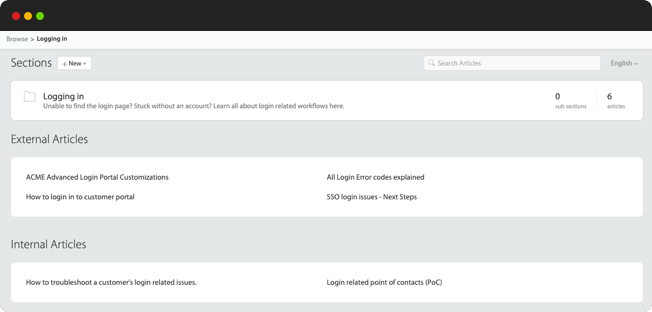
– AI-powered article suggestions
– Self-service portal customization
– Multi-language support capabilities
Enterprise Analytics & Reporting
– Real-time reporting and analytics
– Custom dashboard creation
– Performance metric tracking
– Trend analysis and forecasting
Enterprise-Grade Security & Compliance
– SOC 2 Type II certified
– GDPR compliant
– Custom data retention policies
– Advanced access control
How quickly can enterprises implement these strategies?
With HappyFox, initial implementation takes 2-4 weeks, with immediate improvements visible once core features are deployed.
Which strategy provides the fastest impact?
Smart ticket distribution and automation typically show immediate results in reducing team workload.
How do you maintain consistency across global teams?
HappyFox’s unified platform ensures standardized processes while allowing for regional customization as needed.
Ready to Combat Enterprise Support Burnout?
Transform your support operations and create a healthier, more productive work environment for your global team. Book a demo today to see how HappyFox can help you implement these burnout prevention strategies effectively. Build a resilient, high-performing support team with HappyFox’s comprehensive enterprise solution.





