


Two support agents simultaneously respond to an urgent customer ticket. Both spend 15 minutes crafting detailed responses. When they hit send, chaos ensues – conflicting solutions, confused customers, and wasted time. Sound familiar?
For enterprise support teams handling hundreds of tickets daily, agent collision isn’t just an inconvenience – it’s an efficiency killer that can seriously impact your customer experience and team productivity.
The Hidden Cost of Agent Collisions in Enterprise Support
When multiple agents unknowingly work on the same ticket, it creates a ripple effect of inefficiencies:

– Duplicate efforts waste valuable agent time
– Conflicting responses confuse and frustrate customers
– Team productivity suffers from redundant work
– Customer satisfaction drops due to inconsistent support
– Resolution times increase unnecessarily
Research shows that large support teams lose up to 20% of their productive hours to workflow inefficiencies like agent collision. That’s one full day per week spent on preventable issues.
Why Traditional Collision Prevention Falls Short
Most help desk solutions offer basic collision detection that only alerts agents after someone else has responded. This reactive approach:
1. Doesn’t prevent wasted time spent writing responses
2. Still allows multiple agents to work on the same ticket
3. Creates frustration when completed work can’t be submitted
4. Fails to provide real-time visibility into ticket activity
Learn more: Streamline enterprise customer support with HappyFox’s collaboration tools
Proactive Collision Detection: The Enterprise Solution
Proactive collision detection transforms how enterprise teams handle ticket workflow by:
Real-Time Agent Activity Tracking
– See exactly which agents are viewing or working on tickets
– Track when agents are typing responses or private notes
– Get instant visibility into all ticket-level activities
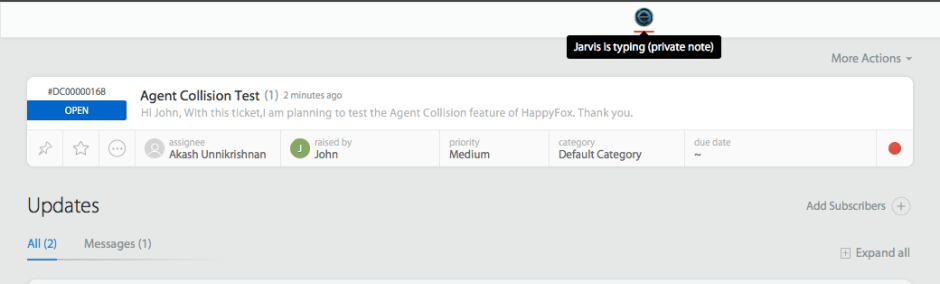
Intelligent Workflow Prevention
– Automatically notify agents before they start working on an assigned ticket
– Alert agents when attempting to submit a reply if another update has occurred
– Prevent duplicate work through early warning systems
– Enable smart ticket routing based on agent availability
Enhanced Team Collaboration
– Facilitate seamless handoffs between agents
– Enable better resource allocation across teams
– Improve coordination on complex support issues
Learn more: 7 Customer experience best practices for support teams
Implementation Guide: Maximizing Proactive Collision Detection
Step 1: Assess Your Current Setup
Implementation Checklist:
– [ ] Audit your current collision prevention methods
– [ ] Document instances of agent collision in past month
– [ ] Calculate time lost to duplicate work
– [ ] Identify peak periods when collisions occur most
Step 2: Configure Your Settings
Pro Tip: Start with your highest-volume ticket queues when implementing proactive collision detection. This provides the biggest immediate impact while teams adjust to the new workflow.
Step 3: Train Your Team
Essential training elements:
1. Understanding real-time activity indicators
2. Proper ticket assignment procedures
3. Collaboration protocols for complex tickets
4. Handoff procedures between shifts
HappyFox’s Comprehensive Collision Prevention System
HappyFox tackles agent collision through a two-tiered approach, offering both reactive and proactive collision prevention to meet diverse support team needs.
Reactive Collision Detection
Reactive collision detection serves as your first line of defense against duplicate responses. The system automatically monitors ticket updates and immediately alerts agents when simultaneous responses occur. This prevents conflicting information from reaching customers and ensures response integrity across all support channels.
Key capabilities include:
– Automatic detection of simultaneous ticket updates
– Clear warning messages before submission conflicts
– Prevention of duplicate response submissions
– Seamless integration with existing workflows
Proactive Collision Detection
Proactive collision detection takes prevention to the next level. This advanced system provides real-time visibility into all ticket activities, allowing teams to prevent collisions before they occur.
The system enables:
Real-Time Activity Monitoring
– Instant visibility of all agents accessing a ticket
– Live status updates when agents begin typing
– Clear distinction between reply and private note composition
– Comprehensive tracking across all ticket operations
Enhanced Collaboration Tools
– Dynamic agent presence indicators
– Automatic ticket locking mechanisms
– Real-time typing notifications
– Instant status change alerts
Seamless Workflow Integration
– Natural incorporation with existing ticket processes
– Zero disruption to current support operations
– Automatic synchronization across channels
– Built-in compatibility with custom workflows
Transform Your Support Workflow
For enterprise support teams, proactive agent collision detection isn’t just another feature – it’s a critical tool for maintaining efficiency and delivering consistent customer experiences. With real-time visibility, smart prevention, and enhanced collaboration capabilities, your team can eliminate wasted effort and focus on what matters most: solving customer problems.
Ready to eliminate agent collisions and supercharge your support team’s efficiency? Schedule a demo to see HappyFox’s proactive collision detection in action.





