



Spiceworks has served many IT teams well as a starting point, but its limitations become glaringly apparent as organizational needs evolve:
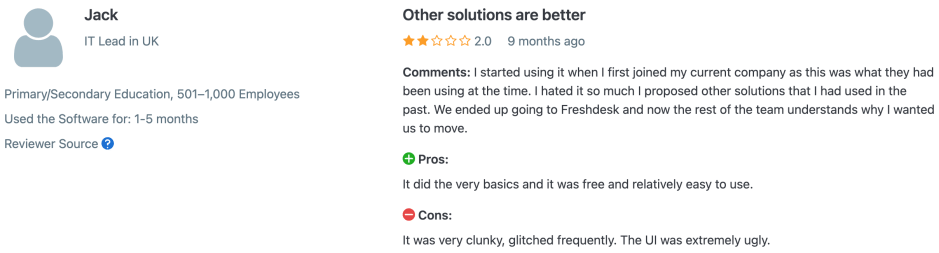
- Intrusive advertisements that interrupt critical workflows and derail urgent troubleshooting sessions
- Poor search functionality that turns finding historical tickets into a time-consuming treasure hunt
- Limited customization options that force your unique processes into rigid, predefined boxes
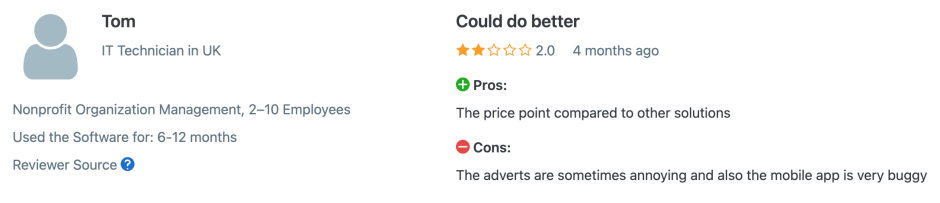
- Basic mobile support that leaves field technicians frustrated with clunky, outdated interfaces
- Minimal automation capabilities that trap your team in repetitive, manual ticket management
- Performance bottlenecks when handling enterprise-scale inventories or complex network environments
- Lack of advanced reporting that makes demonstrating IT value to leadership nearly impossible
If these challenges resonate with your daily experience, you’re ready to explore professional alternatives that can transform your IT operations from reactive firefighting to proactive, strategic support.
This guide examines seven modern help desk solutions designed for today’s complex IT environments, focusing on platforms that deliver advanced automation, mobile optimization, and analytical capabilities that modern IT teams need.
Why IT Teams Are Moving Beyond Spiceworks
Let’s address the reality – Spiceworks is free, reasonably functional, and handles basic ticketing. But as your IT environment grows beyond simple break-fix support into strategic business enablement, the platform’s limitations become productivity killers.
The Hidden Economics of “Free” Software
That zero-dollar price tag carries substantial hidden costs:
- Productivity Loss: Every advertisement interruption during a critical system outage represents lost focus and delayed resolution. Research shows teams lose an average of 2.3 hours weekly to ad-related workflow disruptions.
- Manual Process Trap: Limited automation forces technicians into repetitive tasks that modern platforms handle automatically – ticket routing, status updates, escalation management, and follow-up communications.
- Mobile Efficiency Loss: Field technicians report spending 40% more time per ticket when using inadequate mobile interfaces, directly impacting service delivery speed.
- Integration Friction: The inability to seamlessly connect with cloud services, collaboration tools, and business applications creates data silos and forces manual information transfer.
Modern IT Environment Demands
Today’s IT departments operate in fundamentally different environments:
- Hybrid workforce complexity requiring sophisticated mobile capabilities and flexible access controls
- Security and compliance requirements demanding enterprise-grade features and audit trails
- Business integration expectations for seamless connectivity with CRM, project management, and communication systems
- Stakeholder accountability requiring clear ROI demonstrations and strategic insights
5 Spiceworks Alternatives Worth Considering
1. HappyFox – Best for Versatile Teams
Core Strength: Designed to work across different industries, departments, and business sizes while maintaining ease of use.
Key Features
Comprehensive Ticketing:
- Omnichannel support from email, chat, phone, and social media
- Multi-brand help desk for managing multiple organizations

- Role-based access controls with granular permissions

- Custom fields and workflows for different business processes
Recommended Reading:
Automation Features:
- Smart categorization and ticket routing
- Event and time-based triggers for workflow management
- SLA management with timers, notifications, and escalation rules
- Auto-assignment based on agent skills and workload
Knowledge Management:
- Knowledge base with advanced search capabilities
- Internal knowledge base for agent training and documentation
- Community forums for peer-to-peer support
- Multi-language support for global organizations
Recommended Reading:
Reporting & Analytics:
- Real-time dashboards with customizable metrics
- Reports covering ticket inflow, agent performance, and SLA compliance
- Analytics for trend identification and performance optimization
- Export capabilities for executive reporting
Collaboration Tools:
- Collision detection to prevent agent conflicts
- Private notes for internal team communication
- Task management for complex issue resolution
- Customer portal with ticket tracking and self-service
AI Capabilities:
- AI copilot for agent response suggestions
- Automated ticket summaries and insights

- Content-based intelligent routing
- Analytics for proactive support
Multi-Industry Support:
- Educational institutions managing student, faculty, and staff requests
- Healthcare systems handling patient, provider, and administrative workflows
- Corporate environments supporting employees, vendors, and customers
- Government agencies serving citizens and departments
- Retail operations managing various stakeholder communications
Investment Details
- Pricing: $24-$99 per agent/month for standard plans
- Enterprise: Unlimited agent plans starting at $1,999/month
- Integrations: 50+ pre-built integrations available
- Deployment: Cloud-based with enterprise security features
2. Freshworks – Best for Growing Teams
Core Strength: User-friendly platform with automation features designed for teams looking to streamline their support operations.
Key Features:
- Omnichannel unified interface managing email, chat, phone, and social media
- Freddy AI for automatic ticket categorization and predictive escalation
- SLA management with business-hour awareness
- Mobile-first architecture with offline capabilities
- Automation features and workflow management
- Knowledge base and community forums
- Reporting and analytics with custom dashboards
Investment: $15-$49 per agent/month
3. Zendesk – Best for Enterprise Scale
Enterprise Advantage: Platform with powerful customization and integration ecosystem for large organisations.
Key Features:
- Omnichannel support (email, chat, phone, social media)
- Advanced ticketing system with automation and workflows
- Knowledge base and community forums
- Analytics with custom dashboards and reporting
- 1,000+ integrations through marketplace
- Machine learning for ticket routing
- Enterprise security and compliance features
- Multi-language and multi-brand support
- SLA management and escalation rules
Investment: $19-$115 per agent/month
Learn more about Gartner’s take on Zendesk in this comprehensive article
4. Help Scout – Best for Personal Support
Core Strength: Focuses on conversational, personal customer support with shared inbox approach for collaborative team communication.
Key Features:
- Shared inbox for collaborative support
- Conversational ticketing with threaded conversations
- Built-in live chat and email functionality
- Customer satisfaction surveys and feedback tools
- Knowledge base creation and management
- Collision detection and internal notes
- Mobile app for on-the-go support
Investment: $20-$65 per agent/month
Recommended Reading:
5. Zoho Desk – Best for Small to Medium Teams
Core Strength: Comprehensive help desk features at competitive pricing with strong integration within Zoho ecosystem.
Key Features:
- Multichannel support (email, phone, chat, social media)
- Automation workflows and business rules
- Knowledge base and community forums
- Time tracking and SLA management
- Agent collaboration tools
- Integration with Zoho suite and third-party apps
- Mobile app for remote support
Investment: $14-$40 per agent/month
Future-Proofing Considerations
When evaluating platforms, consider:
- AI Integration: Choose platforms actively developing machine learning capabilities beyond basic automation
- API-First Architecture: Ensure comprehensive API access for future integrations
- Mobile-Native Design: Verify mobile functionality is core platform capability, not an afterthought
- Compliance Support: Evaluate data sovereignty, security certifications, and audit trail capabilities
- Scalability: Assess whether the platform can grow with your organization without requiring migration
- Multi-Channel Evolution: Consider how well the platform adapts to new communication channels
- Integration Ecosystem: Ensure the platform connects with your current and planned business tools
Making Your Decision
The question isn’t whether to move beyond Spiceworks – it’s which platform delivers the greatest long-term value for your specific needs.
For Versatile Operations: Choose a platform that adapts to diverse teams, industries, and use cases without compromising on features or usability. Perfect for organizations with varied stakeholder groups or those planning to expand across departments.
For Growing Teams: Select a user-friendly platform with automation features and AI capabilities designed to streamline support operations as your team scales.
For Enterprise Scale: Opt for a mature platform with extensive customization options and integration marketplace suitable for large organizations with complex workflows.
For Personal Touch: Consider a conversational approach with shared inbox functionality that prioritizes personal customer relationships and collaborative team communication.
For Budget-Conscious Teams: Look for comprehensive help desk features at competitive pricing, especially beneficial if you’re already using integrated business applications.
Next Steps
Start with vendor demonstrations and free trials for platforms matching your organizational profile. Most offer risk-free evaluation periods allowing hands-on testing with actual data and workflows.
Choose a platform that can grow with your organization over 3-5 years rather than just solving immediate problems. The best investment delivers long-term business value through improved efficiency, user satisfaction, and strategic IT capability.
Your IT team’s productivity and your organization’s technology success depend on having the right tools for modern service delivery. The transition from reactive, ad-supported software to proactive, professional IT service management begins with taking action today. See HappyFox in action today.




