



It starts small. A few tickets from the weekend. Then a system issue generates 15 more. An agent calls in sick, and suddenly you’re looking at 80 unresolved tickets by Wednesday. What began as a manageable queue has become an overwhelming backlog that seems to grow faster than your team can clear it.
Here’s what most support teams don’t realize: ticket backlogs aren’t caused by too many customers or understaffing. They’re created by five predictable scenarios that happen in every support operation. The difference between teams that stay on top of their queue and those that drown? Having the right systems to prevent these scenarios from snowballing.
We’ve found that teams using specific HappyFox features together can effectively tackle and prevent these backlog scenarios. Let’s explore how each feature addresses the root causes behind ticket pile-ups.
What Causes Ticket Backlogs? The 5 Most Common Scenarios
Ticket backlogs don’t just happen—they’re created by specific, predictable patterns. Here are the five scenarios that generate 80% of all support backlogs:
1. Weekend Tickets Pile Up
It’s 9 AM Monday. Sarah opens her inbox to find 147 weekend tickets waiting. By noon, 23 more have arrived. By 5 PM, she’s handled 31 tickets but somehow has 156 remaining.
What’s Really Happening: Without 24/7 processing, tickets accumulate faster than humanly possible to clear.
2. Everything Is “Urgent”
Everything is marked “urgent.” A billing question sits next to a system outage report. Mike spends 20 minutes deciding which to tackle first, then gets interrupted by his manager asking about ticket #47821.
What’s Really Happening: Poor prioritization creates decision fatigue and inefficient workflow.
3. Tickets Get Passed Around
A customer’s login issue gets assigned to IT, transferred to billing, escalated to security, then back to IT. Four departments, six agents, three days later – still no resolution.
What’s Really Happening: Unclear routing creates internal friction and delays.
4. Agents Can’t Find Answers
Agent Jenny knows the answer exists somewhere. She spends 30 minutes searching the knowledge base, asks two colleagues, and finally escalates to a senior agent. The answer was buried in a 2019 article with a misleading title.
What’s Really Happening: Poor knowledge management wastes agent time on solvable issues.
5. SLA Deadlines Create Panic
At 4:47 PM, alerts start firing. Twelve tickets are about to breach SLA in the next hour. The team drops everything to firefight, disrupting their workflow and creating new delays for other customers.
What’s Really Happening: Reactive SLA management creates chaos instead of preventing problems.
Recommended Reading:
How Long Should It Take to Resolve Support Tickets?
Industry benchmarks for ticket resolution times vary by complexity and industry:
| Ticket Type | Target Resolution Time | Industry Average |
| Simple/FAQ | < 2 hours | 4.2 hours |
| Technical Issues | < 24 hours | 2.8 days |
| Complex Problems | < 72 hours | 8.3 days |
| Account/Billing | < 4 hours | 1.2 days |
The key isn’t just speed—it’s consistency and setting proper expectations with customers.
10 HappyFox Features That Eliminate Ticket Backlog
1. Smart Rules
HappyFox’s smart rules handle ticket processing continuously, categorizing and routing incoming requests based on content, sender information, and defined criteria. This eliminates the manual sorting that often creates processing delays during peak periods.
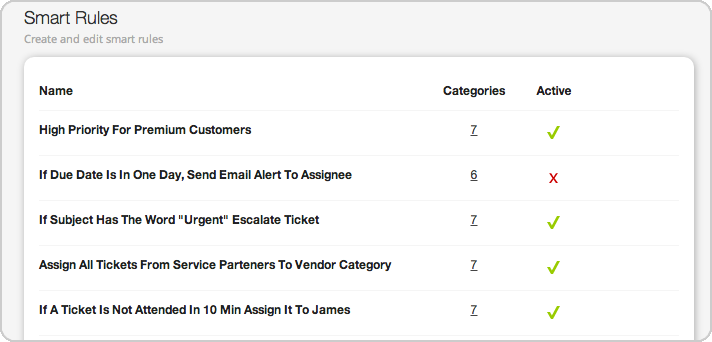
Key Capabilities:
- Custom automation rules for instant prioritization
- Round-robin assignment preventing agent overload
- Smart views organizing tickets by urgency and complexity
- Escalation workflows that trigger automatically
Impact: Routine tickets get processed immediately, even outside business hours, preventing Monday morning pile-ups.
2. Canned Responses & Templates
HappyFox provides pre-written response templates for common customer inquiries, reducing the time agents spend typing repetitive answers. Canned response templates can include dynamic fields that auto-populate with customer-specific information.

Key Capabilities:
- Pre-built templates for frequently asked questions
- Dynamic field insertion for personalized responses
- Team-specific template libraries by department
- Quick insertion with keyboard shortcuts or search
Impact: Agents respond to routine inquiries in seconds rather than minutes, dramatically increasing ticket throughput during busy periods.
3. Intelligent Routing Engine
The routing system analyzes each ticket’s content, customer history, and required expertise to assign requests to the most suitable available agent. This reduces the back-and-forth transfers that delay resolution.
Key Capabilities:
- Skill-based routing matching tickets to right expertise
- Load-balanced distribution across available agents
- Department-specific workflows with clear ownership
- Automatic agent availability detection
Impact: Customers get faster resolutions from qualified agents, while internal handoffs become virtually eliminated.
4. Bulk Actions & Mass Updates
HappyFox allows agents and managers to perform actions on multiple tickets simultaneously, such as status updates, assignments, or closures. This is particularly valuable during system outages or when clearing resolved tickets.
Key Capabilities:
- Select and update multiple tickets at once
- Bulk status changes, priority adjustments, and assignments
- Mass closure of resolved or duplicate tickets
- Batch operations with custom criteria
Impact: Tasks that would take hours of individual ticket updates can be completed in minutes, especially useful for clearing post-incident backlogs.
5. Advanced SLA Management
HappyFox’s SLA system tracks ticket progress against defined timeframes and sends notifications when breaches occur. This helps teams understand performance patterns and identify areas where backlog prevention efforts should focus.
Key Capabilities:
- Custom SLA policies by customer tier and issue type
- Automatic breach notifications and reporting
- Live SLA timer functionality ensuring accuracy
- Comprehensive SLA analytics and trend tracking
Impact: Teams gain visibility into resolution performance and can identify systematic issues that contribute to backlog formation.
6. Ticket Scheduling & Deferral
HappyFox enables teams to schedule tickets for future processing or defer non-urgent items to off-peak times. This helps balance workload and ensures important but non-urgent tasks don’t get lost in daily firefighting.
Key Capabilities:
- Schedule tickets for specific dates and times
- Defer low-priority items to designated time slots
- Automatic reactivation of scheduled tickets
- Workload balancing across peak and off-peak periods
Impact: Teams can focus on urgent backlogs while ensuring scheduled maintenance and follow-up tasks happen at optimal times.
7. AI-Powered Knowledge Base
HappyFox’s knowledge base system identifies patterns in incoming tickets to highlight content gaps and suggest article updates. This helps maintain relevant, up-to-date information that addresses common customer questions.
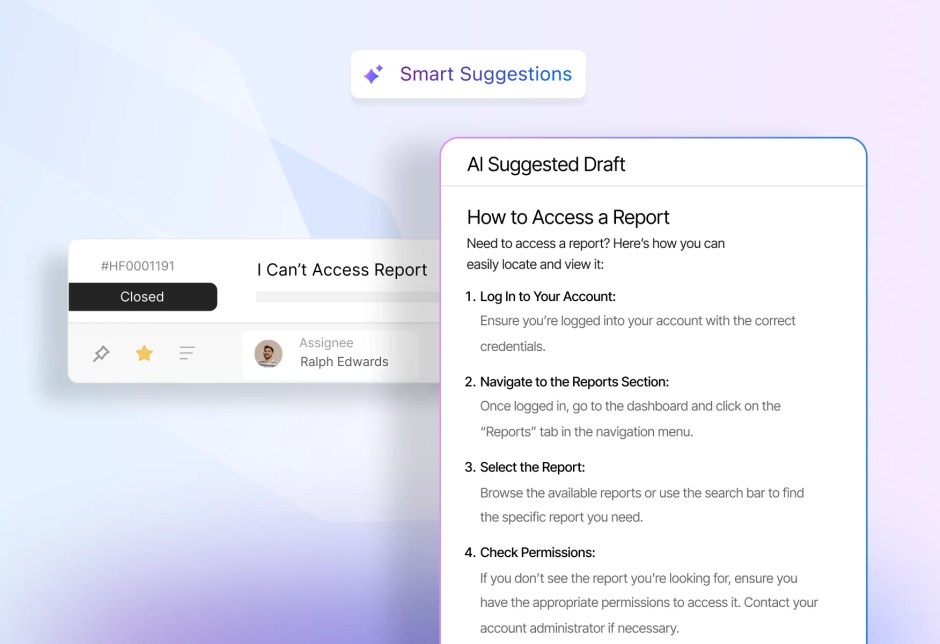
Key Capabilities:
- AI Knowledge automatically identifies content gaps from ticket patterns
- Smart search with natural language processing
- Real-time article recommendations for agents
- Automatic content updates based on successful resolutions
Impact: Common questions get resolved through self-service, while agents spend time on complex issues that require human expertise.
8. AI Resolve & AI Agents
HappyFox’s AI capabilities handle standard inquiries and routine workflows automatically. AI Resolve provides immediate responses to frequently asked questions, while AI Copilot can process entire ticket types without human intervention.

Key Capabilities:
- AI Resolve provides instant responses to common queries
- AI Copilot handle ticket summaries and suggestions automatically
- Continuous learning from successful agent interactions
- Seamless handoff to human agents when needed
Impact: Routine tickets get resolved instantly, freeing your team to focus on complex problems that require human creativity and expertise.
9. Omnichannel Support
The platform consolidates customer communications from email, chat, phone, and social media into a single interface. Agents can view complete conversation history regardless of which channel customers use to contact support.
Key Capabilities:
- Unified platform for email, chat, phone, and social media
- Single customer timeline across all touchpoints
- Channel-specific automation while maintaining consistency
- Integrated live chat with seamless ticket conversion
Impact: Agents have complete context for every interaction, while customers experience consistent service across all channels.
10. Built-in Collaboration Tools
HappyFox includes communication and workflow tools that help team members coordinate on complex issues without leaving the platform. This keeps all relevant information and discussions connected to the ticket.
Key Capabilities:
- Internal notes and @mentions for seamless team communication
- Approval workflows for sensitive or complex issues
- File sharing and attachment management within tickets
- Real-time activity tracking and team visibility
Impact: Complex issues requiring multiple team members get resolved smoothly through clear communication and defined workflows.
Your 30-Day Backlog Elimination Timeline
Rather than trying to implement everything at once, here’s a proven rollout sequence:
Week 1: Stop the Bleeding
- Deploy AI Agents for weekend/after-hours coverage
- Set up basic smart routing by department
- Keep knowledge base up-to-date
Week 2: Improve Flow
- Implement skill-based routing
- Create automation rules for common ticket types
- Enable collaboration tools for complex issues
Week 3: Scale Prevention
- Launch AI-powered knowledge base
- Set up omnichannel consolidation
- Configure advanced SLA policies
Week 4: Optimize & Monitor
- Fine-tune routing based on performance data
- Expand AI coverage to more ticket types
- Establish ongoing performance monitoring
This phased approach prevents overwhelming your team while building momentum with quick wins.
Take Control of Your Backlog Today
Ticket backlogs aren’t inevitable – they’re symptoms of inefficient processes that the right tools can solve. HappyFox’s comprehensive feature set doesn’t just manage backlogs; it prevents them through intelligent automation, smart routing, and AI-powered assistance.
Ready to eliminate your ticket backlog once and for all? Transform your support operations from reactive chaos to proactive excellence.
Start your backlog elimination journey – Schedule a HappyFox demo today.




