


How good is your customer service ticket management? If you’re seeking faster, more reliable service delivery, ticket escalation could be the key. Read on as we uncover the basics, the complete support ticket escalation process, best practices, and strategies for implementing an effective ticket escalation mechanism.
What is Ticket Escalation?
Ticket escalation refers to the process of internal transfer of ticket ownership among the support team members. A ticket is escalated when an agent who owns the ticket transfers it to a senior agent or manager for prompt resolution. Effective ticket escalation helps achieve improved resolution times, SLA compliance, and more satisfied customers.
When to escalate a support ticket?

Agent lacks the required expertise
The agent assigned to the ticket may not possess the specific skill set or in-depth knowledge required to effectively address and resolve the issue. This lack of expertise can lead to delays in providing a satisfactory solution, making it necessary to escalate the ticket to a more qualified or specialized team member who can handle the complexity of the problem.
The issue is too complex
Sometimes, the issue at hand is too complex or advanced for an inexperienced Level 1 (L1) agent to manage effectively. In such cases, the problem may involve technical details or processes that are beyond the scope of basic troubleshooting. To ensure the issue is resolved accurately and efficiently, it is crucial to escalate the ticket to a senior agent or a specialist with the required knowledge and experience.
Agent takes longer than expected to resolve the ticket
Even when the assigned agent possesses the necessary skills and expertise, they may still struggle to resolve the issue within an acceptable timeframe. This could be due to the complexity of the problem, unfamiliarity with certain aspects, or a high workload. In such situations, it may be necessary to intervene and escalate the ticket to ensure a quicker resolution, thus minimizing customer frustration and maintaining service standards.
SLA is breached
Service Level Agreements (SLAs) set clear expectations for how quickly issues should be resolved. If a ticket remains unresolved within the agreed-upon SLA timeframe, it indicates a potential failure to meet the organization’s commitments to the customer. To prevent further delays and ensure the issue is addressed with the highest priority, the ticket must be escalated to a higher level of management or to a dedicated team focused on critical cases.
Ticket Escalation Process
- Customer issue/request gets logged as a ticket inside the ticketing system
- The ticket is now categorized, prioritized, and assigned to an agent either manually or through automated ticket routing.
- The agent who is assigned the ticket tries to resolve it within the agreed SLA.
- If the agent is unable to solve the issue, they change the priority to ‘high’ and assign it to a senior agent.
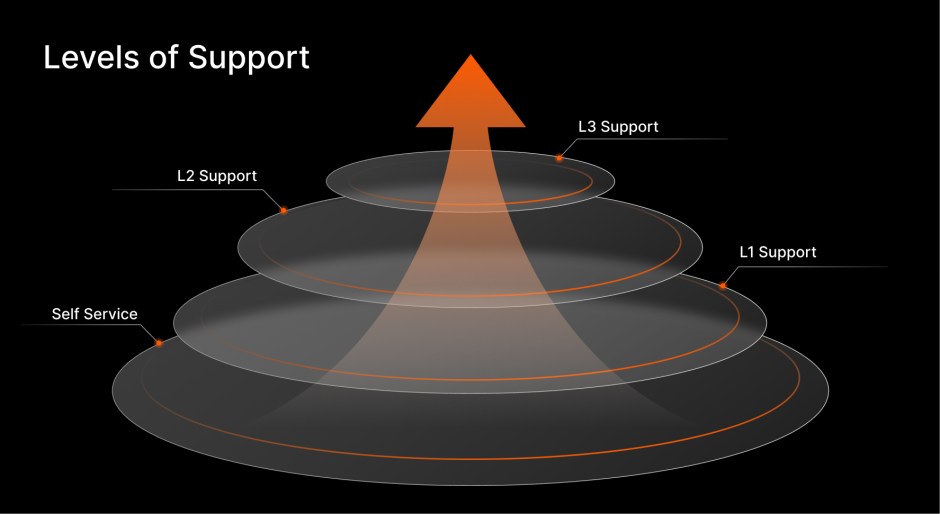
- The senior agent, now the ticket owner (often an L2 agent), works on resolving the issue. If they lack the necessary skills or experience, they escalate the ticket to ‘critical’ and assign it to a more experienced agent (often an L3 agent) or a manager.
- The L3 agent prioritizes the ticket and works to bring it to a swift resolution. At this stage, the agent may collaborate with appropriate team members if needed.
- Once a satisfactory solution is achieved, the current ticket owner (L3 agent) closes the ticket.
Strategies for Support Ticket Escalation
- 1. Set up a Tiered Support Function
- 2. Define Your SLA and Strictly Adhere to it
- 3. Set Guidelines for When a Ticket Should be Escalated
- 4. Prioritize Escalated Tickets
- 5. Keep Your Customers Informed
- 6. Train Your Agents
- 7. Free up Time for Agents to Learn New Skills
- 8. Document Resolutions into Knowledge Base Articles
- 9. Monitor Ticket Lifecycle at Each Stage
1. Set up a Tiered Support Function
Group your agents into three tiers based on their subject knowledge, skills and experience.
- L1 agents are typically new hires or those with less than six months of experience, capable of handling basic issues.
- L2 agents should manage more advanced technical problems and resolve the majority of tickets at this level.
- L3 agents are seasoned experts, who you can rely on to address the most complex and specialized issues requiring deep technical and subject matter expertise.
2. Define Your SLA and Strictly Adhere to it
A Service Level Agreement (SLA) is a formal contract between a company and its customers that sets ground rules for the expected service. An important and non-negotiable parameter of an SLA is the resolution time and therefore you should strive to close the tickets within the agreed SLAs.
When a ticket remains in the same stage without much activity, consider transferring the ticket ownership to a different agent who is better equipped to handle the ticket.
Advanced ticket escalation software like Happyfox Help Desk allow you to monitor ticket SLAs. You can prioritize tickets that are nearing the SLA deadline. Moreover, you can also set up email notifications for SLA breaches prompting you to take immediate action to close the ticket.
3. Set Guidelines for When a Ticket Should be Escalated
An important aspect of ticket escalation management is to have clear guidelines for when a ticket should be escalated. Unnecessary escalation of tickets lead to agent frustration, increased response times, and impacts the overall service delivery. Set clear guidelines for when a customer support ticket should be escalated and ensure that your agents follow it religiously.
Typically, tickets get escalated when agents don’t have the skill or access or when they can’t resolve it within the SLA. However, there can be exceptions. Set aside time to review exceptional cases; make necessary adjustments to your support ticket escalation policy and communicate the same with your agents.
4. Prioritize Escalated Tickets
When a ticket gets escalated, it would have spent a considerable amount of time inside the help desk. Whenever a ticket gets escalated, ensure that you flag and prioritize it, and bring it to a resolution at the shortest possible time. If required, use the services of multiple experts to close the ticket. Customer Satisfaction should be your utmost priority and every team member should be aligned with this goal.
5. Keep Your Customers Informed
Most help desk support tickets get resolved at the first contact, often by an L1 agent, without the intervention of higher tiered agents. However, when a ticket cannot be solved at the first contact, it may sometimes require additional time to resolve the issue than the original deadline. During such cases, it is important to have the customer on the loop by sending regular updates.
Also, Happyfox ticket escalation software has an in-built contact portal that allows customers to track the status of the tickets they raised.
6. Train Your Agents
Train your agents extensively on your help desk ticket escalation process. When you have a tiered support process, it is important that your agents skill up and move to the next level. An agent staying in Tier 1 for long is counter-productive and may bring down the efficiency of your support system. Conduct regular training sessions for agents to learn about your services, products or required technical knowledge.
Evaluate your agents from time to time and promote them to higher tiers of support when you feel they are ready. Also, remember to make changes to your ticket routing workflow based on agents’ newly acquired knowledge and technical skills.
7. Free up Time for Agents to Learn New Skills
A tiered support system becomes efficient only if agents from lower tiers subsequently move to higher tiers by improving their knowledge, technical abilities, and customer handling skills. This may not happen if the agents are overwhelmed with support tickets occupying every minute of their time.
As your support organization grows mature, look out for ways to reduce the incoming ticket volume. Perhaps you can start with promoting self-service among your customers, deflecting repetitive queries from entering your help desk.
Also, leverage AI technology to auto-respond to customer queries and provide instant resolutions. Conduct regular training sessions for agents to skill up and improve their ability to handle more complex tickets .
8. Document Resolutions into Knowledge Base Articles
As your team resolves advanced and unique customer issues, chances are that other customers may face the issues too. We recommend you to document resolutions into Knowledge Base articles, which may serve two purposes:
- Customers can browse through these knowledge articles for solutions eliminating the need for raising tickets
- When tickets are raised for similar issues, your support teams can point the customers to the appropriate solution articles improving resolution speeds.
9. Monitor Ticket Lifecycle at Each Stage
A ticket lifecycle is a measure of how long the said ticket stays in your help desk, moving through various stages before it gets closed. Measuring ticket lifecycle at each stage may shed light into the bottlenecks in your ticket escalation process. You may be surprised to learn that the tickets stay in the same stage for too long before they get escalated. Perhaps, you may also see cases where tickets don’t move fast enough even after they’re escalated. We recommend a monthly review of Ticket Lifecycle metrics to identify gaps and fix issues in your help desk ticket escalation system.
Automated Ticket Escalation with Happyfox Help Desk
Happyfox Help Desk offers a robust solution for automating ticket escalation, ensuring that customer issues are addressed promptly and efficiently.
- Skill-Based Ticket Routing for Better Triaging: Happyfox Help Desk’s skill-based ticket routing ensures that tickets are automatically assigned to the most suitable agent based on their expertise. This feature helps in accurately triaging tickets, reducing the likelihood of unnecessary escalations and ensuring that issues are resolved by the right team member from the start.
- SLA Management with Alerts: Happyfox’s SLA management tool monitors the time remaining before a ticket breaches its SLA. It sends timely alerts as a ticket approaches its SLA deadline, prompting the reassignment or escalation of the ticket to ensure compliance. This proactive approach helps in maintaining high service standards and preventing delays in resolution.
- Collaboration with Private Notes: Inside Happyfox Help Desk, agents can collaborate directly within a ticket by adding private notes. This feature allows agents at different levels to share insights and provide updates without involving the customer, making the escalation process smoother and more coordinated.
- AI-Driven Resolutions: The AI Resolve feature provides agents with automated suggestions based on past ticket resolutions and knowledge base articles. This tool significantly reduces the time spent on resolving issues, especially during escalations, by offering immediate and relevant solutions that agents can use or modify.
- Automatic Knowledge Base Article Generation: Happyfox Help desk streamlines the process of creating knowledge base articles by automatically generating them from resolved tickets. This feature not only saves time for agents but also enriches your knowledge base, helping customers find answers more quickly and reducing the overall ticket volume in the future.
With Happyfox Help Desk you can improve your ability to manage ticket escalations effectively, ensuring faster resolutions, improved SLA compliance, and higher customer satisfaction. If you are interested in learning more, explore all the features here or sign up for a demo with our product experts.
Frequently Asked Questions
1) What is Ticket Escalation?
Ticket escalation refers to the process of internal transfer of ticket ownership among the support team members. Typically, a support ticket escalation starts from an L1 agent and moves through L2 and L3 agents as required before it gets closed. The goal of ticket escalation is to provide the best resolution to the customer issue/request, by the most appropriate agent, within the agreed SLA.
2) Is a 3-tier support structure mandatory?
No. A three-tier support system is a best practice followed by mature support organizations. If you are establishing a new support function or don’t have the resources for a three tier support, you can start with a two-tier support system grouping your agents into L1 and L2 tiers. In this case, it is recommended that you encourage self-service among your employees and deflect most of the support requests that enter your help desk.
3) What metrics should I track to manage ticket escalation better?
Keep an eye on these metrics to make informed decisions on help desk ticket escalation management:
- Escalation rate: The percentage of tickets that require escalation
- Time to escalation: How long it takes for a ticket to be escalated
- Resolution time after escalation: How quickly escalated tickets are resolved
- Customer satisfaction scores for escalated tickets
- First-contact resolution rate: The percentage of tickets resolved without escalation
- Average ticket lifecycle at each state of the ticket journey





