


Your support team works hard to deliver excellent service, but even the smallest routing inefficiency can create major bottlenecks. When tickets don’t reach the right agents at the right time, response times lag and customer satisfaction suffers.
Let’s explore the seven most common ticket routing mistakes and how to fix them with smart automation.
1. Relying Solely on Basic Round-Robin Assignment
The Mistake: Simple round-robin distribution ignores agent workload and expertise, creating imbalanced queues and slower resolution times.
The Solution: Implement intelligent load-balanced routing that:
– Distributes tickets based on current agent capacity
– Prevents queue overload
– Maintains fair workload distribution
Pro Tip: HappyFox’s smart assignment engine combines round-robin efficiency with intelligent load balancing, ensuring optimal distribution while preventing agent burnout.
Learn more: Skill-Based vs Round-Robin Ticket Routing – Ideal One?
2. Ignoring Agent Availability in Routing Rules
The Mistake: Assigning tickets to offline or unavailable agents creates unnecessary delays and risks missing SLA targets.
The Solution: Use smart assignment features that:
– Auto-detect agent availability status
– Consider working hours and time zones
– Route only to active agents
– Improve first response times
Feature Spotlight: Smart Assignment
HappyFox automatically assigns tickets only to active agents, ensuring immediate attention to customer issues and maintaining consistent response times across time zones.
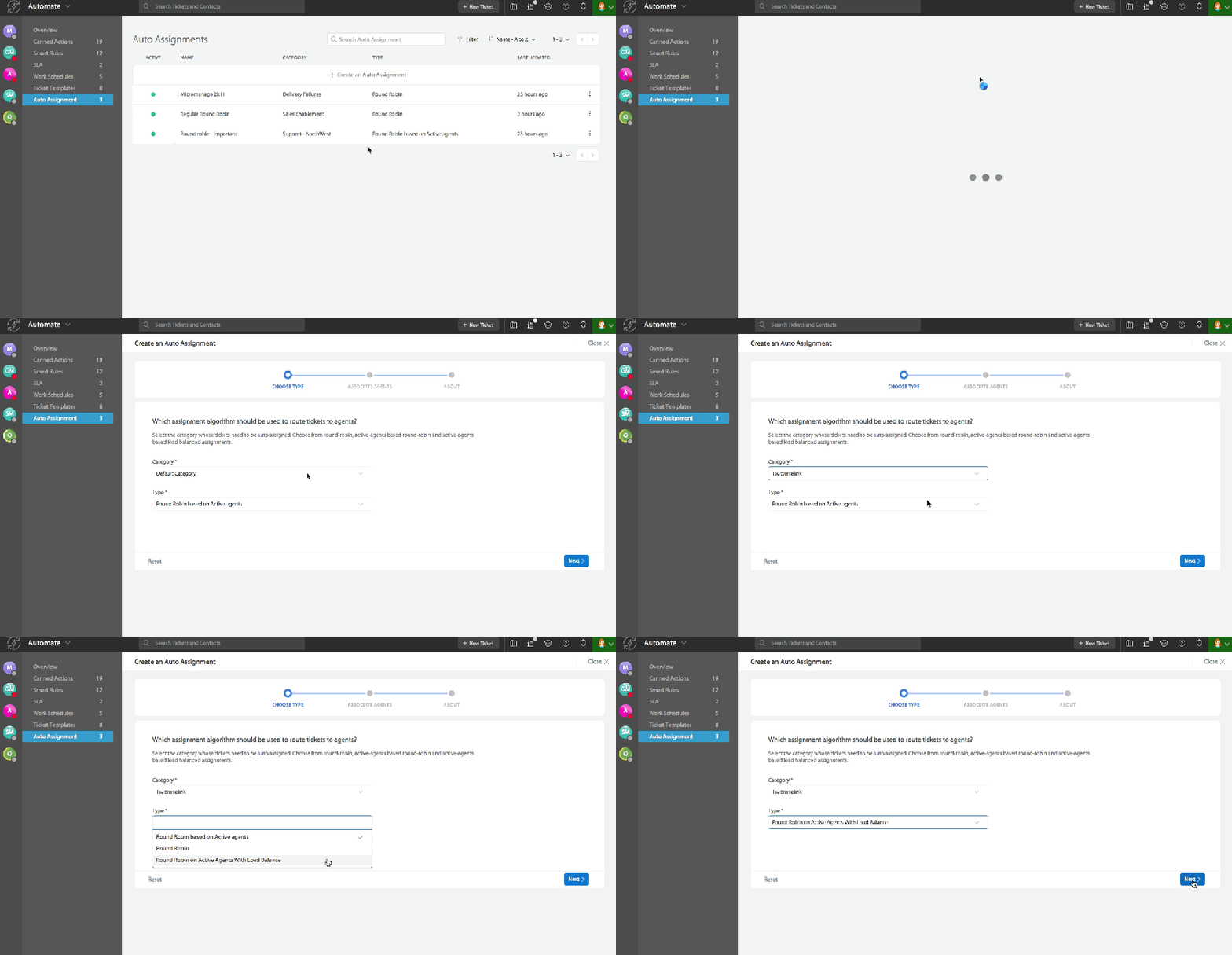
3. Using One-Size-Fits-All Routing Rules
The Mistake: Applying identical routing logic across different departments or issue types creates inefficiencies and delays.
The Solution: Deploy simultaneous routing rules that:
– Enable department-specific workflows
– Allow team-based routing strategies
– Adapt to different ticket types
4. Overlooking Skill-Based Assignment
The Mistake: Random ticket distribution without considering agent expertise leads to multiple transfers and extended resolution times.
The Solution: Implement skill-based routing that:
– Matches tickets to agent expertise
– Routes based on issue complexity
– Considers agent specializations
– Enables efficient first-contact resolution
Pro Tip: Configure HappyFox’s routing rules to automatically assign technical issues to your tech experts while routing billing queries to financial specialists.
Learn more: Skill-Based Ticket Routing – Guide
5. Not Setting Workload Limits
The Mistake: Failing to set maximum ticket thresholds leads to overwhelmed agents and inconsistent service quality.
The Solution:
– Configure assignment limits per agent
– Enable load-balanced distribution
– Set up overflow handling
– Monitor workload metrics regularly
Implementation Checklist:
– [ ] Define maximum tickets per agent
– [ ] Set up workload monitoring
– [ ] Configure overflow rules
– [ ] Establish regular review process
6. Poor Prioritization in Routing Logic
The Mistake: Treating all tickets equally delays critical issues while minor queries get immediate attention.
The Solution:
– Implement priority-based routing
– Set up smart routing workflows
– Establish escalation rules
– Enable smart ticket triage
7. Not Utilizing Customer-Based Routing
The Mistake: Failing to consider customer segments when routing tickets leads to inconsistent support experiences.
The Solution:
– Route based on customer categories
– Configure dedicated agent assignments
– Maintain support consistency
– Enable VIP routing rules
What is Intelligent Ticket Routing?
Intelligent ticket routing is the process of automatically assigning support tickets to the most qualified available agents based on factors like skills, workload, and ticket priority. When implemented correctly, it can improve first contact resolution rates by up to 90% while significantly reducing response times.
HappyFox’s Intelligent Routing: Key Features & Use Cases
HappyFox offers flexible routing options that adapt to your support team’s needs:
Smart Assignment Engine
– Assigns tickets only to active agents
– Balances workload automatically
– Prevents agent overload
– Maintains optimal queue distribution
Multiple Routing Strategies
– Round-robin for equal distribution
– Load-based for balanced workload
– Skill-based for specialized issues
– Priority-based for urgent matters
Common Use Cases
Enterprise Teams
– Route technical issues to specialists
– Direct VIP queries to dedicated agents
– Balance workload across departments
– Handle multi-brand support efficiently
Global Support
– Distribute tickets across time zones
– Route by language preference
– Manage regional queues
– Ensure 24/7 coverage
Pro Tip: Start with a simple routing strategy and gradually add complexity as your team gets comfortable with the system. HappyFox makes it easy to adjust rules as your needs evolve.
Conclusion
Effective ticket routing is fundamental to delivering exceptional customer support. With HappyFox’s advanced routing capabilities, you can:
– Optimize ticket distribution
– Improve response times
– Balance agent workload
– Enhance customer satisfaction
– Scale support operations efficiently
Ready to transform your support operations with intelligent ticket routing? Schedule a demo with HappyFox today and discover how our advanced routing capabilities can elevate your customer support experience.





