



Every support ticket tells a story. But when you’re handling hundreds—or even thousands—of tickets daily, making sense of these stories becomes challenging. Prioritizing, resolving, and analyzing issues can feel like navigating a maze without a map. That’s where ticket tagging steps in—a powerful way to organize, track, and derive insights from your support interactions. With HappyFox’s ticket tagging system, scattered support data transforms into actionable insights, helping your team work smarter, not harder.
What is Ticket Tagging?
Ticket tagging is a systematic way to label and categorize support tickets using descriptive keywords or phrases. Think of tags as digital sticky notes that make it easy to identify ticket topics, track recurring issues, and analyze trends within your support ecosystem. Tags bring structure to the chaos, ensuring no important detail is overlooked.
Why Your Support Team Needs Effective Ticket Tagging
According to McKinsey’s research, support agents spend up to 30% of their time searching for information across different systems. Here’s how proper ticket tagging transforms this challenge:
- Faster Issue Resolution
- Instantly identify similar past issues
- Access relevant solutions quickly
- Group related tickets for bulk resolution
- Better Resource Allocation
- Track issue frequency by type
- Identify areas needing more support
- Plan team training based on tag patterns
- Improved Customer Experience
- Understand customer pain points
- Spot recurring problems
- Build targeted knowledge base articles
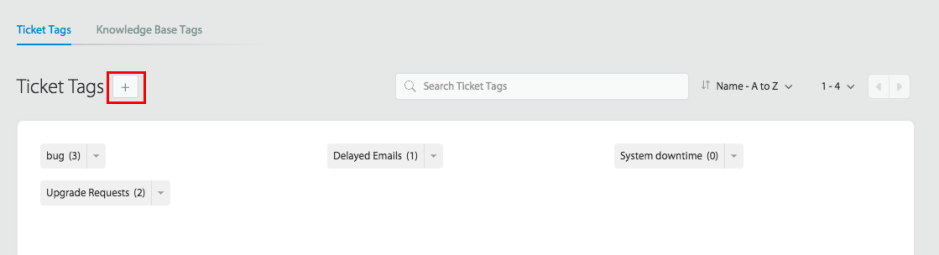
Making Ticket Tags Work for You
HappyFox’s tagging system goes beyond basic labeling. It’s an intelligent framework that adapts to your support needs. Let’s explore how to maximize its potential.
Smart Tag Organization
Your tagging structure should mirror how your team thinks about support. Create clear categories for:
- Product lines or services
- Issue types and severity levels
- Customer segments
- Resolution priorities
Automated Tagging
HappyFox’s Smart Rules transform manual tagging into an intelligent process. The system can automatically:
- Tag tickets based on keywords in subject lines or content
- Apply tags based on ticket source or customer segment
- Set priority levels based on specific criteria
- Create dynamic tags based on custom fields
Think of Smart Rules as your tireless assistant, consistently categorizing tickets even as you sleep. This ensures no issue goes unnoticed or miscategorized.
Turning Tags into Insights
Your tagged tickets tell a deeper story about your customer support operations. HappyFox’s advanced reporting tools bring this data to life, helping you uncover actionable insights.
Tag Analysis Patterns
Frequent tag usage sheds light on:
- Customer Pain Points: What issues are customers facing repeatedly?
- Seasonal Trends: Are certain problems more common during specific times?
- Operational Bottlenecks: Where are processes breaking down?
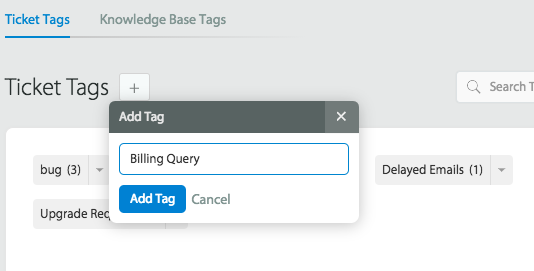
Knowledge Base Optimization
Recurring tags point to knowledge gaps. Use this data to:
- Create or update knowledge base articles.
- Train agents on frequently asked questions.
- Share insights with other teams to refine products or services.
Technical Capabilities of HappyFox’s Tagging System
HappyFox’s tagging implementation offers several technical advantages:
- Tag-Based Smart Rules
- Conditional tag application based on ticket content analysis
- Multi-condition rule creation using AND/OR logic
- Tag-based ticket routing and assignment logic
- Integration Capabilities
- Tag synchronization with CRM systems like Salesforce
- Webhook triggers based on tag changes
- Tag-based automation with tools like Zapier
- Custom API calls for tag management
- Reporting Infrastructure
- Real-time tag frequency analysis
- Custom report generation using tag filters
- Tag trend analysis across time periods
Implementation Strategy
Starting your tagging journey requires a strategic approach. Here’s how to begin:
Phase 1: Analysis
Start by understanding your current support landscape:
- Review common ticket types
- Identify recurring themes
- Map existing workflows
Phase 2: Design
Create your tagging framework:
- Develop clear naming conventions
- Establish tag hierarchies
- Define automation rules
Phase 3: Implementation
Roll out your system thoughtfully:
- Train your team on best practices
- Set up initial automation rules
- Monitor early results
Moving Forward
Effective ticket tagging isn’t just about organization – it’s about transforming your support operations. With HappyFox’s robust tagging system, you’re building a framework that grows smarter with every interaction.
Consider your current support challenges. Are you spending too much time searching for information? Are similar issues being handled inconsistently? Your support team deserves tools that make their jobs easier and more effective.
Ready to see how our tagging system can revolutionize your support operations? Let’s explore how we can customize it for your specific needs. Book a demo of Happyfox help desk to start your journey toward smarter, more efficient support.





