Customers running into issues is a common sight across businesses. The knack to handle their queries with a trouble ticketing system emerges as the key success differentiator.
Infact, 90% of customers regard issue resolution as the primary support concern. This can become challenging as businesses scale up.
Streamlining ticketing workflows is the way forward in the service-first era. A ticket management system helps organizations meet their CX demands while empowering growth.
As support stakeholders, you’re likely considering intuitive customer service solutions. We’ve done the groundwork for you!
This guide explores how trouble ticket software aligns support with your business bottomline. We’ll look at some best ticket tracking systems and best practices for optimizing support.
Dive into our actionable tips to aid your choice for the ideal help desk ticketing system.
TL;DR
A trouble ticketing system is a powerful software platform that centralizes and organizes customer issues into a single digital command center. These trouble ticketing systems are essential programs that let you capture and track ticket requests created by employees or third parties, such as customers.
By utilizing these tools, your organization can efficiently track the detection, reporting, and resolution of tickets across multiple channels. Ultimately, a modern trouble ticket system is designed to automate and streamline the organization and handling of service request tickets, ensuring faster resolutions and a more professional support experience.
More in this guide:
- Define a trouble ticket system?
- Benefits of a ticket tracking system
- Features to consider in a ticket management system
- Top 7 Trouble Ticketing Softwares
- Pick the right help desk system – 5 step framework
What is a Trouble Ticketing System?
A trouble ticketing system is a centralized software platform used by IT and customer service teams to capture, manage, and resolve support requests. It converts reported issues into formal digital records, automating ticket assignment and tracking resolution progress to ensure faster response times and higher satisfaction.
The Role of a Tracking System In Trouble Ticketing System
Having a ticket tracking system in place simplifies issue management for agents and customers. The software serves a prime role in customer support for varied aspects:
- Facilitates prompt issue capturing and handling
- Helps in ticket prioritization
- Enables better workflows for seamless routing
- Establishes unified communication amongst agents and customer
- Tracks tickets for compliance and progress
- Offers insights for improving service efficiency
The diverse spectrum of roles makes a trouble ticketing system a strategic asset. The software not only drives agent productivity, customer satisfaction but also fuels growth.
Customers today expect prompt issue responses from businesses. This precisely explains the need of the software across industries and use cases. Some common use cases include IT, customer support, HR, facilities etc.
Regardless of the business, customer service is what sets organizations apart. Here’s a fact – 74% of customers believe that customer service impacts brand loyalty. That said, let’s explore the significance of a ticketing system in the coming section.
Why is a Trouble Ticketing System Important?
A ticket management system offers a multitude of benefits for businesses. The unified system includes a host of features to simplify support for agents and customers alike. This helps teams stay organized, while maintaining higher standards of service and satisfaction.
Learn how these systems add value to your support:
Benefits of Trouble Ticketing System:
Happier Customers:
Simplified ticketing processes lead to quicker resolution, boosting customer retention. The more happier customers, the higher customer lifetime value for businesses.
Empowered Agents:
An issue tracking system brings order to processes via predefined rules and routing mechanisms. This categorization eliminates agent burnout and empowers them towards quicker fixes. It also helps better prioritize their time, enhancing overall productivity.
Ticket to Efficiency:
A trouble ticketing system strategizes customer issues, facilitating prompt issue handling. The software enables better agent collaboration across tickets, enhancing support efficiency.
Support Made Future-proof:
Modern help desk ticketing systems seamlessly adapt to the evolving business needs. They are extensible to accommodate integrations with new technologies. Hence, a ticketing system makes support operations future-proof and scalable.
Unlock Data-Driven Insights:
Ticketing systems offer valuable reports across significant support KPIs. Leveraging insights, businesses can identify gaps, patterns and take targeted measures to scale support.
Productivity Gains:
The centralized system unifies all customer queries providing transparency within processes. Efficient ticket management enables better collaboration and knowledge transfer amongst agents. This helps reduce downtime, enhancing productivity and resolving tickets faster.
A proven ticket management system provides well-rounded benefits for support teams across industries. Eventually, it translates to delighted customers, empowered agents and efficient support.
Now, how does a ticketing system handle these requests? Let’s explore in the coming section.
What does a Trouble Ticketing System Workflow look like?
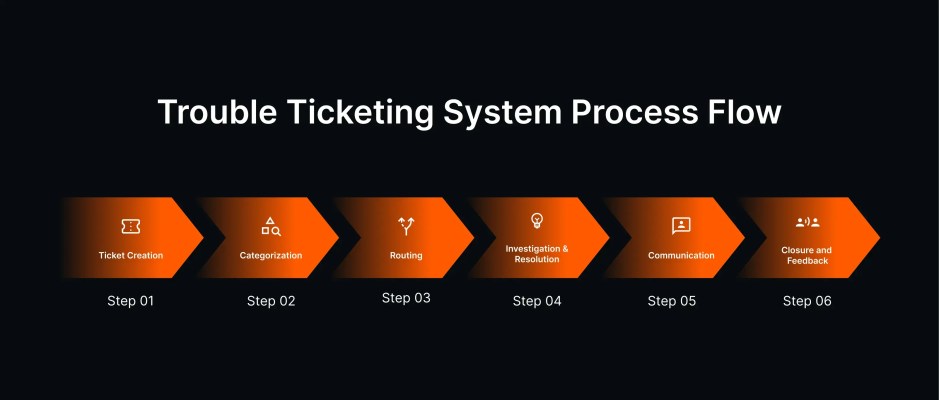
A typical customer support journey starts right from logging an issue until resolution. The ideal workflow entails creation, sorting, routing, resulting in closure. It also includes investigation, collaboration among agents for faster resolution. This structured approach enables support teams towards enhanced support efficiency.
Let’s look into the key stages of practical ticket workflow:
1. Ticket Creation
Refers to the process of converting customer interactions across channels into tickets. Most trouble ticketing software support email, chat, social and call interactions.
2. Categorization
Denotes the process of organizing and sorting tickets based on type, urgency, impact.
3. Routing
Indicates the mechanism of assigning tickets to agents evenly to balance workload.
4. Investigation and Resolution
Involves examining the cause and nature of the issue. Also includes steps taken to get the query resolved.
5. Communication
Refers to the communication within the ticket, keeping customers in loop throughout.
6. Closure and Feedback
Denotes ticket closure after resolution and follow-up communication via feedback surveys.
Must-have Features of a Ticket Tracking System:
A comprehensive ticket management system is the foundation for effortless support. That said, let’s examine the top features every ticketing system should have.
Ticket Management:
Ticket management includes capabilities necessary to track customer issues efficiently. Functionalities like inbox, omnichannel support, custom ticket fields, views are pivotal here. It also covers capabilities like ticket merge, split, templates, etc for easy management.
Ticket Prioritization:
Prioritization refers to features that classify tickets seamlessly. Consider features like ticket categories, statuses, SLA handling, smart queues, timer etc. here. Ideally, these play a major role in triaging tickets, ensuring nothing slips through.
Ticket Routing:
Routing indicates functionalities that balance ticket workload evenly. Round-robin, load balanced assignment, conditional auto-assignment are key routing features to have. Businesses can set up routing criteria based on skills, workload, or other conditions.
Team Collaboration:
Collaboration provides capabilities required to establish agent communication. Functionalities like internal notes, collision detection, task management setups serve the purpose. These enable agents to share context, smoothen handoffs, ensuring cohesive experience.
Communication:
Communication refers to enabling active conversation between agents and customers. Canned responses, customer portal, multi-lingual support are common communication avenues. Organizations rely on these features to establish transparency, improving autonomy.
Automation:
Automation comprises capabilities that remove complexity of the manual tasks. Significant features include event, time-based triggers, customizable workflows and rules. By automating key processes, businesses can better handle critical issues with ease.
Reporting:
Reporting features helps the team unlock the advantage of data for continuous improvement. Real-time reports, customisable dashboards, pattern analysis are key capabilities to note. Businesses can make their support pro-active by taking data-driven measures.
Artificial Intelligence:
Efficient use of AI technology takes support experiences to the next level. Popular AI-led features include AI copilot, AI answers, summaries, intelligent triaging. AI-powered chatbots are a great example here. They deflect FAQs, leaving room for complex problem-solving, enhancing response times significantly.
7 Best Trouble Ticketing Software:
Having understood the significance of a ticketing system, let’s dive into the top choices. Below is a comprehensive list of softwares built to augment support experience.
- HappyFox
- Zendesk
- Freshdesk
- Intercom
- Zoho Desk
- Kustomer
- Spiceworks
1. HappyFox
HappyFox Help Desk is a comprehensive trouble ticketing system designed for customer success. The system differentiates itself with its intuitiveness and simplistic design. HappyFox simplifies support workflows enabling you to manage tickets with ease.
The platform offers a host of features for streamlining ticket management. HappyFox is rated the Best Help Desk Software by PC Mag for its exceptional service commitment. The versatile software is a premier choice for businesses optimizing support across departments.
Top Features:
- Omnichannel ticketing: Refers to converting requests from channels into tickets. This includes email, social, chat, phone.
- Multi-brand help desk: Effortlessly setup and manage multiple brands under a single help desk. Customize your support portal, knowledge base, forum as per preference.
- Automation: Make the most of event, time-based automation, auto-assignment, and smart rules for your business.
- SLA Management: Set, track and measure realistic SLAs with SLA live timers, breach notification, alerts and reporting.
- Knowledge base: Build a feature-rich support center with knowledge articles for convenient self-service.
- Real-Time Reporting: Tap into data-driven insights with comprehensive reports on ticket inflow, SLA, performance, automation etc.
- Team Collaboration: Collaborate effectively amongst agents with collision detection, private notes for seamless operation
- Gen AI Capabilities: Take advantage of AI copilot, AI answers, summaries, insights to elevate your customer experience.
- Integration: HappyFox Help Desk effortlessly integrates with 50+ SaaS application across major categories
| Overall Rating | Ease of Use | Quality of Support | Strengths | Limitations |
| 4.5 – G2, 4.6 – Capterra | 8.9 | 9.1 | 1. Full-stack solution for versatile customer support use cases 2. Responsive support and intuitive interface | 1. Social media connections are limited to Facebook and Twitter |

Customer Testimonials
“If you are looking for a feature rich innovative product- your search ends here. Great customer service and quick setup – also tools to convert legacy data.” – Sachin Choudhari CEO (CircularEdge)
“Easy to setup and manage, easy to use, customizable to our needs. HappyFox is stream lining the way we help our users.” – James Towner Director of IT (LiveOps Inc)
To learn why growing teams are choosing HappyFox, Schedule a demo with us to find out!!!
2. Zendesk
Zendesk, the trouble ticketing system enables omnichannel support for streamlining customer interactions across channels. The ticketing system comes with advanced reporting and workflows to streamline ticket handling. The support software caters to businesses of all sizes.
Top Features:
- Omnichannel support – Aggregates tickets across social, email, chat, phone
- Self-service capabilities – Knowledge base, forums
- Automation options include predefined responses, custom rules, triggers
- SLA management
- Team collaboration features
- Gen AI features include rephrasing, summarizing, AI-powered insights for accuracy
| Overall Rating | Ease of Use | Quality of Support | Strengths | Limitations |
| 4.3 – G2, 4.1 – Capterra | 7.9 | 8.3 | 1. Offers powerful automation features 2. Extensible platform | 1. Customer support is deemed non-existent |
3. Freshdesk
Freshdesk offers a ticket tracking system for optimising support operations. The software empowers agents with robust features designed to swiftly manage tickets. The built-in multi-channel support, automation, self-service options improves CX at scale. The ticketing platform is suitable for diverse businesses from small to large.
Top Features:
- Centralized ticketing system converting requests into tickets – email, chat, phone, social, web
- Knowledge base and community forums for self-service
- Powerful reporting and analytics with custom dashboards, reports
- Automation include event, time-based triggers, round robin assignment, SLA management
- Offers AI-powered rephrasing, ticket summaries, tone enhancers.
| Overall Rating | Ease of Use | Quality of Support | Strengths | Limitations |
| 4.4 – G2, 4.5 – Capterra | 8.5 | 8.8 | 1. Interface is quite user-friendly 2. Extensive integration capabilities | 1. Customisation options are limited |
Know how Freshdesk stacks up against Zendesk, learn more
4. Intercom
Intercom offers a robust trouble ticketing software aimed to elevate customer experiences. The ticketing system gives customers and agents the support needed to stay in control of tickets. Tailored for varied businesses, the software minimizes inaccuracies and maximizes support efficiency.
Top Features:
- Unified inbox to manage customer conversation across channels
- Automates ticket assignment, prioritization with automation builder, canned responses, triggers
- Support portal and knowledge base enables self-service
- Comprehensive real-time reporting covers built-in reports, data exports, performance data etc.
- Facilitates AI-powered summaries, rephrasing, tone adjustment
| Overall Rating | Ease of Use | Quality of Support | Strengths | Limitations |
| 4.5 – G2, 4.5 – Capterra | 8.5 | 8.7 | 1. Multilingual customer support capabilities 2. Offers comprehensive knowledge articles | 1. Steeper learning curve |
5. Zoho Desk
Zoho Desk, the ticket tracking system provides essential capabilities to enhance support experience. With focus on improving satisfaction, the platform enables tools for effective ticket management. Automation, ticket distribution, detailed reporting are notable functionalities.
Top Features:
- Multichannel support – email, phone, messaging, social media
- Automation workflows cover workflow rules, time-based rules, SLA, macros for efficient handling
- Reporting with custom reports, dashboards, data exports
- Aids team collaboration with collision detection, private notes
- AI features includes AI assistant, sentiment analysis, responses etc
| Overall Rating | Ease of Use | Quality of Support | Strengths | Limitations |
| 4.4 – G2, 4.5 – Capterra | 8.2 | 8.3 | 1. Affordable and scalable solution for emerging businesses 2. Customer service is deemed efficient | 1.Customization is rather inconsistent |
6. Kustomer
Kustomer is a unified ticketing system that aims to deliver convenient support. Built-in with robust automation, multichannel support, and reporting for empowering issue management. The platform is adept at deflecting support tickets, driving experiences of customers’ delight.
Top Features:
- Multichannel support – chat, email, social media, voice
- Convenient self-service options: knowledge base
- Prioritizes customer requests with queues and routing mechanisms
- Promotes agent collaboration with canned responses, tags.
- In-depth reporting: custom reports, track KPIs, schedule reports
- AI bot: Offers AI-powered customer service, AI answers
| Overall Rating | Ease of Use | Quality of Support | Strengths | Limitations |
| 4.3 – G2, 4.4 – Capterra | 8.8 | 8.9 | 1. User-friendly experience 2. Helpful knowledge articles | 1. Limited integration options |
Recommended Reading
Discover the top 7 AI customer support software solutions today.
7. Spiceworks
Spiceworks is a cloud helpdesk system built to cater to the needs of IT teams. The ticketing system helps tackle tickets efficiently at scale. Ticket collaboration, assignment, custom fields, customisable customer portal are notable features. Feature-rich platform enables ticketing via email, customer portal and agent interface for streamlined support operations.
Top Features:
- Ticketing system
- IT asset and task management
- Auto assignment, ticket routing based on categories, priorities
- Custom knowledge base for self-help
- Ticket management options : queues, views, rules
- Advanced reporting capabilities
| Overall Rating | Ease of Use | Quality of Support | Strengths | Limitations |
| 4.3 – G2, 4.4 – Capterra | 8.7 | 8.4 | 1. Ideal for IT support needs 2. Easy implementation | 1. Not suited for general customer service |
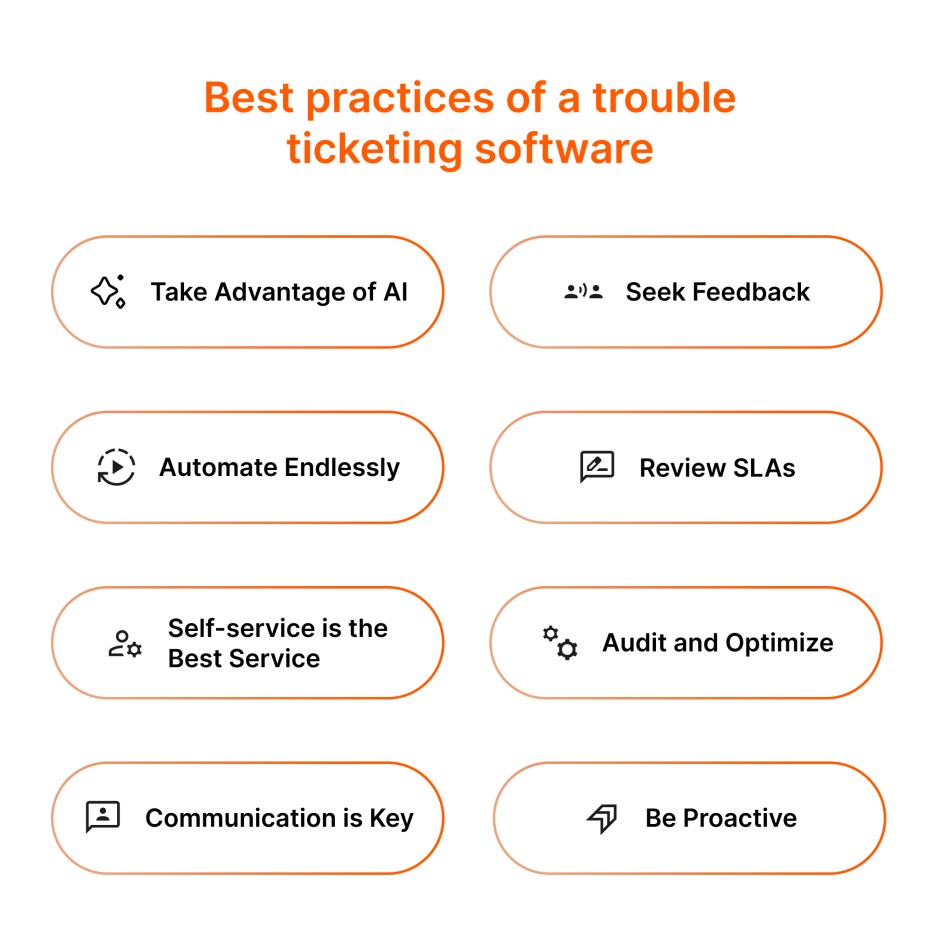
Trouble Ticketing System : Best Practices
We now know that a help desk system is the right call for better support. That said, we’ll look into some best practices for setting up an effective ticketing system.
Take Advantage of AI:
Maximize the use of AI capabilities for proactive issue resolution.
Seek Feedback:
Consider asking for feedback periodically to gauge scope for improvement.
Automate Endlessly:
Automate everything manual to bring the support process up to speed.
Review SLAs:
Revisit SLA agreements to adjust and make changes for maximum compliance.
Self-service is the Best Service:
Enable endless self-service options to empower autonomy and convenience.
Audit and Optimize:
Examine the ticketing processes for bottlenecks and take steps to overcome them.
Communication is Key:
Ensure to keep everyone informed of regular updates. This includes agents, stakeholders, and customers.
Be Proactive:
Identify gaps in the process using reporting tools and make adjustments as needed.
Choosing the Ideal Software For Trouble Ticketing System
Narrowing down the right help desk ticketing system is essentially simple. Follow the 5-step framework to choose the best software for your customer support.
Evaluate your support needs:
Assess your current support processes in terms of volume, complexity, channels. Identify common challenges within the process. This will help prioritize features you’re looking for in a help desk ticketing system.
Prioritize CX:
Explore if the software makes it easy for customers to get started with. Check the software’s capability to support omnichannel experience, personalization and customisation options. This will play a prime role in improving customer satisfaction.
Review agent experience:
Verify if the software is intuitive for agents and admins alike. Look for features in the system that enhance productivity like automation, AI-led capabilities. Make sure that the software streamlines the process and makes agent lifes easier.
Consider scalability and integration:
The customer support software must expand to the growing needs of your businesses. Consider help desk softwares that are extensible and accommodate integrations as per need.
Weigh in vendor pricing and support:
Last but not least, examine the vendor’s support capabilities in terms of quality and responsiveness. Learn more about their pricing, product updates, uptime guarantees etc,. This will help you stay aligned with business objectives and budget.
Conclusion
It is clear that a trouble ticketing system lays the groundwork for customer success. These platforms transform your support with advanced practices.
Features like ticket management, automation, collaboration, AI helps businesses drive happier support experiences. This leads to process efficiency, delighted customers and well-equipped agents.
As you explore options, factor in the key considerations to guide your choice. Eventually, the right ticketing system will not only address current limitations but also stays agile. Doing so will set your support team up for customer satisfaction and success in the long run.
Schedule a demo with us to see how we bring things into action!
FAQ
What is an online trouble ticket system?
An online trouble ticket system is a cloud-based platform that centralizes support requests from channels like email, chat, and social media. It acts as a digital hub for IT or customer service teams to organize, prioritize, and track issues from creation to resolution, ensuring no request is ever lost
What is a trouble ticket used for?
A trouble ticket is used to document a specific problem or service request. It records vital data like the issue description, user details, and priority level. Teams use it to maintain a clear audit trail of the resolution process, automate task assignments, and measure internal support performance.
What is another name for a trouble ticket?
A trouble ticket is commonly referred to as a support ticket, help desk ticket, or service request. In more technical environments, it may also be called an incident record, case, or support case. Regardless of the name, the goal remains the formal tracking of a user’s problem.