


Are you tired of wrestling with AssetPanda’s sluggish interface and limited integrations? You’re not alone. Many IT managers are discovering that their asset management solution should streamline operations, not complicate them.
If you’re managing a growing IT environment and finding AssetPanda more complicated, this guide will walk you through proven alternatives that offer better performance, stronger integrations, and more reasonable pricing for small to medium-sized teams.
Understanding AssetPanda and Why Consider Alternatives?
AssetPanda is a cloud-based IT asset management platform designed to help organizations track hardware, software, and other IT resources throughout their lifecycle. While it offers basic asset tracking capabilities, many users report significant limitations that impact daily operations.
Key AssetPanda features include:
- Asset inventory tracking
- Barcode scanning capabilities
- Basic reporting and analytics
- Cloud-based access
- Mobile app functionality
However, these features often come with drawbacks that prompt IT managers to seek alternatives.
Why IT Managers Are Moving Away from AssetPanda
The decision to replace AssetPanda typically stems from several recurring issues that impact team productivity and budget efficiency.
What are the main problems with AssetPanda?
Based on user feedback and reviews, the most common AssetPanda limitations include:
- High costs for small teams: Pricing becomes expensive as you add users and features
- Poor navigation experience: Slow performance and cumbersome interface design
- Limited third-party integrations: Difficulty connecting with QuickBooks, Salesforce, and help desk systems

- Inadequate customer support: Inconsistent response times and solution quality
- Data export restrictions: Limited options for getting your data out of the system
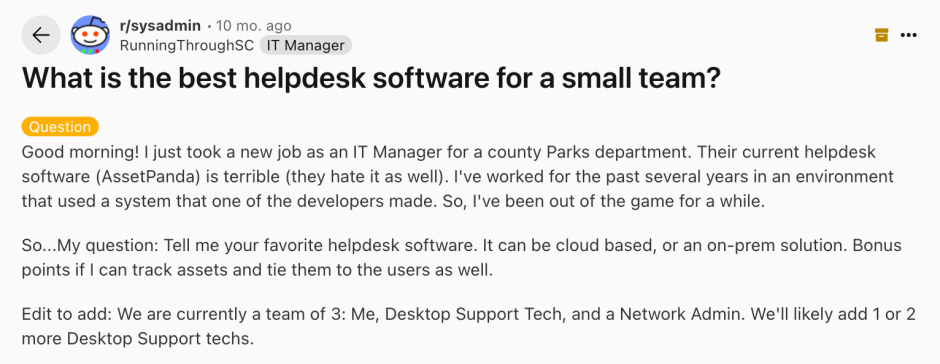
Recently, an IT manager shared their frustration on Reddit:
The current helpdesk software (AssetPanda) is terrible (they hate it as well)… Tell me your favorite helpdesk software. Bonus points if I can track assets and tie them to the users as well.
This sentiment reflects a broader trend – IT teams need integrated solutions that combine asset management with help desk functionality.
What Should You Look for in AssetPanda Alternatives?
Before exploring specific alternatives, it’s important to understand what makes an asset management solution effective for modern IT operations.
Essential Features for Asset Management Success
Integration Capabilities
- Native connections to help desk, accounting, and procurement systems
- API access for custom integrations
- Real-time data synchronization across platforms
Unified Workflow Design
- Direct linking between assets and support tickets
- Asset history visibility within ticket contexts
- Automated routing based on asset type or location
- Combined reporting for support and asset metrics
User-Friendly Interface
- Intuitive navigation that doesn’t require extensive training
- Fast performance with minimal loading times
- Mobile accessibility for field asset management
Scalable Pricing Structure
- Transparent costs with no hidden fees
- Reasonable per-user pricing as teams grow
- Feature tiers that match organizational needs
Top 5 AssetPanda Alternatives for IT Teams
1. HappyFox
Best for: Organizations seeking integrated help desk and asset management across different scales
HappyFox stands out by combining help desk functionality with comprehensive asset tracking in a single platform, making it suitable for teams ranging from startups to enterprise environments.
Key Strengths:
- Unified platform: Tickets and assets managed from one dashboard
- Automated asset discovery: Keeps inventory current without manual updates
- Extensive integrations: 50+ native connectors including QuickBooks and Salesforce
- Transparent pricing: Clear costs that scale reasonably with team growth
- Responsive support: Live chat availability and comprehensive documentation
Asset Management Features:
- Customizable asset types and custom fields
- Automatic asset-ticket linking for complete context
- Lifecycle management with warranty and maintenance tracking
- Advanced reporting combining support and asset metrics
- Mobile app for remote asset management
- Enterprise security and compliance features
Pricing: Starts at $24/agent/month (includes both help desk and asset management capabilities)
2. ServiceNow IT Asset Management
Best for: Large enterprises with complex asset portfolios and dedicated IT teams
ServiceNow provides enterprise-grade asset management with advanced automation and comprehensive ITIL compliance features.
Key Strengths:
- Enterprise scalability and robust security
- Advanced workflow automation capabilities
- Complete ITIL compliance framework
- Extensive integration ecosystem
- Powerful analytics and reporting tools
Considerations:
- Higher complexity requiring dedicated administrators
- Significant cost investment for smaller organizations
- Longer implementation timelines
3. Lansweeper
Best for: Organizations prioritizing detailed asset discovery and network visibility
Lansweeper excels at automated asset discovery and provides comprehensive visibility into network-connected devices.
Key Strengths:
- Excellent automated asset discovery capabilities
- Detailed hardware and software inventory tracking
- Strong security and compliance reporting
- Agentless network scanning
- Comprehensive asset documentation
Considerations:
- Limited help desk functionality (requires separate ticketing system)
- Complex initial configuration process
- Steeper learning curve for non-technical users
Learn More: Transform IT Support with Lansweeper Integration
4. ManageEngine AssetExplorer
Best for: Organizations wanting comprehensive ITAM with integrated help desk capabilities
AssetExplorer provides full asset lifecycle management with built-in help desk integration at competitive pricing.
Key Strengths:
- Complete asset lifecycle management
- Integrated purchase order and contract management
- Software license compliance tracking
- Built-in help desk functionality
- Competitive pricing for the feature set
Considerations:
- Interface design feels dated compared to modern alternatives
- Advanced features often require additional module purchases
- Time-intensive setup and customization process
5. Freshservice
Best for: Teams seeking modern UI design and Freshworks ecosystem integration
Freshservice offers a contemporary approach to IT service management with solid asset tracking capabilities.
Key Strengths:
- Modern, intuitive user interface
- Seamless integration within Freshworks ecosystem
- Solid automation and workflow capabilities
- Reasonable pricing for small to medium teams
- Excellent mobile experience
Considerations:
- Asset management features less comprehensive than dedicated ITAM tools
- Advanced reporting requires higher-tier subscription plans
- Limited customization options compared to other alternatives
How to Choose the Right AssetPanda Alternative
What factors should you consider when selecting asset management software?
Team Size and Growth Projections
- Current number of daily users
- Expected growth over the next 2-3 years
- Different access levels needed for various team members
Integration Requirements
- Existing systems requiring connection
- Need for real-time vs. periodic data synchronization
- Compliance requirements for data handling
Budget Considerations
- Total budget including implementation and training costs
- Hidden fees or required add-on purchases
- Pricing scalability as you add users or features
Implementation Timeline
- Urgency of replacement needs
- Available internal resources for setup and training
- Required level of vendor support during migration
Step-by-Step Migration Guide from AssetPanda
How do you migrate from AssetPanda to a new system?
Phase 1: Data Assessment (Week 1)
- Export all asset records and custom field configurations
- Document current workflows and automation rules
- Identify all integration points with other systems
- Note critical reports and dashboards your team relies on
Phase 2: Solution Evaluation (Weeks 2-3)
- Request demos from 3-4 vendors meeting your criteria
- Test each solution using your actual use cases
- Involve daily users in the evaluation process
- Compare total cost of ownership beyond monthly fees
Phase 3: Pilot Testing (Week 4)
- Run limited pilot with your chosen solution
- Import subset of asset data for testing
- Validate critical workflows and integrations
- Gather comprehensive feedback from pilot users
Phase 4: Full Migration (Weeks 5-6)
- Develop detailed migration timeline with milestones
- Execute user training and change management plan
- Set up performance monitoring and adoption tracking
- Maintain rollback plan for unexpected issues
Common Migration Challenges and Solutions
What are the biggest challenges when migrating from AssetPanda?
- Data Quality Issues: Many organizations discover inconsistencies during migration. Use this opportunity to clean duplicate records, standardize naming conventions, and establish data governance practices.
- User Adoption Resistance: Address change resistance through clear communication about benefits, hands-on training sessions, early adopter support, and celebrating quick wins.
- Integration Complexity: Start with the most critical integrations first. Many platforms offer migration specialists to help with complex data mappings and custom integrations.
- Workflow Disruption: Plan migration during lower-activity periods when possible. Consider running both systems briefly in parallel to ensure continuity.
Making Your Final Decision
The right AssetPanda alternative depends on your specific organizational needs, technical capabilities, and growth plans. For most small to medium IT teams, integrated solutions like HappyFox provide the optimal balance of functionality, ease of use, and value.
What’s the best next step?
- Assess your requirements using the criteria outlined in this guide
- Request demos from vendors that match your needs
- Involve your team in the evaluation process
- Plan your migration with realistic timelines and expectations
Remember, the goal isn’t just replacing AssetPanda – it’s finding a solution that makes your entire IT operation more efficient and effective. Ready to explore better alternatives? Start by requesting demos from the solutions that best match your team’s needs and don’t hesitate to ask detailed questions about pricing, implementation support, and ongoing maintenance requirements.





