


Your WooCommerce store just hit 100 orders per day. Great news, right? But with every fifth order generating a support query, your inbox is overflowing. Setting up a proper ticketing system isn’t just an upgrade – it’s essential for survival. Let’s build a support system that scales with your success.
Why Your WooCommerce Store Needs a Ticketing System
Growing pains in e-commerce support often look like this:
- Multiple customer queries lost in email threads
- Support team struggling to track order-related issues
- No way to measure response times
- Customer frustration due to delayed responses
- Lack of visibility into support performance
Essential Features for WooCommerce Ticketing
1. Order Integration
- Automatic order data sync
- Quick access to purchase history
- Real-time status updates
- Order-ticket linking capability
2. Customer Management
- Complete customer profiles
- Purchase history access
- Communication timeline
- Preference tracking
3. Team Collaboration
- Ticket assignment
- Internal notes
- Knowledge sharing
- Performance tracking
Building Your Support Infrastructure
Step 1: Choose the Right Platform
Before selecting a platform, understand the key differences between basic email support and a WooCommerce help desk solution. Once you’ve decided to upgrade your support system, consider these factors:
- WooCommerce integration capabilities
- Ease of setup and use
- Scalability options
- Support channels offered
- Reporting features
Step 2: Plan Your Implementation
- Audit current support processes
- Define support workflows
- Set up team structure
- Create response templates
- Establish SLAs
Step 3: Configure Integration
- Connect with WooCommerce
- Set up data synchronization
- Configure ticket routing
- Establish automation rules
The HappyFox Solution for WooCommerce Stores
HappyFox is a comprehensive help desk ticketing system that centralizes all your support requests while offering powerful integration capabilities with WooCommerce. Our platform transforms how you manage customer support by bringing together order management and customer service.
Key Integration Features
1. Seamless Order Management
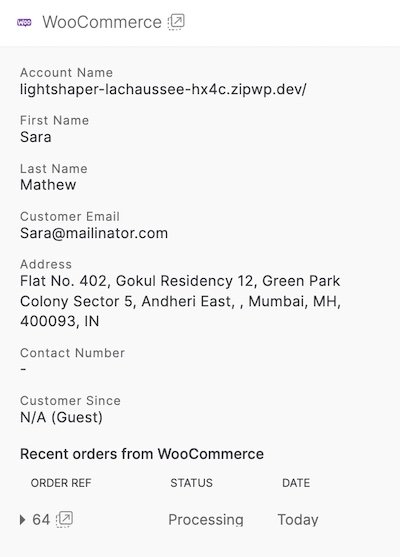
- View customer details and order information while creating tickets
- Access last two orders directly in the ticket widget
- Real-time order status synchronization
- Quick navigation to WooCommerce order details
2. Smart Ticket Handling
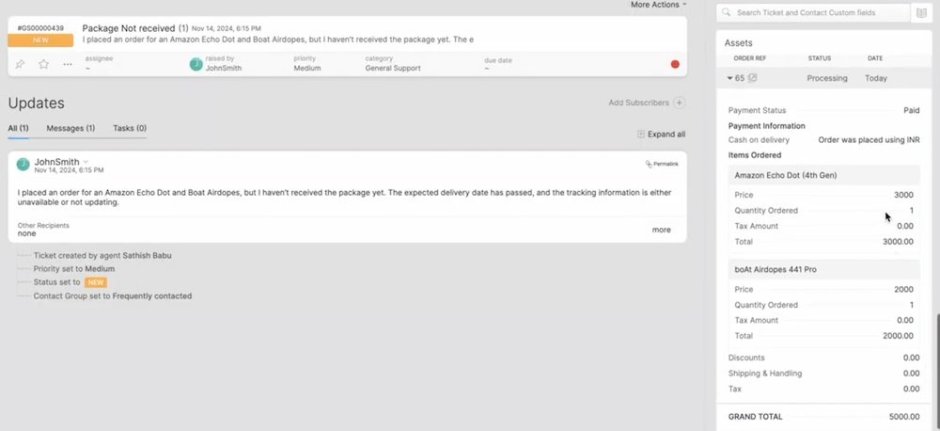
- Automatic ticket creation from queries
- Custom ticket fields for order tracking
- Intelligent ticket routing
- Status update automation
3. Customer Support Automation
- Templated responses
- Automated workflows
- Trigger-based actions
- Custom notification rules
As a leading e-commerce support solution, HappyFox has the ideal support stack to help online stores scale.
Best Practices for Implementation
1. Start with Core Features
- Set up basic ticket routing
- Configure order integration
- Create essential templates
- Train core team
2. Establish Workflows
- Define ticket categories
- Set up assignment rules
- Create response standards
- Implement SLAs
3. Optimize and Scale
- Monitor performance metrics
- Refine automation rules
- Expand template library
- Add advanced features
Common Setup Challenges and Solutions
Challenge 1: Data Migration
Solution: Phased migration approach with careful testing
Challenge 2: Team Adoption
Solution: Comprehensive training and clear documentation
Challenge 3: Integration Issues
Solution: Step-by-step setup with expert support
Measuring Success
Track these key metrics:
- Average response time
- Resolution rate
- Customer satisfaction scores
- Team productivity
- Order-related ticket volume
Pro Tips for Success
- Template Everything
- Common responses
- Follow-up messages
- Internal notes
- Status updates
- Automate Wisely
- Order status updates
- Priority assignment
- Team notifications
- Customer communications
- Monitor and Adjust
- Review metrics regularly
- Gather team feedback
- Optimize workflows
- Update procedures
Transform Your WooCommerce Support
Ready to elevate your customer support? HappyFox offers:
- Complete WooCommerce integration
- Powerful automation tools
- Comprehensive reporting
- Multi-channel support
- Scalable solutions
Take the Next Step: Book a demo to see how HappyFox can transform your WooCommerce support operations.





