


A critical bug report lands in your help desk. Your support team scrambles to escalate it, developers need details, and product managers want to track its impact. Sound familiar? This scenario plays out in countless organizations daily, exposing a critical gap between customer support and project management tools.
As businesses seek to bridge this divide, Zendesk often comes up as a potential solution. But is it truly the best choice for integrating project management with help desk software? Let’s explore Zendesk and its top alternatives to find out.
The Importance of Project Management in Help Desk Software
Before diving into specific solutions, let’s understand why integrating project management capabilities with help desk software is crucial:
1. Seamless Issue Escalation: Easily convert complex tickets into development tasks.
2. Enhanced Cross-Team Collaboration: Bridge the gap between support, development, and product teams.
3. Improved Accountability: Clearly assign and track responsibilities for issue resolution.
4. Faster Resolution Times: Reduce delays caused by switching between multiple tools.
5. Data-Driven Decision Making: Gain insights into support trends and their impact on development priorities.
Zendesk’s Project Management Capabilities and Limitations
Zendesk, a popular help desk solution, offers some project management features through its app marketplace and integrations.
Capabilities:
- Integration with project management tools like Jira and Trello
- Basic task management within tickets
- Customizable workflows and automation
However, it has several limitations when it comes to comprehensive project management integration. Let’s compare Zendesk’s limitations with HappyFox’s solutions:
| Feature | Zendesk Limitation | HappyFox Solution |
| PM Tool Integrations | Limited native integrations, reliance on third-party apps | Native integrations with Jira, Asana, Wrike, GitLab, and Azure DevOps |
| Task Management | Basic functionality, often requires additional tools | Built-in task management alongside tickets |
| Cross-team Collaboration | Separate interfaces for help desk and project data | Unified dashboard for ticket and project information. Task management, asset management, private notes, agent collision detection are notable cross-team collaboration features |
| Workflow Customization | Restrictive customization options | Flexible workflows and automation rules to suit specific needs. Eg: custom categories, automation rules, department-specific ticket statuses |
| Two-way Synchronization | Limited, often requires manual updates | Real-time, bi-directional sync between tickets and tasks |
| Multi-department Support | Not ideal for cross-functional project management | Supports various departments with tailored PM features. Eg: Asset management for IT, scheduled tickets for Facilities, custom statuses for all departments (IT,HR,Finance, Facilities) |
These limitations often lead users to seek more comprehensive alternatives that offer tighter integration between help desk and project management functionalities.
Top Help Desk Alternatives with Robust Project Management Features
Let’s explore some alternatives to Zendesk that offer strong project management capabilities:
1. HappyFox
HappyFox stands out with its comprehensive integrations and user-friendly interface.
Key Features:
– Seamless integrations with Jira, Asana, Wrike, GitLab, and Azure DevOps
– Two-way synchronization between tickets and tasks
– Customizable workflows and automation
– Unified dashboard for ticket and project information

Why HappyFox stands out:
- Multi-department support: Enables seamless project management across departments – IT, HR, Finance, Facilities and other teams. Features like asset management scheduled tickets and custom statuses aid seamless support for both external and internal teams.
- Easy customization: Flexible customization options across ticket management, support center, workflows, automations, and reporting allow teams to tailor the platform to their specific project management needs. Capabilities includes custom ticket statuses, form fields, categories and workflows.
- Unlimited pricing: The popular Unlimited Agent plan offers cost-saving potential, allowing unrestricted access for support team members without per-user fees, facilitating scalable project management.
- Great support: A dedicated customer success team provides swift escalations and account management, ensuring project-critical issues are resolved quickly and the platform is optimized for your project management processes.
- Smart Rules: Automate task creation in your project management tool based on ticket criteria, streamlining workflows between support and project management activities.

2. Freshdesk
Freshdesk offers project management features through its “Freddy” AI and integrations.
Key Features:
– Native task management within tickets
– Integration with Jira, Trello, and other tools
– AI-powered ticket-to-task conversion
3. ServiceNow
ServiceNow provides robust ITSM features with integrated project management capabilities.
Key Features:
– Native project portfolio management
– Agile development tools
– Resource management and capacity planning
Why HappyFox Could Be Your Best Choice
HappyFox addresses many of Zendesk’s limitations, offering a more comprehensive solution for integrating help desk and project management workflows. Here’s why HappyFox stands out:
1. Versatile Integrations:
HappyFox offers seamless integrations with popular project management tools, including Jira, Asana, Wrike, GitLab, and Azure DevOps. These native, deep integrations don’t rely on third-party tools, ensuring a smoother workflow and reducing potential points of failure.
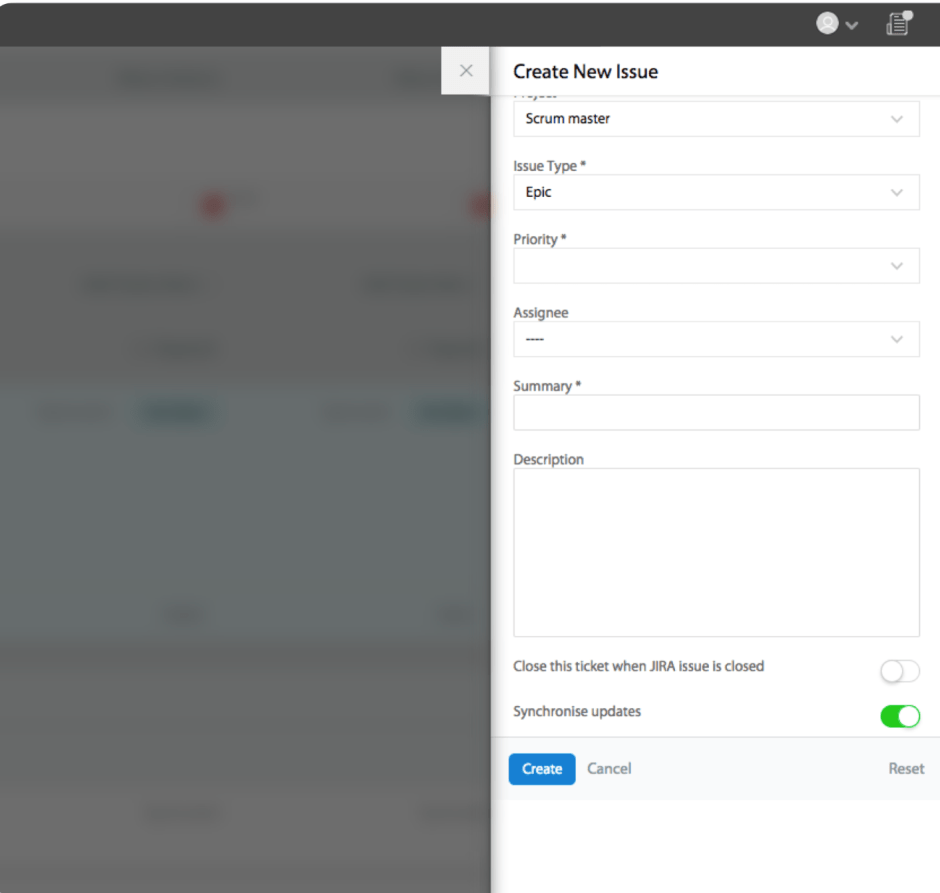
2. JIRA Integration:
Key Features:
– Create JIRA issues directly from HappyFox tickets
– Bi-directional comment syncing
– Automatic ticket closure when JIRA issues are resolved
Pro Tip:
Use HappyFox’s Smart Rules to automatically create JIRA issues for tickets with specific tags or priorities, ensuring critical bugs are immediately added to the development backlog.
3. Asana Integration:
Key Features:
– Convert tickets to Asana tasks with a single click
– Sync task updates and comments between platforms
– View Asana task details directly within HappyFox tickets
4. Wrike Integration:
Key Features:
– Create and link Wrike tasks to HappyFox tickets
– View task progress and details within the ticket interface
– Two-way sync of comments and updates
5. Customization and Flexibility:
– Highly customizable workflows and automation rules
– Flexible field mapping between help desk tickets and project management tasks
6. Unified Dashboard:
– Comprehensive dashboard displaying both ticket and project information
– Customizable views for different team roles
7. Two-way synchronization:
– Real-time, bi-directional sync between help desk tickets and project tasks
– Automatic updates to both systems when changes occur in either systems
Empower your Team with HappyFox:
While Zendesk offers basic project management integration, HappyFox provides a more comprehensive solution that seamlessly bridges the gap between customer support and project management. With its robust integrations, customizable workflows, and unified dashboard, HappyFox empowers teams to work more efficiently and collaboratively.
Ready to transform your support and project management workflows? Discover how HappyFox can revolutionize your team’s productivity and effectiveness.





