


Your support team handles thousands of tickets monthly. Agent burnout is rising. Response times are slipping. Sound familiar? Enterprise support teams face mounting pressure to deliver faster, more accurate responses while maintaining quality at scale. AI-powered help desk solutions can transform these challenges into opportunities—but only if you choose the right features.
This comprehensive guide breaks down the essential AI capabilities that enterprise support teams should prioritize when evaluating help desk solutions. We’ll explore how these features drive efficiency, reduce costs, and elevate the customer experience.
When Do You Need AI-Powered Help Desk Features?
AI-powered help desk features are essential when your support team faces:
– High Ticket Volume: Handling 1000+ tickets monthly with response times slipping
– Complex Issues: Managing multi-step problems requiring coordination across departments
– Knowledge Gaps: Struggling to maintain consistent responses across growing teams
– Agent Burnout: Dealing with repetitive queries that could be automated
– Scaling Challenges: Supporting global customers across different time zones
– Quality Concerns: Maintaining support standards while scaling operations
Essential AI Features for Modern Enterprise Support
1. AI-Assisted Ticket Analysis and Resolution
Modern enterprise support demands intelligent ticket handling. Here’s why this feature is crucial and what to look for:
Why It’s Necessary:
– Reduces initial response time by up to 60%
– Prevents important issues from being overlooked
– Helps identify systemic problems
– Enables proactive support strategies
Key Capabilities:
– Automated ticket classification
– Context-aware response suggestions

– Priority and sentiment analysis
– Root cause identification
– Performance tracking and quality assessment
Real-world scenario:
A global e-commerce company receives hundreds of tickets during flash sales. AI ticket analysis automatically prioritizes order-related issues, and suggests responses based on previous successful resolutions – reducing average response time from 45 to 12 minutes.
Pro Tip: When evaluating AI ticket analysis features, test the system with complex, multi-issue tickets to assess its ability to identify and separate distinct problems requiring different solutions.
2. Intelligent Knowledge Management
Your knowledge base should evolve with your business. Here’s why this capability is essential:
Why It’s Necessary:
– Reduces repetitive queries by up to 40%
– Ensures knowledge base stays current
– Improves self-service success rates
– Decreases agent training time
– Maintains consistent support quality
Essential Features:
– Automated content gap analysis
– Smart article suggestions based on ticket patterns
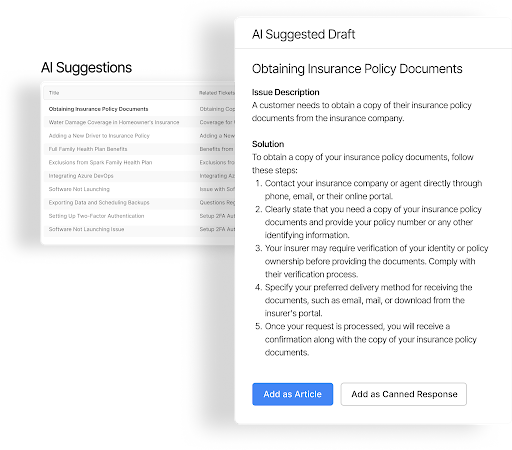
– Content effectiveness tracking
– Dynamic article updates
– Pre-written response evaluation
Real-World Scenario:
A SaaS company’s product updates were causing spikes in support tickets. AI-powered knowledge management identified documentation gaps before each release, automatically suggested new articles, and tracked their effectiveness – reducing new feature-related tickets by 35%.
Implementation Checklist:
– [ ] Audit existing knowledge base structure
– [ ] Identify high-priority content gaps
– [ ] Set up automated content review cycles
– [ ] Configure knowledge base analytics
– [ ] Train agents on AI-assisted article creation
Learn more: 6 ways HappyFox transforms enterprise support
3. Predictive Support Resolution
Modern support teams need to stay ahead of issues. Here’s why predictive capabilities matter:
Why It’s Necessary:
– Prevents issues from escalating
– Increases first-contact resolution rates
– Reduces support costs
– Improves customer satisfaction
– Enables proactive support strategies
Key Capabilities:
– Predict customer issues before they escalate
– Suggest solutions based on historical data
– Provide instant answers through self-service
– Learn from successful resolutions
– Adapt responses based on customer context
4. Advanced Analytics and Insights
Data-driven decision making is crucial for modern support teams. Here’s why:
Why It’s Necessary:
– Identifies improvement opportunities
– Optimizes resource allocation
– Predicts support trends
– Measures ROI of support initiatives
– Enables strategic planning
Must-Have Capabilities:
– Trend analysis and pattern recognition
– Customer behavior insights

– Performance metrics tracking
– Predictive analytics
– Actionable recommendations
Feature Spotlight: AI-Powered Analytics
Modern analytics should provide:
– Real-time dashboards
– Custom report generation
– Trend forecasting
– Performance benchmarking
– ROI tracking
5. Custom AI Assistants
AI assistants are becoming indispensable for enterprise support. Here’s why:
Why It’s Necessary:
– Handles up to 70% of routine queries
– Available 24/7 across time zones
– Reduces response times significantly
– Maintains consistent service quality
– Frees agents for complex issues
Essential Capabilities:
– Handle routine inquiries independently
– Learn from agent interactions
– Provide personalized responses
– Scale during peak periods
– Integrate with existing workflows
Real-World Scenario:
A technology company implemented AI assistants to handle password reset and basic troubleshooting requests. The AI resolved 80% of these queries automatically, reduced average response time to under 1 minute, and allowed human agents to focus on strategic customer interactions.
Learn more: 8 Critical integrations essential for your enterprise support
HappyFox: Setting the Standard in AI-Powered Enterprise Support
HappyFox’s comprehensive AI suite addresses these essential requirements through five integrated solutions:
AI Copilot:
– Analyzes tickets instantly for faster resolution
– Provides context-aware response suggestions

– Tracks support quality metrics
– Assists with complex problem-solving
AI Knowledge:
– Identifies knowledge gaps automatically
– Suggests new articles based on support patterns

– Evaluates content effectiveness
– Keeps information fresh and relevant
Pro Tip: Configure AI Knowledge to automatically flag outdated content and suggest updates based on recent support interactions.
AI Resolve:
– Provides immediate answers on your support center
– Learns from successful resolutions
– Reduces ticket volume through smart deflection
– Handles complex queries effectively
AI Insights:
– Analyzes support patterns
– Identifies improvement opportunities
– Provides actionable recommendations
– Tracks key performance metrics
AI Agents:
– Handles routine inquiries independently
– Provides personalized responses
– Scales instantly during peak periods
– Learns continuously from interactions
Implementation Checklist for HappyFox AI Suite:
– [ ] Define automation goals and KPIs
– [ ] Configure AI tools for your specific needs
– [ ] Train agents on AI-assisted workflows
– [ ] Set up performance monitoring
– [ ] Plan regular optimization reviews
Common Implementation Pitfalls and How to Avoid Them
1. Insufficient Data Training
– *Problem:* AI systems performing poorly due to limited training data
– *Solution:* Start with historical ticket data and continuously feed new interactions
2. Resistance to Change
– *Problem:* Agents hesitant to adopt AI tools
– *Solution:* Implement gradually, showcase early wins, provide comprehensive training
3. Unrealistic Expectations
– *Problem:* Expecting AI to handle all support scenarios immediately
– *Solution:* Start with specific use cases, gradually expand capabilities
4. Poor Integration Planning
– *Problem:* AI features not working seamlessly with existing tools
– *Solution:* Conduct thorough integration testing, maintain API documentation
Pro Tip: Create an implementation timeline with clear milestones and success metrics for each phase of your AI deployment.
Learn more: What is an enterprise help desk?
Making the Right Choice: Evaluation Framework
Consider these factors when assessing AI-powered help desk solutions:
1. Integration Capabilities
– Seamless connection with existing tools
– API availability
– Custom integration options
2. Scalability
– Handling increasing ticket volumes
– Supporting team growth
– Managing peak periods
3. Customization Options
– Workflow adaptation
– Response personalization
– Reporting flexibility
4. Implementation Support
– Training resources
– Technical assistance
– Ongoing optimization help
5. Security and Compliance
– Data protection measures
– Industry certifications
– Privacy controls
The Path Forward: Implementing AI-Powered Support
Successfully implementing AI in enterprise support requires:
1. Clear goals and metrics
2. Structured implementation plan
3. Comprehensive agent training
4. Regular performance reviews
5. Continuous optimization
HappyFox’s AI-powered help desk solution offers all the essential features enterprise teams need, backed by implementation support that ensures successful adoption and optimal results.
Ready to transform your enterprise support operations? Take the first step toward AI-powered efficiency with HappyFox. Our team of experts will guide you through implementation and ensure your success with our comprehensive AI solution suite.





