



Like many businesses, you probably started small with your customer support operations. A single shared email address such as support@ or info@ that handles all customer inquiries. The team shares access and it looks simple and effective in the beginning.
Six months later, everything changes. Your client list triples. The inbox becomes unmanageable. Unread messages pile up. Team members trip over each other’s work. Important customer queries slip through the cracks.
This is a common journey for growing businesses:
1. Start with a shared Gmail or Outlook account
2. Add team members to check the inbox
3. Business grows, emails flood in
4. Chaos takes over
As you scale, shared inbox limitations become clear:
- Lack of ticket ownership and accountability
- No collaboration, potential for duplicated effort
- No automation, more repetitive tasks
- Constant switching between tabs for multiple mailboxes
- No reporting and performance analytics
- Cannot adhere to SLAs
Help Desk Ticketing System To the Rescue
A help desk system solves these challenges:
- Organizes emails into trackable tickets
- Assigns clear ownership for each inquiry
- Provides a structured workflow
- Enables seamless team collaboration
- Ensures consistent responses with templates
- Offers detailed performance analytics
- Automates repetitive tasks
Automation stands out as a key feature, promising to revolutionize your support workflow. By implementing smart, automated processes, you can reclaim valuable time and ensure consistent, high-quality customer service.
HappyFox Help Desk stands out in the support ticket software category by combining comprehensive helpdesk ticketing capabilities with ease-of-use and intuitive design. It enables you to offer omnichannel support, centralizes all your incoming requests, and puts you in control.
Here are 7 Time-Saving Rules for Your Shared Email Inbox that harness the power of automation:
1. Automatically Categorize Incoming Emails
Manually sorting emails wastes precious time. Automate this process to instantly organize your inbox.
How to do it in HappyFox:
- Create custom fields in your support enquiry form like – Accounts, IT issue, Product update, Sale etc, so you can categorise accordingly and route to that relevant team.
- Use Smart Rules to categorize emails based on keywords, sender, or subject line
- If you are running multiple brands, create categories specific to the brand
2. Automate Ticket Assignment
Eliminate confusion over who’s handling what. Ensure fair workload distribution and match tickets to the right expertise.
How to do it in HappyFox:
- Automate ticket assignment based on custom rules
- Enable automated assignment using round-robin or load balancing for even ticket distribution
- Use keyword-based routing to match tickets with qualified team members
- Get clear visibility of ticket status and assigned agent
- Track agent-level performance metrics
3. Set Up Canned Responses
Stop retyping common replies. Create a library of pre-written responses to boost efficiency and maintain consistency.
How to do it in HappyFox:
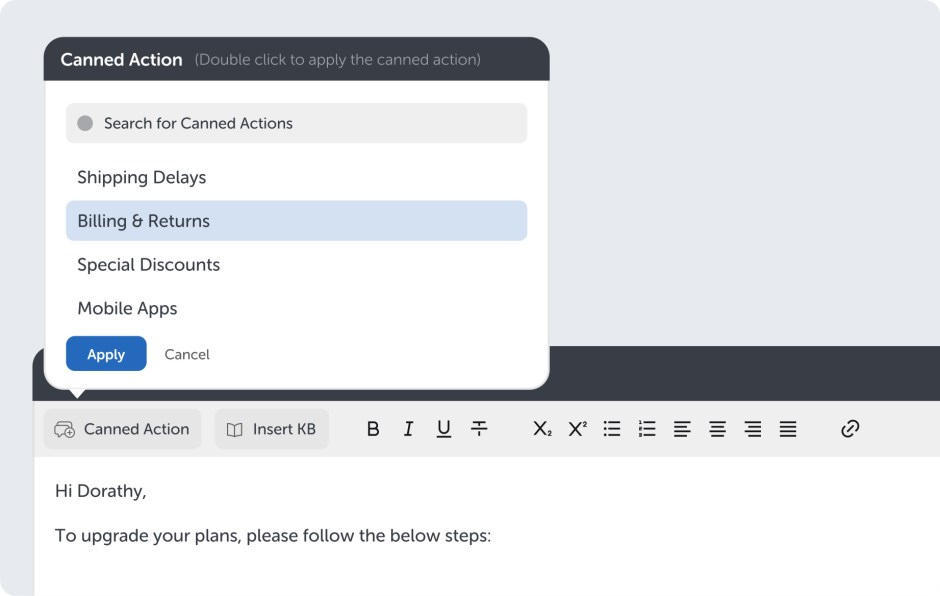
- Build a comprehensive library of canned actions
- Segregate based on category or issue type
- Apply canned action to your reply window with a single click
4. Implement SLA-Based Alerts
Never miss a deadline again. Automate reminders and escalations to keep your team on track.
How to do it in HappyFox:
- Define SLAs based on ticket priority, customer type, or issue category
- Set up automated reminders for approaching deadlines
- Configure escalation rules for overdue tickets
5. Create Follow-Up Reminders
Keep conversations flowing and ensure no customer falls through the cracks.
How to do it in HappyFox:
- Set automated follow-up reminders for unresolved tickets
- Configure time-based triggers to check in after ticket resolution
- Use Smart Rules to create task reminders for complex, multi-step issues
6. Enhance Team Collaboration
Streamline communication within your support team for faster, more efficient problem-solving.
How to do it with HappyFox:
- Agent collision detection
- Private/internal notes
- Task management

7. Leverage AI-Powered Suggestions
Let artificial intelligence supercharge your support efforts with HappyFox AI agent copilot.
How to do it in HappyFox:
- Ticket summary generation
- Response recommendations
- Knowledge Base article suggestions
- Writing assistance

Putting It All Together
Implementing these 7 automation rules will transform your shared inbox into a productivity powerhouse. Here’s a quick implementation checklist:
1. Map out your current workflow and pain points
2. Prioritize which automation rules will have the biggest impact
3. Set up and test each rule individually
4. Train your team on the new automated processes
5. Monitor performance and adjust as needed
Remember, automation is powerful, but it requires ongoing refinement. Regularly review and optimize your rules to ensure they continue serving your team and customers effectively.
Ready to Supercharge Your Shared Inbox?
Don’t let email overload hold your team back. With HappyFox’s powerful automation features, you can:
- Slash response times
- Boost team productivity
- Improve customer satisfaction
- Reduce agent burnout
It’s time to take control of your shared inbox and deliver exceptional support at scale.
Experience the power of automated workflows firsthand. Book a HappyFox demo today and see how our intelligent automation can transform your help desk operations.





