


Every extra click, every platform switch, every search for the right metric—it all adds up to less time helping customers and more time wrestling with software. Support teams everywhere know this frustration well: tools that should streamline work often create more obstacles instead.
At HappyFox, we’re constantly listening to these industry-wide challenges, analyzing support workflows, and identifying opportunities to make operations more efficient. Throughout 2025, we’ve been hard at work turning the most common support team needs into powerful new features.
Our product team spent countless hours talking to support managers across different organizations, observing agent workflows, and diving deep into the feature requests that consistently emerge from the support community. Five key themes appeared repeatedly:
- Personalized dashboards tailored to specific roles
- Unified social media support alongside traditional channels
- Faster access to functions without losing context
- Better content workflow management for knowledge base
- Improved project management connectivity with support tickets
Here are those top 5 support requests and the HappyFox help desk features we built in 2025 to address them.
1. “We need dashboards tailored to our specific roles and needs”
Our Solution: Custom Dashboard Analytics
One of the other requests that made more sense: “We need dashboards that actually help us make decisions for our specific roles.” Support teams wanted reporting that was personalized rather than generic.
What we built for different roles:
- Drag-and-drop dashboard builder: Create the exact view you need without technical knowledge
- Role-specific widgets: Choose from performance metrics, SLA tracking, customer satisfaction, asset management, and agent activity displays that matter to your specific role
- Real-time updates: Your critical alerts surface immediately as conditions change
- Individual customization: Your dashboard setup doesn’t affect anyone else’s view
Our widget categories:
We developed 10+ widget types based on your requests: Assets, Contact Groups, Canned Actions, Performance metrics, SLA compliance, Distributions, and Satisfaction Surveys—all with individual-level filtering.
See exactly how to set up dashboards for agents, managers, and executives with our comprehensive dashboard creation guide.
Implementation guidance we recommend:
Start with our “three-question approach”—identify the three questions you ask most often about your support operations, then build widgets that answer them directly.
2. “We need unified Instagram support with our other channels”
Our Solution: Instagram Integration for Customer Support
Social media support across channels is a key need for modern support teams. Managing Instagram separately from other support channels creates a gap in omnichannel strategy.

Setup we designed:
We built the integration to work with Instagram Business Accounts linked to Facebook Pages, reflecting how your marketing and customer service teams actually collaborate.
Workflow benefits you’ll see:
Instagram interactions now appear in your regular HappyFox ticket queue alongside email and phone support. You can apply the same routing rules, SLA tracking, and escalation procedures across all channels.
3. “We need faster access to functions without losing our context”
Our Solution: Go-To Navigation Feature
The need is clear: teams need a way to quickly access any function without losing their place or navigating through multiple menus.

How we solved it:
- Universal keyboard access: Press ⌘+K (Mac) or Ctrl+K (Windows) from anywhere in your HappyFox system
- Intelligent search: Type what you need—”create ticket,” “forward,” “reports”—and get there instantly
- Context-aware results: We show different options based on where you are—general navigation from the dashboard, ticket-specific actions when you’re in a case
- Learning capability: Our search learns which functions you use most and prioritizes them
Want to start navigating faster today? Here’s your comprehensive guide to Go-To Navigation shortcuts and setup.
Why we built it this way:
We studied how developers use command palettes in their tools and realized support agents needed the same instant-access capability. No more clicking through menus while customers wait.
4. “We need better content workflow management for our knowledge base”
Our Solution: Knowledge Base Draft Management
Support teams need the ability to prepare content updates without immediately publishing them. Managing seasonal content, approval workflows, and major restructuring became much easier with our new approach.
How our draft management works:
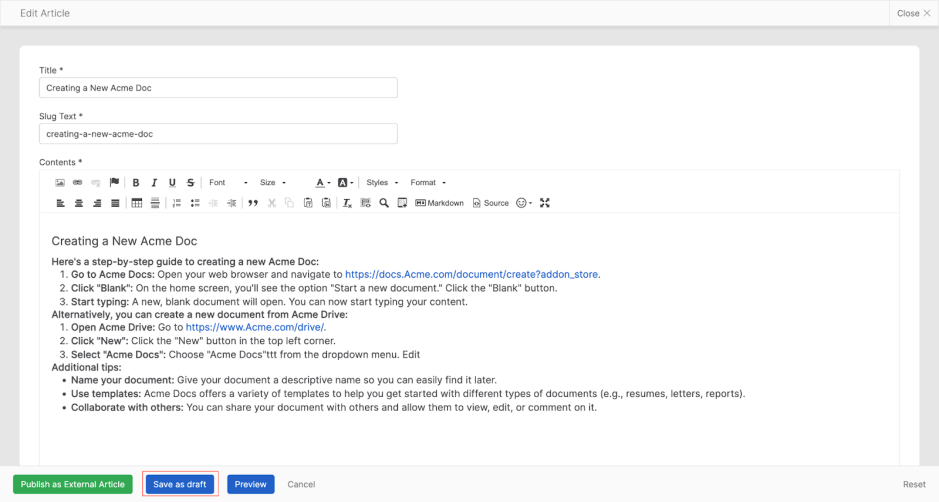
- Save as Draft option: Edit any published article and save changes as a draft without affecting the live version
- Linked draft system: Each draft connects to its published article, maintaining clear relationships
- Approval workflow support: Perfect for organizations requiring content review before publication
- Seasonal preparation: Prepare holiday documentation, policy updates, and seasonal changes in advance
What this enables:
- Prepare major article restructuring without disrupting live content
- Create seasonal content updates well in advance of when they’re needed
- Implement approval processes for content changes
- Test different versions of documentation before making them public
Simple workflow we designed:
Make your edits, click “Save as Draft,” and continue refining until you’re ready to publish. The published article remains untouched until you decide to push your changes live.
Master Knowledge Base drafts: setup, workflows, and best practices.
5. “We need better project management connectivity with our support tickets”
Our Solution: Trello Project Integration
Managing follow-up work, bug fixes, and feature requests often falls through the cracks without proper project management integration. Support teams need seamless connections between customer issues and development workflows.
How our Trello integration works:
- Direct card creation: Generate Trello cards directly from support tickets with pre-filled details
- Existing card linking: Connect tickets to ongoing projects by linking existing Trello cards
- Bidirectional sync: Updates flow between HappyFox tickets and Trello cards automatically
- Context preservation: Ticket details, customer information, and issue descriptions transfer seamlessly
Workflow benefits you’ll see:
Development teams stay informed about customer-reported issues without manual handoffs. Support tickets connect directly to project boards, ensuring nothing gets lost between customer reports and development sprints.
Connect Trello to HappyFox and bridge your support-to-project workflow.
Setup we designed:
Integration works through your existing Trello workspace structure. Choose the board and list where you want cards created, and our system handles the rest. You can even customize sync settings to control which updates flow between platforms.
How We Recommend Implementing These New Features
Our suggested rollout approach:
Introduce new features gradually for the best adoption results. We recommend starting with the navigation improvements that provide immediate productivity benefits, then adding analytics dashboards and integrations once your team is comfortable.
Training resources we provide:
Our redesigned navigation requires minimal training due to its intuitive design. For custom dashboards, we offer guidance on widget selection for different roles. Social media integrations come with clear protocols for response times and escalation procedures.
Success measurement:
We recommend monitoring key performance metrics like average response time, tickets per agent daily, and customer satisfaction scores to evaluate the impact of implementing our new features.
Common Implementation Questions We Address
- Dashboard complexity: We advise focusing on 3-5 metrics that directly impact your daily decisions rather than displaying all available data to avoid information overload.
- Integration protocols: For social media integrations, we recommend establishing clear policies for response times, escalation procedures, and brand voice consistency before activation.
- Change management: We understand some team members resist new features. We suggest starting with willing early adopters who can demonstrate value to encourage broader adoption.
We’re Just Getting Started
The best features come from listening to our users. These 2025 releases represent months of feedback, observation, and development work focused on making your support operations more efficient and effective. The combination of streamlined navigation, personalized analytics, expanded channel support, and regulatory compliance creates the comprehensive support platform you’ve been asking for.
Ready to see how these features can transform your support operations? We’d love to show you how we’ve addressed the specific needs you’ve been sharing with us.





