
Ever calculated how many times your support team switches between Microsoft Teams and their help desk software daily? For most IT managers, this constant context-switching isn’t just frustrating—it’s killing productivity. When your team is handling hundreds of support requests while trying to maintain effective communication in Teams, every second spent jumping between apps adds up.
Why Teams-Based Ticketing is Revolutionizing IT Support
The concept is simple but powerful: bring your help desk directly into Microsoft Teams. Instead of forcing agents to constantly switch between applications, modern ticketing systems integrate seamlessly with Teams, transforming it from a communication tool into a complete support hub.
Key Benefits of Managing Tickets in Microsoft Teams
1. Streamlined Communication
- Instant ticket notifications in relevant Teams channels
- Real-time updates on ticket status changes
- Direct collaboration on complex issues without leaving Teams
2. Enhanced Productivity
- Create and update tickets without switching contexts
- Access knowledge base articles instantly
- Maintain team discussions and ticket handling in one place
3. Better Team Coordination
- Channel-specific ticket routing
- Simplified escalation process
- Improved visibility across support operations
Essential Features to Look for in a Teams Ticketing System
Instant Notifications
- Real-time alerts for new tickets
- Customizable notification preferences
- Channel-specific alert routing
Native Ticket Creation
- Create tickets directly within Teams
- Rich text formatting support
- File attachment capabilities
Knowledge Base Integration
- Search articles without leaving Teams
- Quick access to solution database
- Easy knowledge sharing
Common Challenges and Solutions
Challenge 1: Information Silos
Solution: Implement a unified ticketing system that syncs all communication and updates across Teams and your help desk platform.
Challenge 2: Response Time Delays
Solution: Use instant notifications and in-Teams ticket creation to reduce response times dramatically.
Challenge 3: Knowledge Access
Solution: Integrate your knowledge base directly into Teams for immediate access to solutions.
Best Practices for Teams Ticketing Implementation
- Start with clear workflow definitions
- Set up channel-specific notifications
- Train agents on in-Teams ticket management
- Establish SLA monitoring processes
- Regular review and optimization of workflows
Pro Tips for IT Managers
- Configure notification preferences per channel
- Set up dedicated support channels
- Use tags for better ticket organization
- Implement clear escalation paths
The HappyFox Advantage: Transforming Teams into a Support Powerhouse
HappyFox is a comprehensive help desk ticketing system that centralizes all your support requests and enables omnichannel support through a single platform. By organizing, prioritizing, and automating your support workflows, HappyFox puts you in complete control of your customer service operations.
When integrated with Microsoft Teams, HappyFox brings this powerful ticketing capability directly into your MS Teams environment:
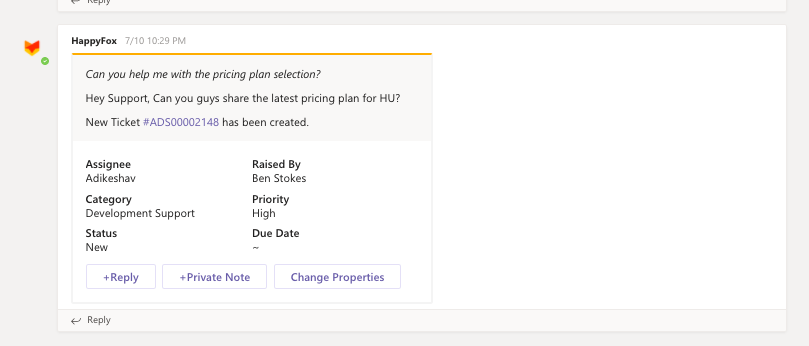
Instant Ticket Management
- Create tickets without leaving Teams
- Update and respond to tickets instantly
- Track ticket progress in real-time
Smart Knowledge Base Access
- Search articles using @mentions
- Access solutions instantly
- Share knowledge efficiently
Powerful Notification System
- Customize notifications per channel
- Get instant updates on ticket status
- Keep teams informed automatically
Learn more about HappyFox and Microsoft Teams integration
Ready to Transform Your Teams Support Experience?
Don’t let your support team waste time switching between apps. With HappyFox’s Microsoft Teams integration, you can:
- Handle tickets directly in Teams
- Access your knowledge base instantly
- Get real-time notifications
- Improve team collaboration
Take the Next Step: See how HappyFox can transform your Microsoft Teams into a powerful support hub. Book a demo today and discover the perfect ticketing solution for your team.