



“Our customers are complaining on X, but we keep missing their tweets!”
Sound familiar? You’re not alone. Support teams everywhere struggle to track and manage the flood of customer interactions on X (formerly Twitter). With 500 million tweets sent daily and 71% of users expecting a brand response within an hour, managing X support without proper tools is like trying to drink from a firehose.
Let’s transform your X(Twitter) support operations from chaos to clarity with a proper help desk integration.
Why Integrate X(Twitter) with Your Help Desk?
When customers reach out on X(Twitter), they expect quick, efficient responses. Here’s what happens without proper integration:
– Support agents manually monitor X feeds
– Tweets slip through the cracks
– Response times lag
– Customer frustration builds
– Brand reputation suffers
A bi-directional sync between your X(Twitter) handle and help desk transforms this scattered approach into a unified support operation.
Key Benefits of X Help Desk Integration
Centralized Support Management
– Convert tweets and DMs into trackable tickets
– Manage all customer interactions from one dashboard
– Never miss a brand mention or customer query
– Create tickets from mentions and direct messages automatically
Improved Response Times
– Instant notification of new mentions
– Quick access to customer history
– Automated ticket creation and routing
– 10-minute sync intervals for new mentions and messages
Better Team Collaboration
– Clear ticket ownership and accountability
– Seamless handoffs between team members
– Consistent response quality
– Centralized knowledge base for quick responses
Enhanced Analytics
– Track response times and resolution rates
– Monitor brand sentiment
– Identify common customer issues
Implementation Guide: Setting Up X Integration
Let’s walk through the process of integrating X with your help desk system.
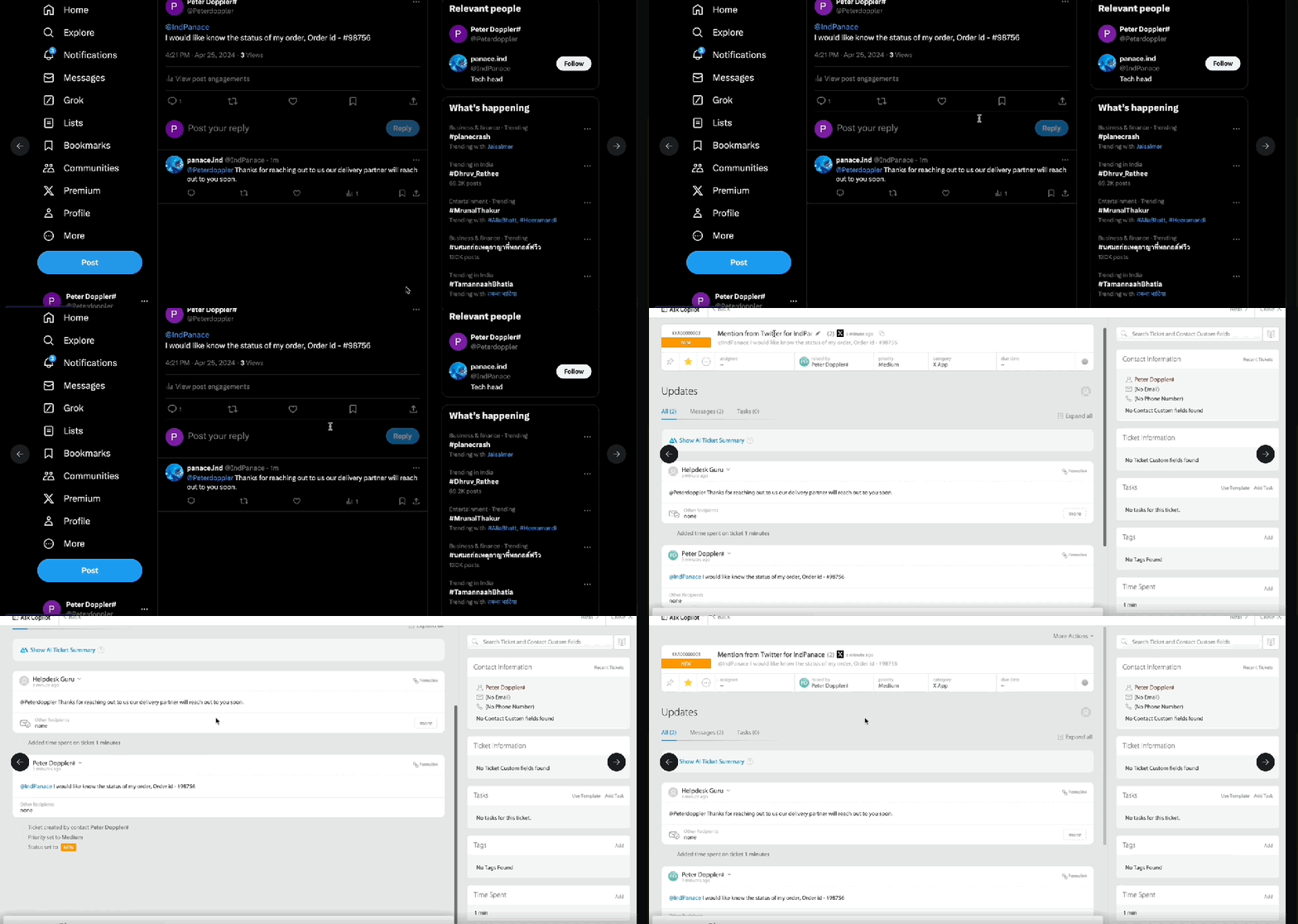
Step 1: Preparation
Implementation Checklist:
– [ ] Audit current X support process
– [ ] List all X handles requiring integration
– [ ] Create non-email integrated categories for X tickets
– [ ] Plan ticket routing workflows
– [ ] Prepare response templates
Step 2: Basic Configuration
Navigate to the platform’s integration or app marketplace
Locate and select X/Twitter integration
Complete the authorization process
Configure your X account permissions
Select which X handles to integrate
Pro Tip: Create separate categories for different types of X interactions (mentions vs. DMs) to better track and analyze response patterns.
Step 3: Customize Settings
Configure these essential parameters:
Per Account Settings:
Account Integration Settings:
- Account Activation – Choose which X accounts to monitor
- Interaction Types – Select which types of interactions to track:
- Public mentions and replies
- Direct messages
- Brand mentions
- Ticket Organization – Define how social interactions are categorized and tagged
- Response Rules – Set up guidelines for different types of social interactions
Pro Tip: Use the gear icon next to each account to manage individual settings and ensure proper category mapping.
Step 4: Train Your Team
Ensure your support team understands:
– Recognizing and tracking X(Twitter) conversations converted as support tickets
– Character limit considerations (280 characters)
– Auto-populated usernames in replies
– Proper ticket handling procedures
– Brand voice guidelines
Best Practices for X Support Management
Response Time Management
– Monitor the 10-minute sync interval for new content
– Set up clear handling procedures for after-hours mentions
– Establish priority levels for different types of mentions
Content Strategy
– Maintain consistent brand voice
– Create pre-approved response templates
– Use appropriate hashtags strategically
– Know when to move conversations to DMs
Team Coordination
– Assign dedicated agents to handle tickets from X
– Establish clear handoff procedures
– Regular team training on X etiquette
Measuring Success
Track these key metrics to evaluate your X support performance:
1. First Response Time
2. Resolution Time
3. Customer Satisfaction
4. Brand Sentiment
5. Issue Resolution Rate
Managing Your X Integration
Daily Operations
– Monitor ticket queue for new X interactions
– Check sync status for all integrated accounts
– Review response quality and timing
– Update knowledge base as needed
Maintenance Tasks
– Regularly verify account authentication
– Update category mappings as needed
– Review and refresh response templates
– Monitor integration status
Troubleshooting Tips
Common challenges and solutions:
1. Missing Mentions
– Verify account status is enabled
– Check category mapping
– Confirm 10-minute sync timing
2. Response Issues
– Verify character count
– Check account authorization
– Confirm proper category assignment
HappyFox X(Twitter) Integration: Features and Capabilities
HappyFox offers a comprehensive X integration solution designed to streamline your social media support operations. Here’s what you get:
Core Integration Features
– Seamless conversion of X statuses into tickets
– Automatic ticket creation from X mentions
– Direct Message (DM) to ticket conversion
– 10-minute sync interval for new content
– Non-email integrated category support
– X icon indicators for easy ticket identification
Smart Configuration Options
– Individual account settings management
– Toggle controls for status, mentions, and DMs
– Custom category mapping per account
– Automated user information capture
– Character limit management (280 characters)
– Auto-populated username handling
Management Tools
– Easy account linking/unlinking
– Centralized integration control
– Clear status indicators
– Robust error handling
– Simple toggle controls for enabling/disabling integration
Security and Compliance
– Secure authorization process
– Protected data handling
– Reliable sync mechanisms
– Clear audit trails
Pro Tip: Take advantage of HappyFox’s non-email integrated categories for X tickets to keep your social media support organized and separate from other channels.
Next Steps: Optimizing Your X(Twitter) Support
Ready to transform your X support operations? Here’s your action plan:
1. Audit your current social support process
2. Document response time goals
3. Plan your integration strategy
4. Train your support team
5. Monitor and optimize performance
Remember: Effective X support isn’t just about responding to tweets – it’s about building lasting customer relationships through timely, helpful interactions.
Transform your X support from reactive to proactive. Experience how proper X integration can streamline your social support operations and improve customer satisfaction. Book a demo today.




