When Sarah, a support manager at a growing SaaS company, noticed their ticket volume had suddenly doubled, her team was overwhelmed. Emails piled up, customers complained about slow responses on social media, and frustration grew on both sides. Sound familiar?
Selecting the right customer service channels is essential for smooth operations, happy customers, and an efficient support team. But with so many channels available, how do you decide which ones are right for your business?
In this guide, we’ll explore the seven most effective customer service channels and help you craft a strategic mix tailored to your team’s needs.
What are Customer Service Channels?
Customer service channels are platforms and methods businesses use to communicate with and support customers. From resolving quick queries to handling complex technical issues, these channels play a vital role in shaping the customer service experience.
7 Most Effective Customer Service Channels
1. Email Support: The Foundation of Customer Service
Email remains one of the most reliable channels for customer support.
- Detailed Communication: Ideal for complex issues requiring detailed explanations.
- Documentation Trail: Provides an automatic record of all interactions.
- Asynchronous Support: Allows thoughtful responses and better workload management.
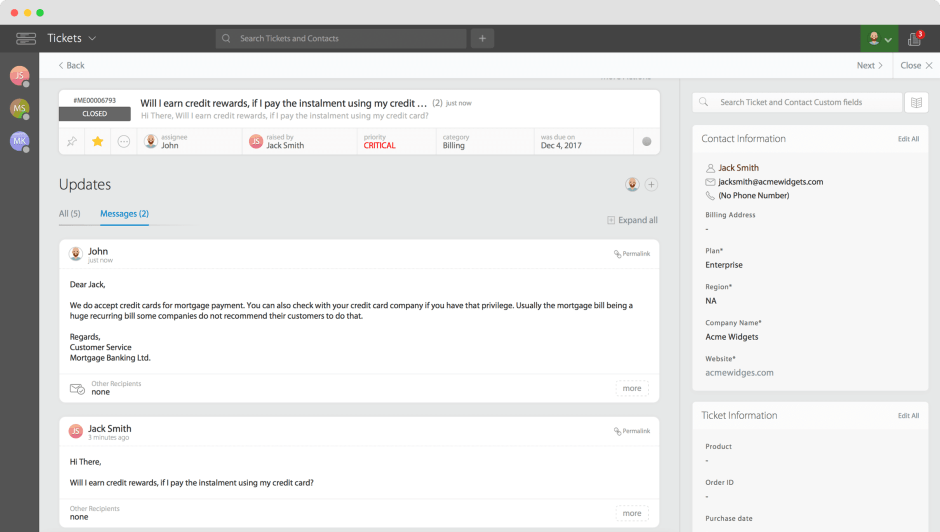
Pro Tip: Use email templates and automated responses for common queries to improve consistency and reduce response times.
2. Web Forms: Structured and Efficient
Web forms streamline support by:
- Collecting necessary information upfront.
- Routing tickets to the right teams.
- Reducing repetitive back-and-forth communication.
Implementation Tips:
Keep forms focused and simple.
Include only essential fields.
Add conditional logic for complex scenarios.
Integrate knowledge base suggestions for self-service.
3. Phone Support: The Human Connection
Voice support remains crucial for:
- Urgent issues that need immediate attention.
- Complex problems requiring real-time interaction.
- High-value customers preferring direct communication.
Pro Tip: Ensure your team is trained in active listening and problem-solving to make phone support effective.
4. Live Chat: Instant Support, Instant Results
Live chat provides:
- Real-time problem-solving.
- Faster response times.
- Enhanced customer satisfaction.
Pro Tip: Analyze chat transcripts to identify recurring issues and improve your knowledge base.
5. Facebook: Support in the Social Sphere
Social media platforms like Facebook allow brands to:
- Handle public and private customer inquiries.
- Manage brand reputation.
- Build stronger customer communities.
6. Twitter: Quick and Transparent Communication
Twitter excels at:
- Swift public acknowledgment of issues.
- Transparent problem resolution.
- Proactive engagement with customers.
7. WhatsApp: Personal and Secure Conversations
WhatsApp Business is gaining traction for:
- Secure, encrypted communication.
- Rich media sharing.
- Familiarity and ease of use for customers.
How to Choose the Right Channel Mix
1. Understand Your Customers
Identify where customers currently reach out.
Survey customer preferences.
Analyze competitor offerings.
2. Evaluate Your Resources
Assess your team’s skills and size.
Review your budget.
Ensure your technology supports integration.
3. Match Channels to Use Cases
| Channel | Best For |
| Complex issues, detailed explanations | |
| Live Chat | Quick questions, sales assistance |
| Phone | Urgent problems, VIP support |
| Social Media | Public interactions, engagement |
Learn more about setting up channels
Implementing Your Channel Strategy
1. Start Small, Scale Gradually
Begin with essential channels (e.g., email, live chat).
Expand based on customer demand.
2. Train Your Team
Provide training specific to each channel.
Establish clear response guidelines.
3. Monitor and Optimize
Track key metrics:
Response times
Customer satisfaction scores
Resolution rates
HappyFox: Your Omnichannel Support Solution
Managing multiple support channels can be challenging without the right tools. HappyFox help desk simplifies this by unifying customer communication across all platforms into a single, streamlined interface.
Unified Ticketing System
- Automatically convert conversations from all channels into tickets.
- Maintain conversation history for better context.
- Seamlessly switch between channels without losing continuity.
Smart Channel Integration
- Email Support: Custom support addresses and automatic ticket creation.
- Web Forms: Smart routing and integration with your knowledge base.
- Voice Support: Integration with popular platforms like Aircall and Dialpad.
- Live Chat: Real-time conversations with ticket tracking.
- Social Media (Facebook & Twitter): Manage messages and posts efficiently.
- WhatsApp: Secure communication and instant ticket creation.
Advanced Features
- AI-powered ticket routing.
- Automated workflows.
- Comprehensive reporting and analytics.
- Knowledge base integration.
Pro Tip: HappyFox’s smart routing ensures customer inquiries are directed to the right team members, improving response times and resolution rates.
Build a Support Ecosystem That Delights
Choosing the right mix of customer service channels is key to delivering exceptional support. By understanding your customers’ preferences, aligning channels with use cases, and continuously optimizing performance, you can create a seamless support experience.
Take the time to evaluate your current approach, refine your strategy, and ensure your team is equipped to meet customer expectations across every channel. Book a demo today.