


Your sales team races against targets while marketing campaigns pile up against deadlines. Without effective sales and marketing support, critical leads get buried and campaign requests float between scattered spreadsheets. The solution? HappyFox’s unified support system transforms chaos into streamlined efficiency with purpose-built tools for sales and marketing teams.
The Challenge of Sales and Marketing Support
When teams rely on disconnected systems:
– Sales leads get buried in overflowing inboxes
– Marketing requests float between spreadsheets
– Teams lose hours searching for information
– Cross-department coordination suffers
– Performance tracking becomes impossible
Let’s explore how an integrated support solution like HappyFox addresses these challenges while maximizing team efficiency.
Core HappyFox Features for Streamlined Support
HappyFox provides a comprehensive suite of features designed to streamline sales and marketing support operations:
1. Centralized Request Management
The unified ticketing system brings order to chaos by transforming scattered communications into organized, trackable items. This comprehensive solution offers:
Ticket Creation and Routing
– Convert emails into structured tickets automatically
– Create categorized tickets for leads, campaigns, and resources
– Assign custom categories for different request types
– Set priorities based on importance/deal size
– Track deadlines and progress in real-time
Staff Assignment and Management
– Distribute work through an intuitive staff interface
– Monitor ticket queues for each team member

– Enable quick reassignment when needed
– Set up round-robin distribution for balanced workload
– Track recent replies and updates
Pro Tip: Create separate ticket categories for sales leads and marketing requests while maintaining cross-department visibility for better coordination.
Real-world Example:
Sales Use Case: When a lead comes in through email, it’s automatically converted into a ticket, categorized by deal size, and assigned to the appropriate sales rep. The rep can track all interactions and set follow-up reminders within the ticket.
Marketing Use Case: A campaign request ticket automatically captures brief, timeline, and resource requirements. Marketing managers can prioritize requests and assign team members while tracking progress through customizable status updates.
2. Self-Service and Knowledge Management
Build powerful self-service resources with the dual-purpose knowledge base system. This versatile platform enables:
External Knowledge Base
– Create comprehensive FAQs for common queries
– Share process documentation and guidelines
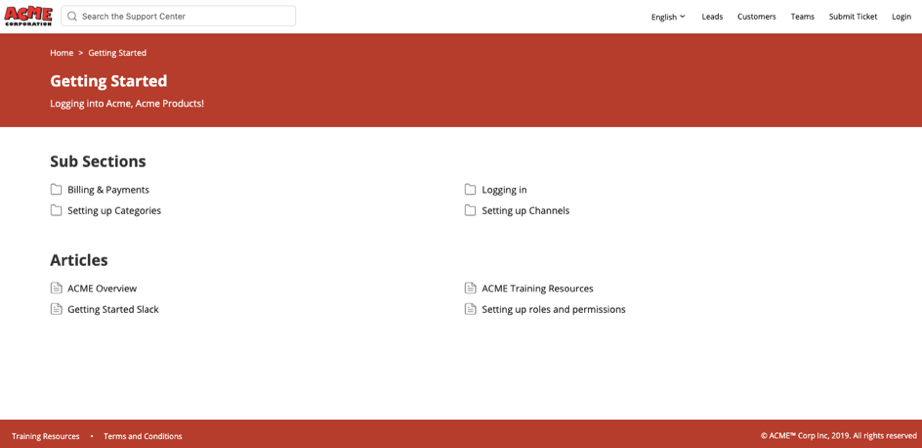
– Provide easy access to contact procedures
– Reduce repetitive support requests
– Enable 24/7 information access
Internal Knowledge Repository
– Store sales playbooks and best practices
– Maintain marketing campaign templates
– Document standard operating procedures
– Share team resources securely
– Enable quick onboarding of new staff
Learn more: Internal vs External Knowledge Base – Comprehensive Guide
3. Communication and Contact Hub
The support software centralizes all your contact management and team communication needs in one unified hub. This integrated approach provides:
Contact Management
– Build a centralized contact database
– Link contacts to relevant tickets
– Store complete interaction history
– Track relationship context
– Access contact information instantly
Team Collaboration
– Add private notes for internal discussion

– Share updates across departments
– Track communication history
– Maintain conversation context
– Enable seamless handoffs
4. Workflow Automation
Eliminate repetitive tasks with HappyFox’s intelligent automation capabilities. The system offers flexible automation tools including:
Process Automation
– Set up automated ticket routing
– Configure response templates
– Enable smart assignment distribution
– Schedule follow-up reminders
– Maintain SLA tracking
Customizable Rules
– Create department-specific workflows
– Set up priority-based routing
– Configure status-based actions
– Customize notification settings
– Automate routine tasks
Automation in Practice:
Sales Workflow: When a lead is marked as “Qualified,” the system automatically creates follow-up tasks, schedules check-in reminders, and notifies the relevant product specialist.
Marketing Workflow: Content approval requests automatically route through predefined stages – from initial review to final approval – with automatic notifications at each step and SLA monitoring.
5. Performance Analytics
Gain actionable insights with comprehensive reporting and analytics tools. The platform provides detailed metrics through:
Ticket Metrics
– Track resolution rates
– Monitor response times
– Measure team performance
– Analyze ticket volumes
– Identify bottlenecks
Operational Insights
– Generate custom reports
– Track departmental metrics
– Monitor staff productivity
– Measure SLA compliance
– Analyze trends over time
6. AI-Powered Support Tools
Enhance your support operations with HappyFox’s suite of AI tools designed to boost efficiency and decision-making:
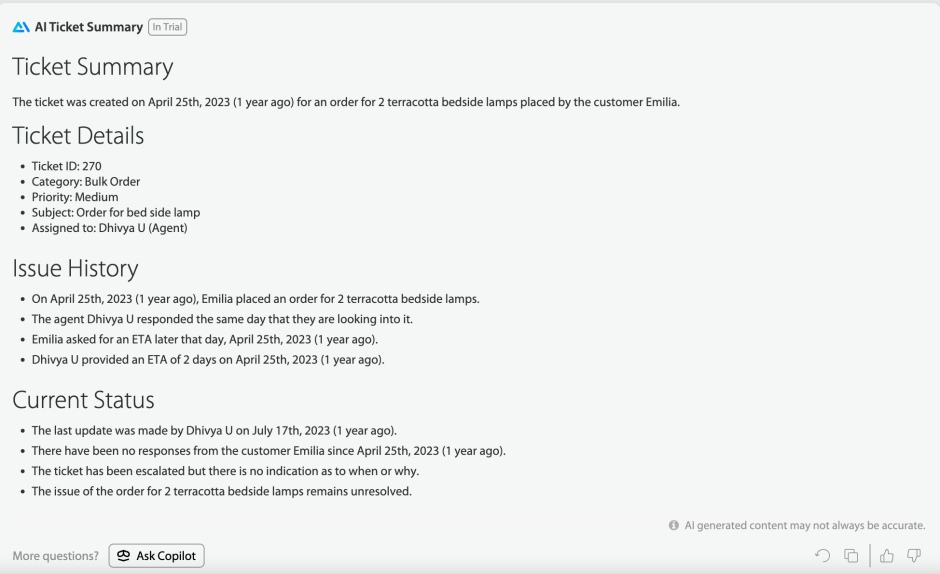
AI Copilot
– Analyze and summarize tickets instantly
– Get AI-assisted response suggestions
– Identify recurring patterns in requests
– Enable faster, more accurate responses
AI Knowledge
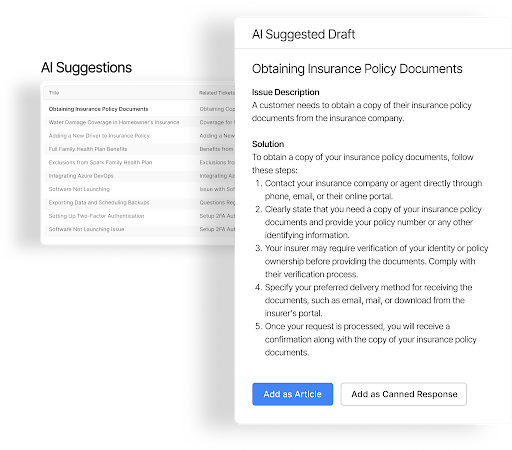
– Automatically identify knowledge gaps
– Generate suggested article updates
– Improve self-service content
– Maintain up-to-date documentation
AI Resolve
– Provide instant answers on your support center
– Suggest solutions for common queries
– Reduce ticket volume through self-service
– Enable 24/7 automated support
AI Agents
– Create custom AI assistants for specific scenarios
– Generate suggested replies
– Handle routine inquiries automatically
– Free up staff for complex tasks
– Maintain consistent response quality
Real-World Impact:
Sales Application: AI Copilot analyzes incoming lead inquiries, summarizes key requirements, and suggests relevant responses based on successful past interactions. This helps sales teams respond faster with more personalized and effective communications.
Marketing Example: When handling campaign requests, AI Knowledge automatically suggests relevant resources from your knowledge base and identifies when new process documentation might be needed, keeping your team’s resources current and comprehensive.
Implementation Guide
Successfully implementing HappyFox for your sales and marketing support requires a structured approach:
Phase 1: Setup and Configuration
1. Assessment
– Map current processes to HappyFox features
– Identify key requirements
– Define workflow needs
– Set success metrics
2. Basic Configuration
– Set up ticket categories
– Configure staff accounts
– Create basic automations
– Enable notifications
3. Knowledge Base Setup
– Create content structure
– Add essential documentation
– Set up access permissions
– Enable search functionality
Phase 2: Team Onboarding
1. Training
– Core system features
– Ticket management
– Knowledge base usage
– Communication tools
2. Process Documentation
– Usage guidelines
– Best practices
– Standard procedures
– Troubleshooting steps
Phase 3: Optimization
1. Review and Adjust
– Monitor ticket flow
– Refine categories
– Adjust automations
– Update documentation
2. Performance Tuning
– Optimize workflows
– Enhance templates
– Improve routing
– Refine metrics
Elevate Your Support Operations with HappyFox
Stop letting valuable leads and marketing requests get lost in the shuffle. HappyFox’s unified support solution provides:
– Organized request tracking
– Comprehensive knowledge management
– Efficient team collaboration
– Automated workflows
– Clear performance visibility
Ready to streamline your sales and marketing support? Schedule a HappyFox demo today and discover how our integrated solution can transform your operations.





