


Your support agents switch between multiple tools 20+ times per hour. Each context switch costs them valuable minutes and breaks their focus. When your team already spends most of their day in Slack, why not bring help desk functionality to where they work?
Why Slack Integration Matters
Support teams face growing pressure to provide faster, more accurate responses while juggling multiple platforms. A robust Slack integration addresses key help desk challenges:
Unified Workspace Benefits
– Handle support tickets where your team already collaborates
– Eliminate constant switching between platforms
– Maintain conversation context and history
– Access help desk features without leaving Slack
Real-time Collaboration Power
– Instant team discussions on complex tickets
– Quick escalations to subject matter experts
– Seamless knowledge sharing between departments
– Unified view of customer interactions
Support Process Enhancement
– Automated notifications
– Centralized knowledge base access
– Streamlined team communication
– Faster resolution workflows
HappyFox + Slack: The Ideal Integration
Transform your Slack workspace into a powerful support hub with HappyFox’s comprehensive integration:
Ticket Management Within Slack
Create and manage tickets using simple slash commands:
/happyfox new_ticket [message]
/happyfox update [ticket-id] status=in_progress
/happyfox note [ticket-id] “Internal update”
Smart Notification System
Configure intelligent alerts based on:
– Ticket priority levels
– Assignment changes
– SLA thresholds
– Customer segments
Knowledge Base Access
Access your knowledge base directly in Slack:
– Search articles using `/happyfox search_kb`
– Share solutions in ticket threads
– Quick reference for common issues
– Suggest relevant articles automatically
Workflow Automation
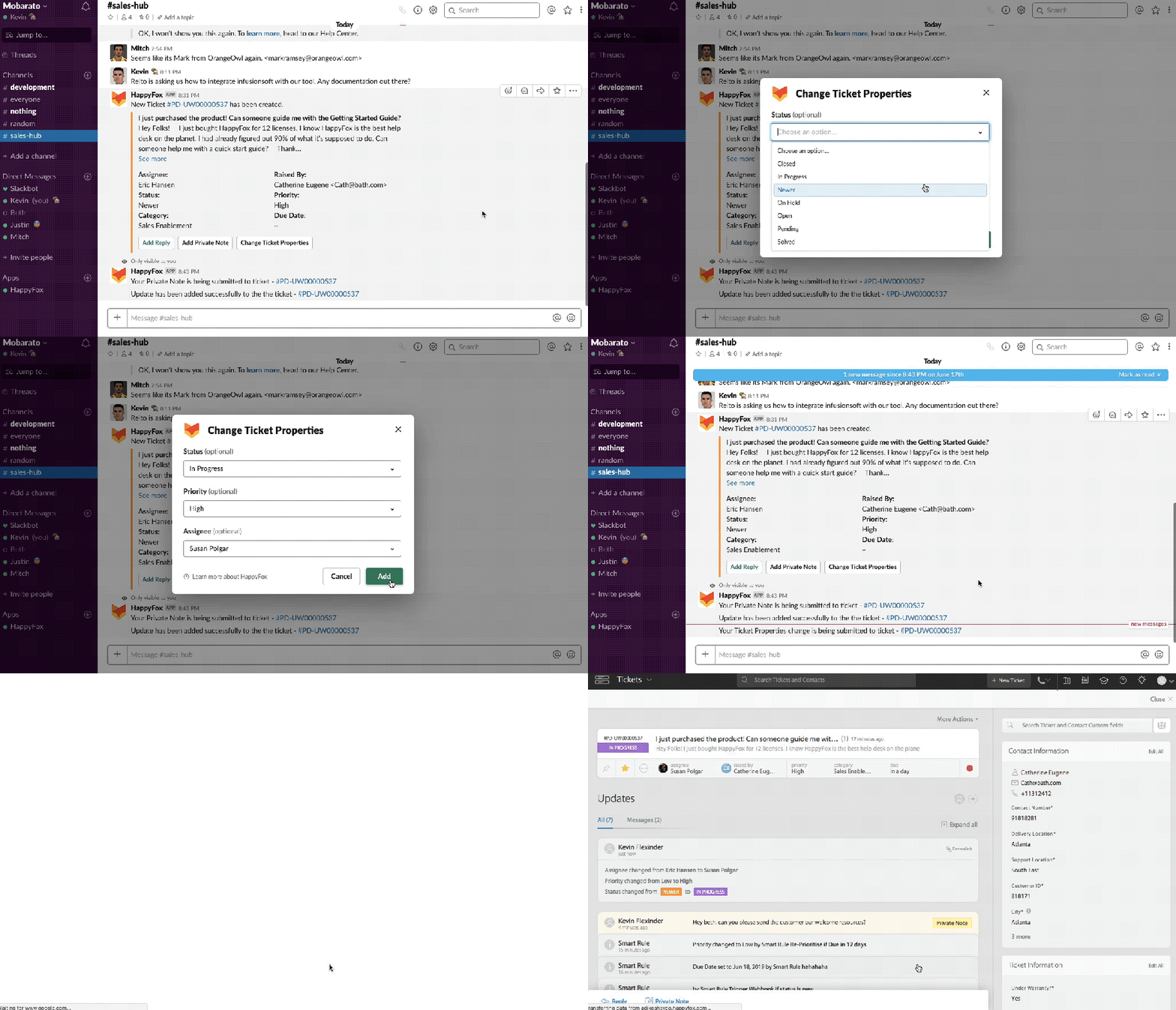
– Streamline ticket handling by updating properties (priority, status, assignee) directly from Slack
– Set up conditional notification rules
– Configure time-based escalations
– Establish SLA monitoring alerts
Improving Agent Productivity with HappyFox Slack Integration
When your help desk seamlessly integrates with Slack, it creates a powerful efficiency multiplier for support teams. Rather than managing multiple workflows across different platforms, agents can leverage a unified workspace that enhances their natural working patterns.
Let’s explore how HappyFox’s Slack integration transforms agent productivity:
Reduced Context Switching
When agents can stay within Slack, productivity soars:
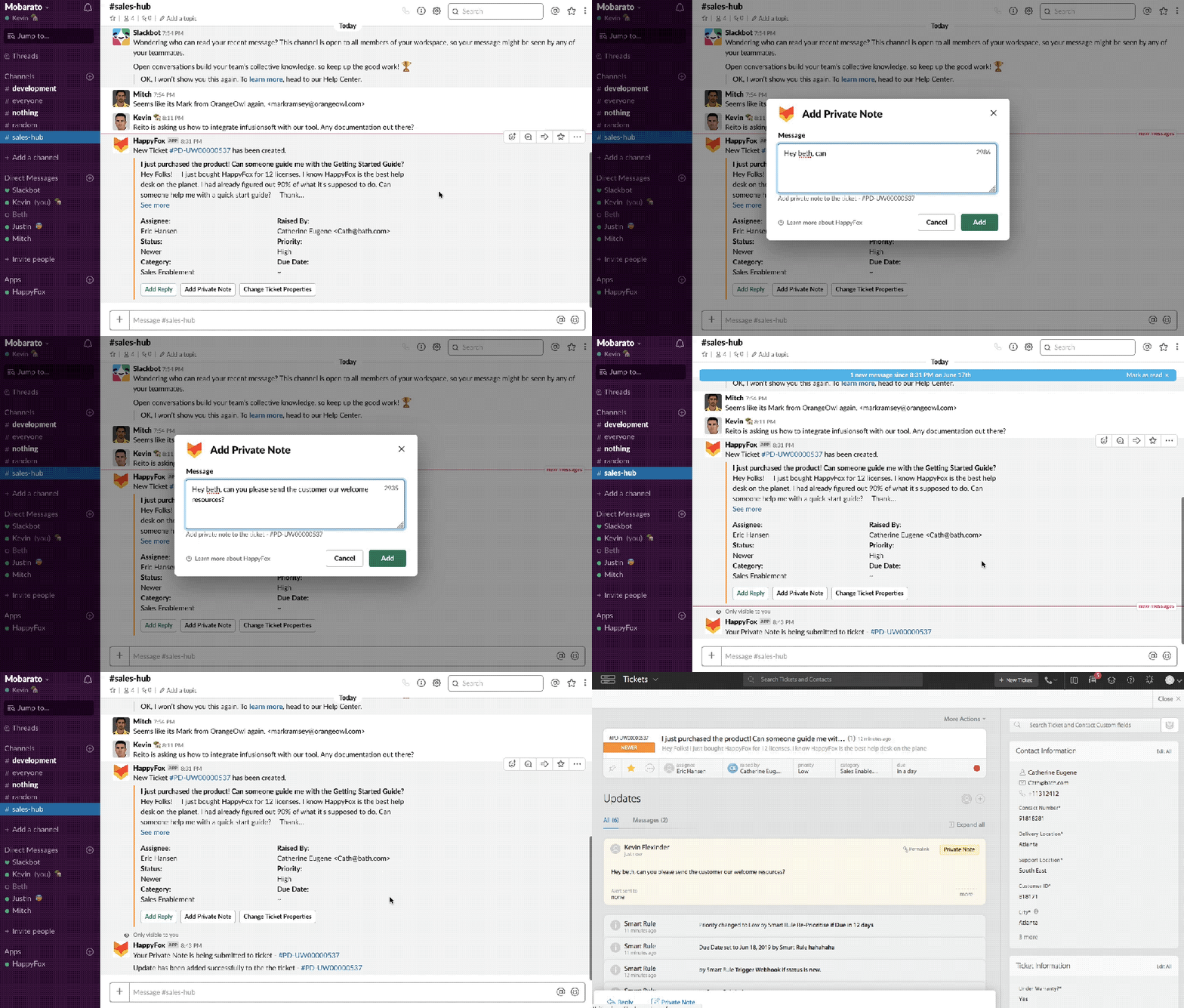
- Handle complete ticket lifecycle without leaving Slack interface
- View customer history and previous interactions inline
- Update ticket status, priority, and assignments with simple commands
- Access all essential help desk tools through familiar Slack commands
- Maintain focus during complex support conversations
Faster Response Times
Smart notifications and instant access lead to quicker resolutions:
- Receive instant alerts for new tickets based on priority rules
- Access relevant knowledge base articles in seconds
- Collaborate with team members in real-time on complex issues
- Update multiple tickets efficiently using slash commands
- Set up automated responses for common queries
Better Team Collaboration
Transform how your support team works together:
- Create dedicated thread discussions for complex tickets
- Instantly loop in subject matter experts from other departments
- Share ticket context and customer history with one click
- Coordinate responses across teams in real-time
- Set up specialized channels for different support tiers
Streamlined Knowledge Sharing
Make institutional knowledge instantly accessible:
- Search knowledge base articles directly within Slack conversations
- Share relevant solutions with both customers and team members
- Contribute to knowledge base updates from within Slack
- Get AI-powered article suggestions based on ticket content
- Track which solutions are most frequently used and shared
Enhanced Workflow Efficiency
Smart automation reduces manual tasks:
- Create customized workflows for different ticket types
- Set up automated escalation paths for urgent issues
- Configure intelligent routing based on agent expertise
- Monitor SLA compliance in real-time
- Track tickets created through Slack with ticket inflow reports
Pro Tip: Encourage agents to create personal shortcuts for their most-used HappyFox commands in Slack to further speed up common actions.
Learn more: Configure Slack Integration with HappyFox
Implementation & Success
Setup Best Practices
Channel Strategy:
– Create dedicated support channels by priority
– Separate internal discussion from notifications
– Set up escalation channels
– Organize by support tiers
Notification Configuration:
– Define priority-based routing rules
– Set up SLA breach alerts
– Configure team-specific notifications
– Establish quiet hours
Workflow Optimization:
– Create standard response templates
– Set up common ticket actions
– Define escalation paths
– Establish collaboration protocols
Measuring Success
Track these key metrics to measure integration impact:
– Average response time reduction
– First contact resolution rates
– Context switching reduction
– Team collaboration efficiency
– Customer satisfaction scores (CSAT)
Pro Tip: Start with a core set of channels and gradually expand based on team feedback and usage patterns.
Elevate Your Support Operations
HappyFox’s Slack integration brings enterprise-grade support capabilities to your team’s favorite collaboration platform. Stop switching between tools and start delivering faster, more efficient support through Slack.
Key Benefits:
– Reduced response times
– Improved team collaboration
– Enhanced knowledge sharing
– Streamlined workflows
– Better agent satisfaction
Ready to transform your help desk operations with HappyFox’s Slack integration? Schedule your personalised demo today and see the integration in action.





