Your customer just sent their third follow-up email this week. Another one posted a frustrated review mentioning your “unhelpful support team.” Your best client is considering switching providers after a billing issue took two weeks to resolve.
Support teams rarely fall apart overnight. But miss enough small cues—like slow replies, vague answers, or lost conversations—and customer confidence starts to vanish. Before you know it, your most loyal accounts are on their way out.
The good news? Most support problems are preventable when you know what to look for. In this blog, we break down 7 early signs of poor customer support —and how to fix them before it affects retention or revenue. Recognizing these red flags early can save your business from losing valuable customers and transform your support team into a competitive advantage.
The Real Cost of Ignoring Poor Customer Support Warning Signs
Before diving into the warning signs, let’s establish why this matters. Poor customer support can affect your business on multiple levels. When businesses ignore these warning signs of poor customer support, customers will switch to competitors without thinking twice.
When customer support fails, the ripple effects are immediate:
- Lost customers who simply stop doing business with you
- Negative word-of-mouth that damages your reputation
- Increased support costs from handling the same issues repeatedly
- Team burnout from constantly firefighting instead of solving root problems
Your help desk isn’t just a cost center—it’s a revenue driver when done right. Let’s identify the specific warning signs of poor customer support that indicate trouble ahead.
Warning Sign #1: Customers Wait Too Long for Initial Responses
The Problem: Nothing frustrates customers more than sending a support request and hearing nothing back. Whether it’s 4 hours, same-day, or next business day, when customers expect faster responses, any delay feels excessive.
What “Too Long” Really Means:
- For urgent issues: More than 2 hours during business hours
- For general inquiries: More than 4-6 hours during business hours
- For any ticket: More than 24 hours total (including weekends)
Why It Happens:
- Manual ticket routing slows everything down
- Agents spend time figuring out who should handle each ticket
- No clear prioritization system for urgent vs. routine requests
The HappyFox Solution:
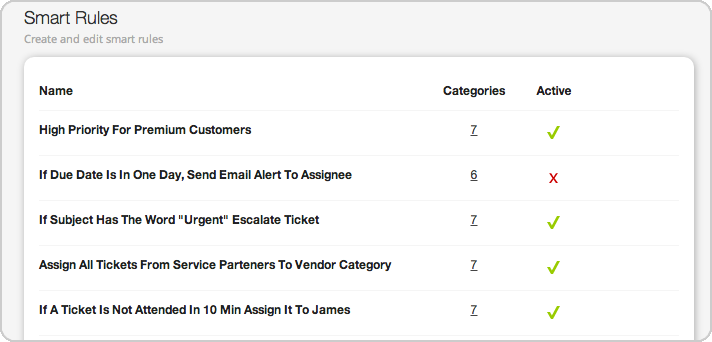
Smart Rules automation eliminates the manual bottleneck that kills response times. The system instantly:
- Routes tickets based on keywords, sender, or issue type
- Assigns to the right agent using round-robin or skill-based distribution
- Sets priorities automatically based on customer tier or urgency
Best For: Teams dealing with high ticket volumes and struggling to meet response time expectations.
Pro Tip: Start with simple rules for common scenarios (like routing billing questions to your finance team), then build more complex automation as your team gets comfortable.
If a business is facing similar problems to ours in terms of tracking incoming emails or a high number of incoming emails from the same customers or suppliers, in my opinion HappyFox really is the best solution to resolve this.
– Pankaj Kumar, Manager, Accounts Payable – WhirlPool Global Finance Center
Warning Sign #2: Agents Provide Cookie-Cutter, Unhelpful Responses
The Problem: Unhelpful chat will create frustration for your customers. Training your agents to avoid cookie-cutter answers and get to the point. Generic responses that don’t address the specific issue make customers feel unheard.
What Customers Experience:
- Responses that clearly didn’t read their original message
- Generic troubleshooting steps that don’t apply to their situation
- Having to repeat their problem multiple times
The HappyFox Solution:
AI Copilot transforms how agents handle tickets by:
- Analyzing ticket context to suggest relevant, personalized responses
- Helping agents understand customer sentiment and history
- Providing writing assistance to improve response quality

Teams using AI Copilot report 30-40% reduction in response composition time with significantly improved response quality.
Best For: Support teams aiming to personalize responses at scale without compromising efficiency.
Warning Sign #3: Your Team Juggles Multiple Platforms to Track Conversations
The Problem: When customer conversations are scattered across email, chat, social media, and phone systems, context gets lost. Agents waste time searching for previous interactions instead of solving problems.
The Customer Impact:
- Having to repeat their story multiple times
- Inconsistent information from different agents
- Feeling like your company doesn’t have its act together
The HappyFox Solution:
Omnichannel ticketing consolidates all customer conversations into a single interface:
- Email – Custom domains or HappyFox-hosted addresses
- Chat – Real-time website integration
- Social Media – Twitter, Facebook, Instagram support
- Phone – Call logs and voicemail integration
Customer context stays intact regardless of how they contact you. A customer might start with chat, follow up via email, and call for urgent updates—all conversations appear in one ticket thread.
Best For: Businesses managing customer queries across multiple channels like email, chat, and social media.
Warning Sign #4: Customers Can’t Find Answers on Their Own
The Problem: According to Forrester, 70% of customers prefer to solve issues themselves before contacting support. When your self-service resources are outdated, hard to find, or incomplete, customers have no choice but to create tickets.
Red Flags:
- High volume of tickets for basic questions
- Customers asking the same questions repeatedly
- Agents spending time on issues that should be self-serviceable
The HappyFox Solution:
AI-powered knowledge base management keeps your self-service resources effective:
- Smart content suggestions – Helps agents identify knowledge gaps and create articles based on common ticket patterns, improving support resolution processes
- AI Answer – Provides customers with instant responses to common questions, eliminating wait times and improving self-service satisfaction
- Automatic article recommendations – Assists agents by suggesting relevant knowledge base content during ticket resolution, leading to faster and more accurate customer support
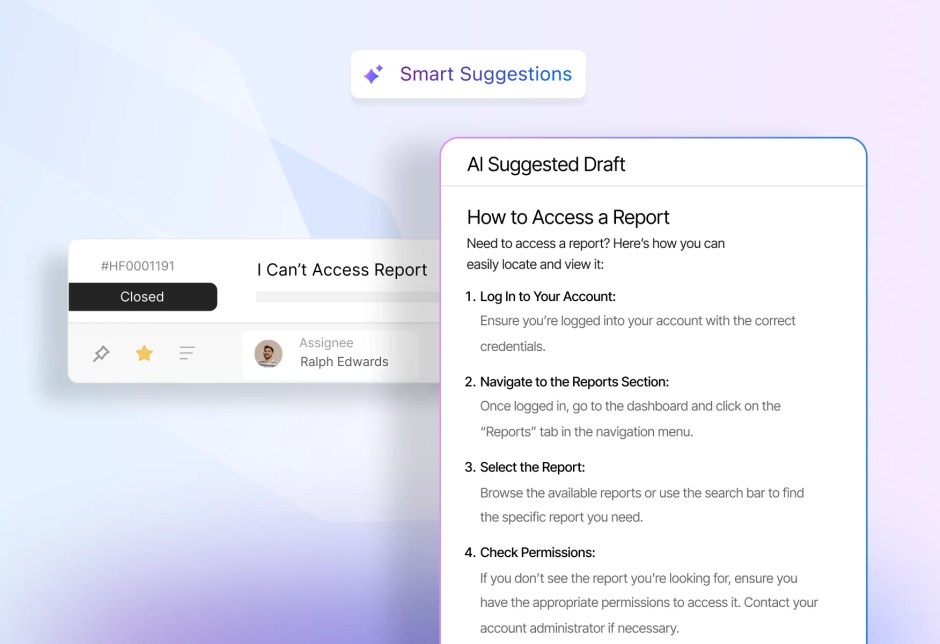
HappyFox AI Knowledge continuously analyzes support interactions to recommend knowledge base improvements, ensuring your documentation stays relevant and effective.
Best For: Teams with overloaded agents and a growing need for self-service support options.
Warning Sign #5: Escalations Happen Too Frequently
The Problem: When first-line agents can’t resolve issues and everything gets escalated, it creates bottlenecks with senior staff and frustrates customers who expected a quick resolution.
Common Causes:
- Agents lack access to customer history and context
- No clear escalation procedures
- Limited permissions to actually solve problems
The HappyFox Solution:
Comprehensive agent empowerment through:
- Complete customer context – Purchase history, previous tickets, account details
- Internal notes system – Team collaboration without customer confusion
- Customizable permissions – Give agents the tools they need to resolve issues
When agents can access the full customer picture and collaborate effectively with teammates, escalations become the exception rather than the rule.
Best For: Support operations where first-contact resolution is low and senior staff are overburdened with escalations.
Warning Sign #6: Your Support Metrics Look Good But Customers Aren’t Happy
The Problem: You might be hitting SLA targets and closing tickets quickly, but if you’re not actually solving problems, customers remain frustrated.
What This Looks Like:
- High ticket volume from repeat issues
- Good first response times but poor resolution rates
- Customers reopening “resolved” tickets
The HappyFox Solution:
Data-driven insights that focus on what matters:
- Customer Satisfaction scores after each interaction
- First Contact Resolution rates to measure actual problem-solving
- Ticket deflection metrics to track self-service effectiveness
HappyFox’s built-in reporting tools help you track metrics that actually correlate with customer happiness, not just operational efficiency.
Best For: Teams tracking traditional metrics but lacking visibility into actual customer satisfaction and retention impact.
Warning Sign #7: Support Quality Varies Dramatically Between Agents
The Problem: Inconsistent support quality creates an unpredictable customer experience. Some agents provide excellent service while others fall short, making your support feel unreliable.
Root Causes:
- Lack of standardized procedures
- Insufficient training or onboarding
- No quality monitoring system
The HappyFox Solution:
Standardization tools that maintain consistent quality:
- Canned responses for common questions (teams see 50% faster response times)
- Smart ticket templates that guide agents through complex processes
- Performance reporting to identify training opportunities
- Agent scripting – Provides step-by-step conversation flows to ensure all agents handle similar issues consistently
- AI Copilot – Ensures consistent, professional responses by suggesting appropriate tone, content, and relevant information for every interaction, plus helps create standardized knowledge base articles
Best For: Organizations looking to standardize agent training, responses, and quality monitoring.
Feature Spotlight: Smart Rules Automation
Let’s dive deeper into one of HappyFox’s most powerful features for addressing these warning signs.
What Smart Rules Do: Think of Smart Rules as having a super-efficient assistant who never sleeps. The system handles complex routing decisions instantly based on:
- Keywords in the subject line or message
- Customer tier or contact group
- Time of day or urgency indicators
- Agent availability and skill sets
Real-World Impact: Support managers consistently report 40-60% reduction in manual ticket handling. Smart Rules eliminate the routing bottleneck that slows down most support teams.
Implementation Strategy:
- Start simple – Route billing questions to finance, technical issues to IT
- Add complexity gradually – Include customer tier-based priority setting
- Monitor and refine – Use reporting to identify rule improvements
Turning Warning Signs Into Action Items
If you have recognized your support operation in these warning signs of poor customer support, don’t panic. Here’s your action plan:
Immediate Steps:
- Audit your current response times – Measure first response and resolution times
- Check your self-service resources – When were they last updated?
- Survey recent customers – Ask directly about their support experience
Strategic Improvements:
- Implement automation for routine tasks and ticket routing
- Consolidate communication channels into a single platform
- Empower agents with better tools and customer context
- Create feedback loops to continuously improve based on customer input
The Path Forward: Building Support That Retains Customers
Great customer support isn’t about being perfect—it’s about being consistent, helpful, and genuinely focused on solving customer problems. When you address these warning signs proactively, support transforms from a potential source of frustration into a competitive advantage.
The companies that thrive are those that recognize warning signs of poor customer support early and take action. With the right help desk solution, your support team can become a revenue driver that builds loyalty and drives growth.
Ready to transform your customer support operations?
HappyFox’s comprehensive platform addresses every warning sign we’ve discussed—from AI-powered automation to omnichannel ticket management to built-in reporting that focuses on customer satisfaction.
Don’t let poor support drive away customers who could become your biggest advocates. Schedule a demo with HappyFox today to see how these tools work together to create exceptional customer experiences that drive business growth.