


Most organizations reach a point where their support setup stops scaling. Tickets fall through the cracks, agents work across three disconnected tools, and leadership has no visibility into what is actually happening. That breaking point is usually where the conversation about an enterprise help desk begins.
This guide covers everything you need to make a confident decision: what an enterprise help desk is and what it does, why traditional tools fail at scale, the benefits that go beyond ticket deflection, a phased implementation checklist, best practices for running it well, how to measure ROI, and a clear framework for evaluating vendors. In short, everything from understanding the problem to choosing the right solution.
TL;DR
An enterprise help desk is a centralized support system built to handle complex, high-volume service operations across departments, teams, and often multiple brands. Unlike standard ticketing tools, it is designed for scale: with automation, SLA enforcement, cross-team workflows, and deep integrations baked in from the start. This guide walks through what it does, why traditional tools break down at enterprise scale, how to implement one in three structured phases, and what to look for when evaluating vendors. The ROI goes well beyond speed: operational efficiency, compliance, retention, and long-term cost reduction all follow when the right system is in place.
What is an Enterprise Help Desk?
An enterprise help desk is a centralized support platform designed to manage service requests, incidents, and internal or customer-facing queries at organizational scale. It goes well beyond a basic ticketing inbox. Where a standard help desk handles linear ticket queues for a single team, an enterprise help desk manages complex workflows across departments, locations, and business units, often simultaneously.
The defining characteristics are scale, structure, and integration. An enterprise help desk handles thousands of tickets per month, enforces SLA policies across multiple teams, connects with the organization’s existing technology stack, and provides the reporting depth that leadership needs to make operational decisions. It is not just a tool for support agents. It is infrastructure for the entire service function.
| Real Example: A manufacturing company with 1,200 employees was running IT support on a shared inbox and HR support through email threads. Response times were averaging four days, and there was no visibility into backlog or agent workload. After deploying an enterprise help desk, they consolidated both functions onto a single platform, dropped average response time to under six hours, and gave department heads live dashboards for the first time. The platform did not just speed things up. It made the operation visible. |
Why Traditional Help Desks Fall Short for Enterprise Needs
Standard help desk tools are built for simplicity: one team, one queue, one workflow. That works until it does not. At enterprise scale, the limitations surface fast. Shared inboxes have no SLA enforcement. Basic ticketing tools cannot route across departments or handle multi-brand support. Reporting is shallow. Integrations are limited or nonexistent.
The deeper problem is structural. Traditional tools are reactive by design. They process what comes in but give no visibility into patterns, no automation for repetitive work, and no mechanism for cross-functional escalation. An enterprise support operation needs a system that anticipates and manages complexity, not one that just logs it.
| What We Saw: A retail group managing five brands tried to run all customer support through a single standard help desk. Agents had no way to separate brand queues, SLAs were manual and inconsistently applied, and escalations between teams happened over Slack. When one brand ran a promotion, the volume spike overwhelmed the entire system. Moving to an enterprise help desk with multi-brand configuration and automated routing eliminated the cross-contamination entirely. |
What Does an Enterprise Help Desk Do?
The core function is ticket management, but that description undersells what a mature enterprise help desk actually handles. At the operational level, it receives, classifies, routes, escalates, and resolves requests across multiple channels: email, chat, phone, portal, and sometimes social. It enforces SLA policies automatically, triggers escalations when thresholds are breached, and closes the loop with the requester without requiring manual intervention at every step.
Beyond ticket processing, an enterprise help desk serves as a knowledge layer for the organization. Self-service portals reduce inbound volume by letting employees or customers resolve common issues without agent involvement. Reporting surfaces patterns: which departments generate the most tickets, where resolution times are lagging, which agents need support. The system becomes a source of operational intelligence, not just a workflow tool.
- Automated ticket routing and prioritization based on category, urgency, and team availability.
- SLA tracking with escalation rules that trigger before breaches happen, not after.
- Multi-channel intake: email, chat, portal, phone, and API-based submission all feed a single queue.
- Knowledge base and self-service portal to deflect repetitive queries before they become tickets.
- Cross-department collaboration with internal notes, shared views, and structured handoff workflows.
- Reporting and analytics dashboards for team leads, department heads, and executive stakeholders.
Key Features of Enterprise Help Desk Solutions
1. Advanced Ticket Management
– Intelligent ticket routing and distribution
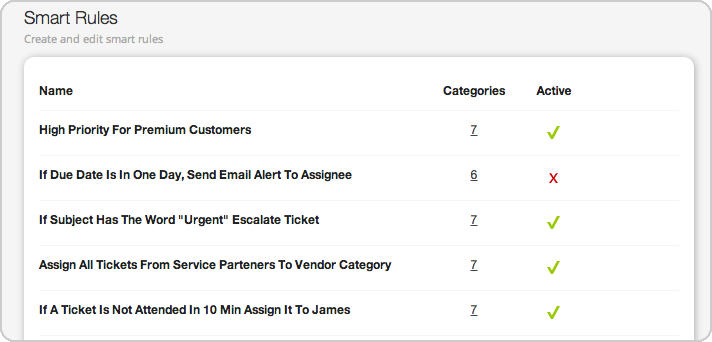
– Custom SLA management
– Multi-level categorization (parent-child categories, sub-categories)
– Automated ticket lifecycle management
– Priority-based queue management

– Cross-department ticket handling
2. Enterprise-Grade Security
– Role-based access control (RBAC)
– Single Sign-On (SSO)
– Data encryption (at rest and in transit)
– IP whitelisting
– Audit logs
– Compliance certifications (GDPR, SOC 2)
3. Workflow Automation
– Custom workflow builders
– Conditional automation rules
– Trigger-based actions
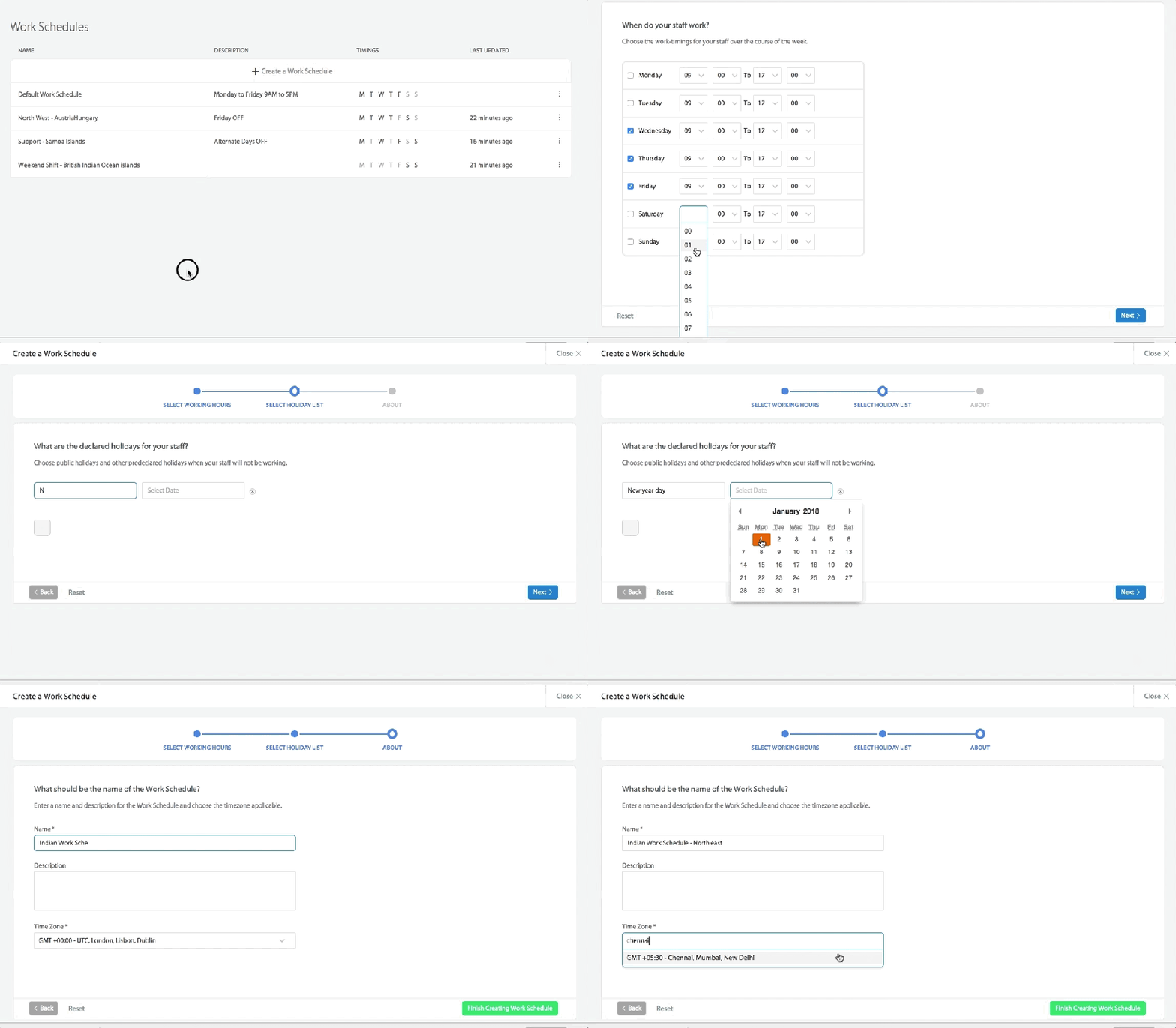
– Business hour management
– Escalation management
– SLA breach prevention
4. Multi-Channel Support Hub
– Email ticket conversion
– Web portal integration
– Social media ticket creation
– Phone support integration
– Live chat capabilities
– Channel-specific workflows
5. Advanced Analytics
– Custom report builders
– Real-time dashboards
– Performance metrics tracking
– SLA compliance monitoring
– Trend analysis
– Customer satisfaction tracking
6. Knowledge Management
– Multi-format content support
– Smart categorization
– Advanced search capabilities
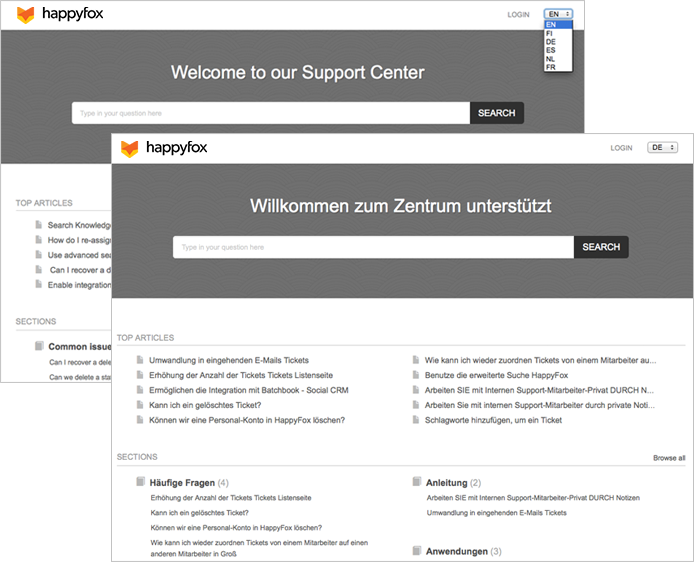
– Multi-language support
7. Enterprise Integration Ecosystem
– Native enterprise software integrations
– API access for custom integration
– Webhook support
– Data synchronization
– Single Sign-On implementation
Learn more: 8 Help Desk Integrations Critical for Your Enterprise
Pro Tip: When evaluating enterprise help desk features, focus on capabilities that align with your organization’s growth trajectory. Not every feature may be necessary at the outset, but having them available as you scale is crucial.
Benefits of Enterprise Help Desk
The benefits compound across three areas of the business. Operationally, response times drop, first-contact resolution improves, and agents stop losing time to manual sorting and status updates. Teams that previously operated in silos gain shared visibility, and management gets the reporting it needs to make staffing and process decisions based on real data rather than estimates.
From a customer and employee experience standpoint, consistency is the main gain. Every request is handled through the same structured process regardless of who picks it up or what time it arrives. That predictability builds trust faster than any single good interaction does.
The strategic case is less obvious but arguably more important. An enterprise help desk creates the data infrastructure to run continuous improvement. You can see what is breaking, measure the impact of changes, and allocate resources to where the actual pressure is. That is a fundamentally different operating posture than managing support by feel.
Implementation Checklist: Deploying an Enterprise Help Desk
A successful enterprise help desk deployment runs in three structured phases. Skipping Phase 1 is the most common reason implementations fail: teams configure the system before they understand what they are configuring it for.
Phase 1: Planning and Assessment
Before touching any configuration, audit what you have. Map every current support process end to end, identify where tickets are created, where they stall, and where they drop. Define your key performance metrics upfront so the system is measuring what matters from day one, not generating reports nobody reads.
- Audit current support processes: document every intake channel, routing step, and escalation path currently in use.
- Define key performance metrics: agree on what good looks like: target response time, resolution time, first-contact resolution rate, and CSAT.
- Map desired workflows: design the future state before configuring the system. Know which team owns what.
- Identify integration requirements: list every tool the help desk needs to connect with: CRM, HRIS, monitoring tools, communication platforms.
- Plan data migration strategy: decide what historical ticket data needs to move, what can be archived, and what should be left behind.
Phase 2: System Configuration
Configuration is where planning pays off. Teams that skipped Phase 1 spend this phase guessing. Teams that did the work configure decisively and iterate from a stable base.
- Set up user roles and permissions: define who can view, edit, assign, and close tickets across each department.
- Configure ticket workflows: build routing rules based on category, team, priority, and source channel.
- Create automation rules: automate repetitive actions: assignment, status updates, SLA warnings, and follow-up reminders.
- Establish SLA policies: set response and resolution targets by ticket type, then configure escalation triggers before breach.
- Build knowledge base structure: create the article categories and templates before content is written, so the structure supports search and self-service from launch.
Phase 3: Team Training and Adoption
Adoption is where most implementations quietly fail. The platform is configured, the go-live happens, and then agents revert to old habits because the training was a one-hour walkthrough two weeks before launch. Build adoption into the rollout plan, not as an afterthought.
- Conduct admin training: admins need to understand configuration logic, not just how to use the interface.
- Train support agents: train on actual workflows, not feature lists. Walk through real ticket scenarios from intake to close.
- Create internal documentation: agents should not have to remember everything from training. Build a reference library they can actually use.
- Set up performance monitoring: establish a cadence for reviewing metrics in the first 90 days. Catch misconfiguration early.
- Plan ongoing optimization: schedule quarterly workflow reviews. The first configuration is never the final one.
| Pro Tip: Run a two-week parallel operation period where the new enterprise help desk runs alongside the old system before full cutover. It exposes gaps in configuration that controlled testing never surfaces, and it gives agents confidence before the old safety net is removed. |
Best Practices for Enterprise Help Desk Management
Workflow Optimization
The most efficient workflows are the ones that require the fewest human decisions for routine work. Design processes so that every ticket that follows a predictable path is handled automatically, freeing agents for the complex work that actually requires judgment. Review automations quarterly: rules built six months ago may be routing tickets to teams that no longer exist or applying SLAs that no longer reflect business priorities.
Knowledge Management
A knowledge base only delivers value if it is current and findable. Assign ownership to articles so updates happen on a schedule rather than when someone notices something is outdated. Track article usage alongside ticket volume: if a high-traffic article is not reducing ticket volume in that category, the article is not solving the problem it is supposed to solve.
- Maintain comprehensive documentation: every recurring ticket type should have a corresponding article. If agents are answering the same question manually, that is a knowledge base gap.
- Enable self-service options: a well-structured portal reduces inbound volume and improves the experience for users who prefer not to wait for a response.
Team Collaboration
Cross-department escalation is where most enterprise help desk implementations create friction rather than remove it. Define escalation paths explicitly, not informally. When a ticket needs to move from IT to HR to Finance and back, every handoff should be structured, tracked, and visible to all parties. Feedback loops matter too: agents need to know when their resolutions actually solved the problem, not just when the ticket closed.
Enterprise Help Desk ROI: Beyond the Numbers
The immediate ROI of an enterprise help desk shows up in speed and efficiency. Response times drop, first-contact resolution improves, and agents spend more time on complex work because automation has absorbed the routine load. These gains are measurable within weeks of a well-executed deployment.
Operational Excellence
- Reduced response times: automated routing and SLA enforcement eliminate the manual triage that creates delays.
- Improved first contact resolution: agents with full ticket context and knowledge base access resolve more issues without escalation.
- Enhanced agent productivity: less time spent on administrative work means more capacity for substantive resolution.
- Streamlined workflows: consistent processes reduce the variation that creates unpredictable outcomes and rework.
Risk Mitigation and Strategic Advantages
Compliance is an underrated benefit. An enterprise help desk creates an auditable record of every service interaction: who handled it, when, what action was taken, and how it was resolved. For organizations in regulated industries, that audit trail is not optional. For everyone else, it is the foundation of accountability.
The strategic picture is about scalability and data. An enterprise help desk grows with the organization without requiring proportional headcount increases. And every ticket that passes through it adds to a body of operational data that reveals where processes are breaking, where demand is growing, and where investment will have the highest return.
- Enhanced customer and employee experience: consistent, fast, and structured support builds trust at scale.
- Better resource allocation: visibility into ticket volume by team, category, and time period makes staffing decisions evidence-based.
- Reduced total cost of ownership: automation, self-service deflection, and process efficiency lower the per-ticket cost over time.
- Future-proof infrastructure: a well-configured enterprise help desk adapts to new teams, new channels, and new business requirements without a full rebuild.
Choosing the Right Enterprise Help Desk Solution
Four criteria separate genuinely enterprise-grade platforms from tools that call themselves enterprise because they added a few features to a mid-market product.
Scalability
The platform needs to handle your current volume and your projected volume three years from now without degrading. Multi-brand support, flexible deployment options, and configurable workflows are the markers here. If scaling requires a significant re-architecture of your setup, it is not built for enterprise.
Security and Compliance
Enterprise environments carry enterprise risk. Look for industry certifications relevant to your sector, granular access controls, data residency options, and a clear audit log. A vendor that cannot articulate their security posture in specific terms is not ready for an enterprise contract.
- Industry certifications: SOC 2, ISO 27001, HIPAA compliance where applicable.
- Granular access control: role-based permissions that can be configured at team, department, and individual level.
- Audit capabilities: full record of every action taken on every ticket, exportable and searchable.
Integration Capabilities
An enterprise help desk that cannot connect with your CRM, HRIS, monitoring tools, and communication platforms creates an island of data rather than a unified operational view. Evaluate native integrations, API quality, and whether the vendor supports custom development for non-standard connections.
Vendor Partnership
Implementation support, training quality, and the responsiveness of ongoing technical assistance matter as much as the product itself. An enterprise deployment is not a self-service exercise. The vendor’s willingness to be a genuine partner through the implementation, and beyond it, is a meaningful differentiator.
Evaluating Enterprise Help Desk Solutions: A Decision Framework
Run every vendor through the same structured evaluation. Decisions made on demo impressions rather than defined criteria are how organizations end up with tools that look good in a sales environment and fail in production.
Business Requirements Assessment
- Current support volume and projected growth: know your numbers before any vendor conversation begins.
- Number of departments and brands to support: single-team tools masquerading as enterprise platforms collapse under multi-department load.
- Required compliance standards: document your regulatory requirements before evaluating security claims.
- Integration needs: list every system the help desk must connect with and verify each integration during the trial, not just the demo.
- Budget and ROI expectations: establish a clear cost ceiling and define how ROI will be measured at 6, 12, and 24 months.
Vendor Evaluation Criteria
- Implementation and onboarding support: ask specifically who handles your implementation and what the escalation path is when problems arise.
- Training and documentation quality: request access to their knowledge base and training materials before signing. Thin documentation is a warning sign.
- Upgrade and maintenance policies: understand how updates are rolled out and what downtime risk they carry.
- Product roadmap and innovation: a vendor investing in their platform is a safer long-term partner than one in maintenance mode.
Proof of Concept Planning
No enterprise help desk decision should be made without a structured trial period. Define success metrics before the trial starts, not after. Set up the test environment to reflect your actual workflow complexity, not a simplified version of it. Collect structured feedback from both agents and administrators during the trial, and benchmark performance against your current system using real ticket data.
| What We Saw: A healthcare organization shortlisted three enterprise help desk vendors based on demo performance. During the proof of concept, only one of the three could handle their multi-department escalation workflow without manual workarounds. The demo winner was not the POC winner. The trial revealed integration gaps and reporting limitations that the sales environment had concealed entirely. Build the POC around your hardest use case, not your easiest one. |
HappyFox Enterprise Help Desk: Feature Deep Dive
Understanding what sets enterprise solutions apart is important, but seeing these capabilities in action makes the difference clearer. Let’s explore how HappyFox implements these enterprise-grade features:
Omnichannel Support Management
Centralized ticket management across email, web, phone, chat, and social channels
Unified agent interface for seamless support delivery
Smart routing and distribution across channels
Intelligent Ticket Management
Route tickets based on several conditions including agent skills, workload, and business hours
Create unlimited custom fields with field-level encryption
Precise SLA management and monitoring
Automate ticket handling based on priorities
Seamlessly transfer ticket and tracking across multiple departments
Enterprise Workflow Engine
Visual workflow builder for complex , multi-step processes
Set up smart rules based on ticket conditions
Create and manage tasks and assets within tickets seamlessly
Knowledge Management
Supports multi-content format – text, images, videos, and attachments
Supports a global customer base with multilingual capabilities
Multi-Brand Capabilities
Support distinct brands
Brand-specific workflows and SLAs
Customizable support portals
AI-Enhanced Support
Analyzes tickets, suggests responses, and assists with complex support scenarios
Provides 24/7 automated support assisting agents with suggestions
Delivers instant answers on your support center, reducing ticket volume
Optimizes knowledge base content and identifies information gaps
Analyzes support trends and provides actionable recommendations
Advanced Security Framework
SOC 2 Type II Certification
GDPR Compliance
256-bit SSL Encryption
Custom Data Retention Rules
IP Range Restrictions
Two-Factor Authentication
Enterprise Integration Suite
50+ Native Integrations
REST API with Custom Endpoints
SSO Integration with Major Providers
Elevate Your Enterprise Support with HappyFox
As organizations grow, their support needs become increasingly complex. An enterprise help desk solution isn’t just about handling more tickets – it’s about transforming how your organization delivers support at scale.
HappyFox’s enterprise help desk solution delivers:
* Comprehensive ticket management with AI-powered assistance
* Enterprise-grade security and compliance features
* Robust reporting and analytics capabilities
* Extensive integration options
* Proven scalability for growing organizations
Conclusion
An enterprise help desk is not a software purchase. It is an operational decision about how your organization delivers service at scale. The right platform removes the friction that slows teams down, surfaces the data that drives better decisions, and creates the consistency that builds trust across every department it touches.
The organizations that get the most from their enterprise help desk are the ones that invest in the planning, configure for their actual workflows rather than the demo defaults, and treat the vendor as a long-term partner rather than a one-time transaction. Get those three things right and the operational and financial returns follow.
Ready to elevate your enterprise support operations? Take the next step toward transforming your support infrastructure with HappyFox.
Frequently Asked Questions
What is the difference between a help desk and an enterprise help desk?
A standard help desk manages tickets for a single team with basic routing and manual SLAs. An enterprise help desk handles multi-department, multi-brand, or multi-location operations with automated workflows, deep integrations, compliance controls, and reporting built for leadership visibility. The gap is not just features. It is architecture.
How long does enterprise help desk implementation take?
A realistic timeline for a structured deployment is six to twelve weeks from planning through go-live, depending on integration complexity and the number of departments involved. Organizations that rush to go-live in two weeks typically spend the following three months fixing what the planning phase would have caught.
What integrations should an enterprise help desk support?
At minimum: CRM, HRIS, identity management, and the organization’s primary communication platform. Beyond that, the integration list is specific to your stack. Evaluate integrations during the POC using real data flows, not just connectivity claims in a sales deck.
How do you measure enterprise help desk ROI?
Track response time, first-contact resolution rate, ticket volume per agent, self-service deflection rate, and total cost per ticket. Compare against pre-implementation baselines at 90 days, six months, and one year. Cost savings and productivity gains compound over time, so the twelve-month number looks significantly different from the ninety-day number.
What makes HappyFox suited for enterprise help desk operations?
HappyFox is built for multi-team, multi-brand environments with configurable SLA policies, intelligent automation, a structured self-service portal, and reporting that surfaces operational insights rather than just ticket counts. It integrates natively with major CRM, HRIS, and communication platforms, and the implementation team works as an active partner through deployment rather than handing over documentation and stepping back.





