



Drowning in a sea of support tickets? It’s a common challenge for enterprise support teams. Overwhelming queues, prioritization nightmares, and the constant pressure to meet SLAs can leave even the most seasoned teams struggling. But what if there was a way to bring order to this chaos and supercharge your support efficiency?
A ticket tagging system is your secret weapon for transforming support operations. This strategic approach can revolutionize how you route, prioritize, and resolve issues. Skeptical? Let’s explore how a well-implemented enterprise ticket tagging system can turn your support team into a lean, mean, problem-solving machine.
What Are Ticket Tags in Enterprise Support?
Ticket tags refers to concise, descriptive labels attached to support tickets. They serve as metadata to categorize and provide instant insights into the nature of each issue. In an enterprise context, these tags become crucial for managing high-volume, complex support operations.
Examples of enterprise-specific tags include:
– Revenue-Critical for issues affecting major accounts
– Compliance for regulatory-related inquiries
– Integration for problems with third-party enterprise software
Why Ticket Tagging is Essential for Enterprise Support
Ticket tagging is essential for enterprise support because it provides a structured approach to managing complex, high-volume support operations. Here’s a detailed look at why it’s crucial:
1. Efficient Ticket Routing: Tags enable automatic distribution of tickets to the right teams or specialists, reducing response times and ensuring issues are handled by the most qualified personnel.
2. Priority Management: By using tags to identify critical issues, support teams can quickly escalate and address problems that impact major accounts or core business operations, maintaining customer satisfaction and minimizing revenue loss.
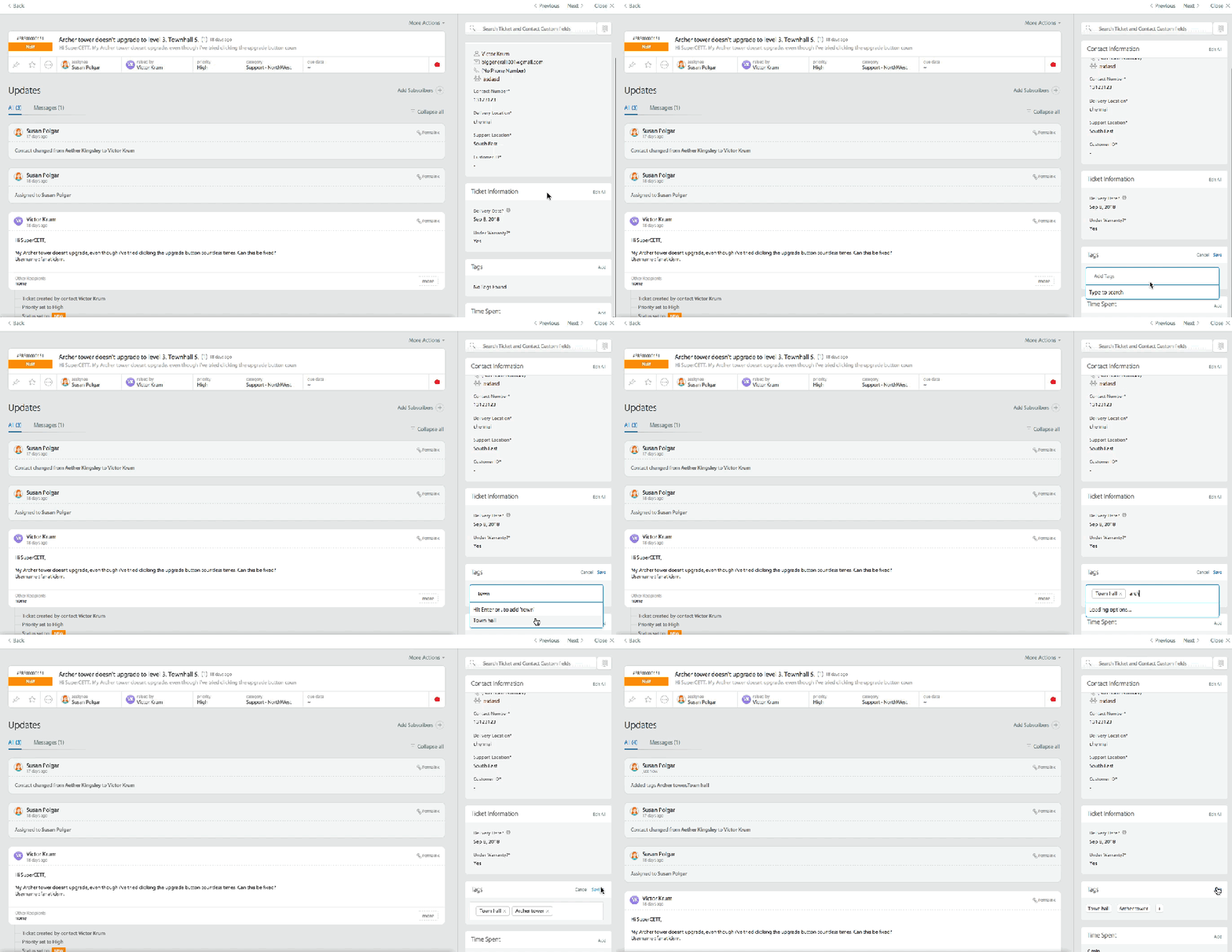
3. Trend Identification: Tagging allows teams to spot recurring problems across the customer base, facilitating proactive solutions and helping to prevent future issues.
4. Enhanced Reporting and Analytics: Tags provide granular data for detailed performance analytics across different segments, products, or regions, enabling data-driven decision-making and strategy refinement.
5. Improved Cross-functional Collaboration: Clear, tag-based categorization provides context for smoother handoffs between departments, enhancing overall team efficiency and knowledge sharing.

6. Resource Optimization: By analyzing tag patterns, support leaders can better understand demand fluctuations and allocate resources more effectively, improving team productivity and cost-efficiency.
7. Knowledge Base Enhancement: By identifying frequently tagged issues, teams can systematically improve self-service resources, reducing ticket volume and empowering customers to find solutions independently.
8. Scalability: As support operations grow, a well-structured tagging system allows for seamless scaling, maintaining efficiency even as ticket volumes and complexity increase.
9. Continuous Improvement: Tags provide insights into areas needing improvement in products, services, or support processes, driving ongoing enhancements to the overall customer experience.
Implementing these benefits through a comprehensive ticket tagging system can significantly improve the efficiency, effectiveness, and strategic value of enterprise support operations.
Learn more: Adding Tags to Tickets
20 Must-Have Ticket Tags for Enterprise Support
1. Priority Tags
Role: Align support efforts with business impact and SLA requirements.
Key Benefits:
- Quickly identify urgent issues
- Ensure appropriate resource allocation
- Maintain customer satisfaction in enterprise environments
Examples:
– Critical
– High
– Medium
– Low
Pro Tip: Create custom tags in HappyFox to match your enterprise’s specific priorities and urgency levels. This allows you to categorize and track issues based on criteria specific to your business operations.
2. Department Tags
Role: Facilitate efficient routing and cross-functional collaboration.
Key Benefits:
- Enable quick involvement of the right experts
- Reduce resolution time
- Improve first-contact resolution rates
Examples:
– IT Infrastructure
– Enterprise Sales
– Financial Operations
– Product Development
3. Issue Type Tag
Role: Categorize problems for better trend analysis and resource allocation.
Key Benefits:
- Identify recurring issues
- Inform product development
- Tailor support strategies to enterprise needs
Examples:
– System Outage
– Feature Request
– Compliance Inquiry
4. Product/Service Tags
Role: Essential for multi-product enterprises, supporting product-specific management.
Key Benefits:
- Allow product-specific reporting and version tracking
- Support license management
- Inform product development priorities
Examples:
– CloudSuite
– EnterpriseERP
– SecureGateway
– AnalyticsPro
5. Customer Segment Tags
Purpose: Enable personalized support experiences and prioritization.
Key Benefits:
- Prioritize issues from high-value accounts
- Monitor account health
- Inform customer retention strategies
Examples:
– Global Enterprise
– Mid-Market
– Government
– Strategic Account
6. Channel Tags
Role: Analyze effectiveness of different support channels.
Key Benefits:
- Reveal most efficient channels for issue types
- Optimize resource allocation across channels
- Improve omnichannel support strategies
Examples:
– Executive Escalation
– Enterprise Portal
– Dedicated Support Line
– Partner Network
7. Cross-Functional Impact Tags
Purpose: Identify and categorize support issues that span multiple departments or functional areas.
Key Benefits:
- Facilitate faster resolution by involving all necessary departments
- Improve collaboration between different enterprise units
- Provide insights into recurring cross-departmental issues
- Enable accurate resource allocation for complex problems
Examples:
- Finance-IT Collaboration
- HR-Facilities Overlap
- Sales-Product Interaction
8. Time-Sensitive Tags
Purpose: Prioritize issues impacting customer relationships or contracts.
Key Benefits:
- Trigger automated reminders and escalations
- Ensure critical deadlines are met
- Manage high-stakes support scenarios
– Immediate Action Required
– Quarterly Business Review
– Renewal-Critical
9. Knowledge Base Tags
Purpose: Identify gaps in self-service resources for enterprise clients.
Key Benefits:
- Flag tickets for knowledge base updates
- Improve self-service offerings
- Reduce ticket volume for common enterprise issues
– Compliance Documentation
– Technical Documentation Update
– Training Material Required
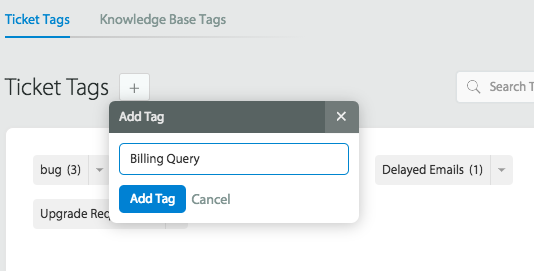
10. Technical Complexity Tags
Purpose: Assist in appropriate ticket routing and resource allocation.
Key Benefits:
- Route tickets to appropriately skilled team members
- Estimate resolution times for enterprise-level issues
- Inform training programs for complex configurations
Skill Mapping: Align these tags with your team’s skill matrix for optimal ticket assignment.
– Quick Configuration
– Complex Integration
– Requires Custom Development
11. Impact Tags
Purpose: Assess and communicate the scope of issues.
Key Benefits:
- Prioritize based on impact breadth
- Guide resource allocation decisions
- Inform communication strategies
Examples:
– Single User
– Department-Wide
– Organization-Wide
12. Root Cause Tags
Purpose: Identify underlying issues and recurring problems.
Key Benefits:
- Facilitate trend analysis
- Inform proactive problem-solving initiatives
- Reduce ticket volume by addressing systemic issues
Examples:
– Configuration Error
– Software Defect
– Third-Party API Issue
– Infrastructure Limitation
13. Resolution Type Tags
Purpose: Track methods used to solve different issues.
Key Benefits:
- Optimize support processes
- Inform resource allocation
- Identify most effective resolution strategies
Examples:
– Remote Troubleshooting
– On-Site Support Required
– Escalation to Engineering
– Account Management Intervention
14. Customer Satisfaction Tags
Purpose: Flag accounts needing special attention or presenting growth opportunities.
Key Benefits:
- Prioritize customer retention efforts
- Identify upsell opportunities
- Cultivate potential reference accounts
Examples:
– At-Risk Account
– Expansion Opportunity
– Reference Customer Potential
15. Training Tags
Purpose: Identify common areas where customers need education.
Key Benefits:
- Inform targeted training program development
- Reduce ticket volume through proactive education
- Enhance customer product adoption
Examples:
– New Feature Onboarding
– Admin Console Training
– Best Practices Workshop
16. Feedback Tags
Purpose: Categorize valuable customer insights for product and service improvement.
Key Benefits:
- Inform product development priorities
- Enhance service delivery
- Identify potential case studies and testimonials
Examples:
– Product Roadmap Input
– Service Improvement Suggestion
– Success Story Candidate
17. Language Tags
Purpose: Ensure tickets are routed to agents with appropriate language skills.
Key Benefits:
- Improve customer experience through native language support
- Support multilingual analytics
- Guide language-specific resource planning
Examples:
– English
– Mandarin
– German
– Spanish
18. Geographic Tags
Purpose: Track region-specific issues and support needs.
Key Benefits:
- Inform localized support strategies
- Guide regional resource allocation
- Identify region-specific trends
Examples:
– EMEA
– APAC
– North America
– Global
19. Environment Tags
Purpose: Provide context for issues within specific system setups.
Key Benefits:
- Support environment-specific troubleshooting
- Improve testing and deployment processes
- Manage legacy system support efficiently
Examples:
– Production
– Staging
– DR Site
– Legacy System
20. Business Impact Tags
Purpose: Highlight tickets with significant organizational implications.
Key Benefits:
- Inform executive reporting
- Guide strategic decision-making
- Ensure appropriate resources for high-stakes issues
Examples:
– Revenue Impacting
– Regulatory Compliance
– Operational Efficiency
– Strategic Initiative
Feature Spotlight: HappyFox AI Insights
HappyFox’s AI Insights analyzes your tagged tickets to identify patterns across all these dimensions, providing data-driven recommendations to optimize your enterprise support strategy.
Read more: Boost FCR with AI-powered customer support
Maximizing the Impact of Your Enterprise Ticket Tagging System
Automated Ticket Routing
Leverage tag combinations to create sophisticated routing rules tailored to your enterprise structure. For example, a ticket tagged with “Financial Operations,” “Strategic Account,” and “SLA Breach Risk” could be automatically routed to your senior financial support specialist and flagged for management visibility.
Pro Tip: HappyFox’s Smart Rules feature enables complex routing logic based on multiple tags, ensuring enterprise-critical issues always receive appropriate attention.
Trend Analysis and Proactive Support
Regularly analyze tag frequency and combinations to identify systemic issues or emerging trends across your enterprise client base. If you notice an uptick in “Performance Degradation” tags associated with a specific “Product” tag, it might indicate a need for proactive outreach or infrastructure upgrades.
Feature Spotlight: HappyFox AI Copilot
HappyFox’s AI Copilot analyzes tagged tickets to provide predictive insights on emerging enterprise support trends, enabling proactive problem-solving and strategic resource allocation.
Knowledge Base Optimization
Utilize tags like “Product Integration Guide” and “Technical Documentation Update” to systematically enhance your self-service resources, crucial for reducing ticket volume in high-stakes enterprise environments.
Reporting and Analytics
Harness your comprehensive tagging system to generate detailed reports on enterprise support performance. Track resolution times across different product lines, customer segments, or geographic regions to inform strategic decisions on team structure and resource allocation.
Implementation Checklist:
– [ ] Define tag categories aligned with your enterprise support structure
– [ ] Establish a standardized naming convention for enterprise-specific tags
– [ ] Configure tag permissions in HappyFox to maintain tag integrity
– [ ] Conduct thorough team training on enterprise tag usage and best practices
– [ ] Implement a process for regular tag audits and optimization
– [ ] Set up Smart Rules in HappyFox to automate enterprise-grade ticket routing
– [ ] Design custom dashboards leveraging tag data for executive-level insights
Elevate Your Enterprise Support with Strategic Tagging
A well-implemented enterprise ticket tagging system is key to world-class support operations. By adopting these 20 must-have tags and leveraging HappyFox’s enterprise-grade features, you can transform your support from reactive to proactive, optimizing efficiency and insight.
Ready to revolutionize your enterprise support? Experience the power of strategic tagging with HappyFox and elevate your support to match your enterprise ambitions.





